
1tamazo - Minecraft Skins & Skin History
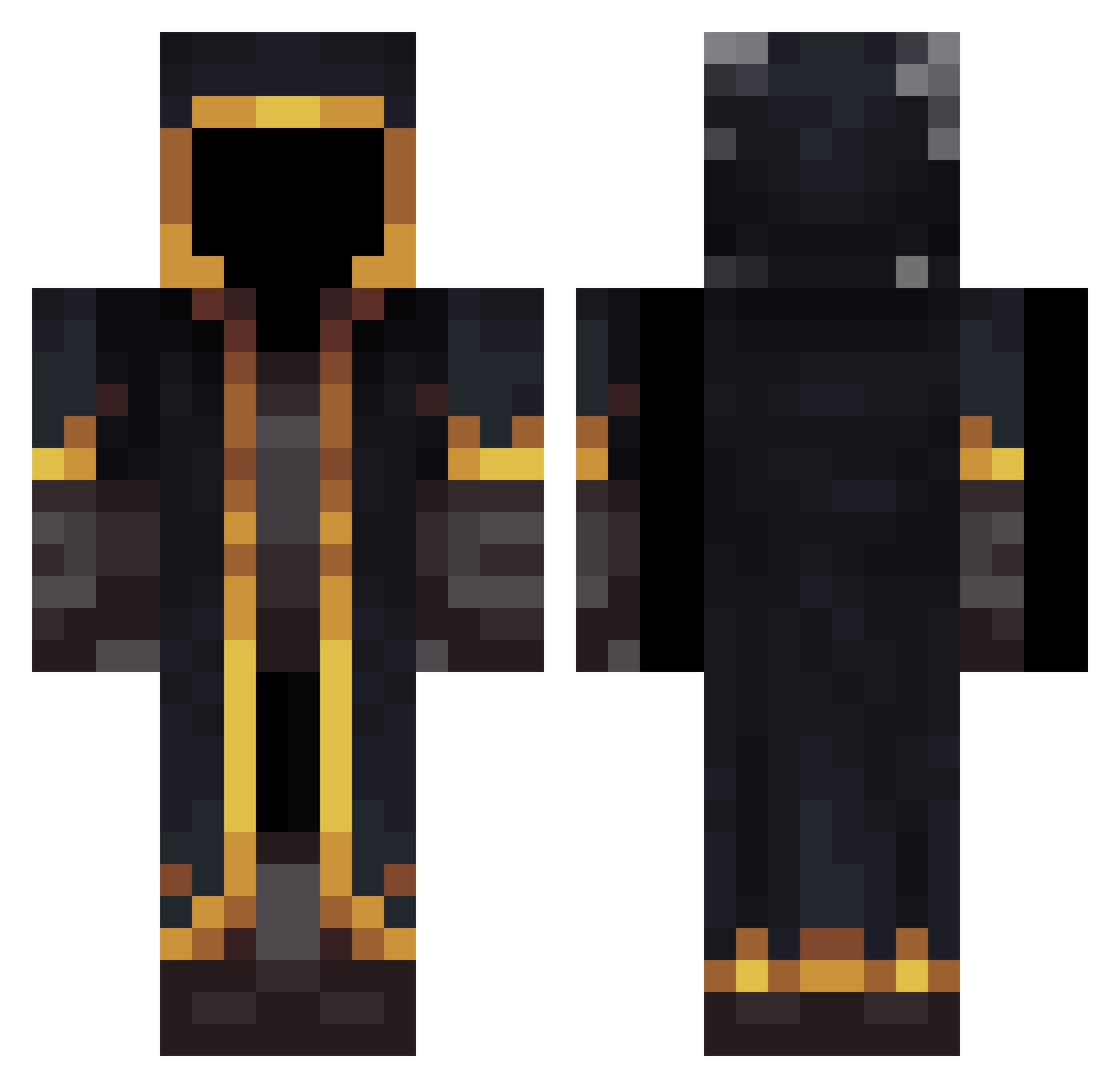
Current Minecraft skin of the player 1tamazo, loaded from the official Mojang API. Rotate the 3D model with your mouse or finger, then download the skin as a PNG file and use it in Minecraft: Bedrock Edition or Java Edition for free. When 1tamazo changes their skin, this page updates automatically and the old skin stays in the history below.
Other players with this skin (653)
1tamazo was the 635th player we have seen with this skin, first spotted on 15.11.2026. The same skin was seen on these players. Open a nickname to see their current skin and skin history.
 jddot344 AccountingJAS NoxFleer50005 ikiyuz saitam_2 sudoowoodo Skyze16 camiloo999 Milkyman23 Nikolo16 Shin1ach_7 BlankMK5000 igorzzz0 KizuhoGaming AresYOUNG Syrgyt Drakon188456 Hadex221 BLACK6913 800815s ImSplitTV95 awildtuby Dekutaa Carpe11200 PhazzX EnzoVinalB darpie1618 _CSOKA_ Sivinsky SKYGALAXER Adamikol Gosciu122 Lays158 amigemelo YogJiao ma_lunch tisanDg EsperanzaGomez69 Hassunee watashiwaz xalo2708 Archfoxgamer DapperColt TheFullAlch3mist Crazy_Boi92 GuppyDaBoii Kawhi666 ciclone102 arun1789 l_Polo_l caamposs5 OneryOwl181224 Sovishe 2005051020050317 lailike01 little_noobz Pioter7474 MENTOR_Ko boubou465 nobody_E
More Mage Minecraft skins
How to install the 1tamazo skin
- Press the Download button above to save the skin as a PNG file.
- Minecraft: Bedrock Edition (PE): open the Dressing Room from the main menu (or tap your character → Edit Character), go to Classic Skins → Owned, press the + (new skin) button, choose the downloaded PNG and pick the Classic (Steve) model. Works on PC and mobile; consoles cannot import custom skins.
- Minecraft: Java Edition: open the Minecraft Launcher, go to the Skins tab, click New Skin, load the PNG, pick the Classic (Steve) model and press Save & Use. You can also upload it at minecraft.net → Profile → Change Skin.
The skin does not show up after import - what should I do?
Restart Minecraft and open the Dressing Room again - imported skins sometimes appear only after a restart. Also make sure you selected the imported skin and picked the Classic (Steve) model.
Which model should I choose, Classic or Slim?
This skin is designed for the Classic (Steve) model. If you pick the wrong model, the arms of the skin will look stretched or squeezed.
Is the skin of 1tamazo free to download?
Yes. Press Download, save the PNG file and use it in Minecraft: Bedrock Edition or Java Edition - no payment or registration needed. The skin also works on multiplayer servers and Realms.
More skins
Looking for more? Go back to all Minecraft skins and check the top skins of the week, month and all time, or find any player's skin by nickname.