
zxc_Ghoul_ - Minecraft Skins & Skin History
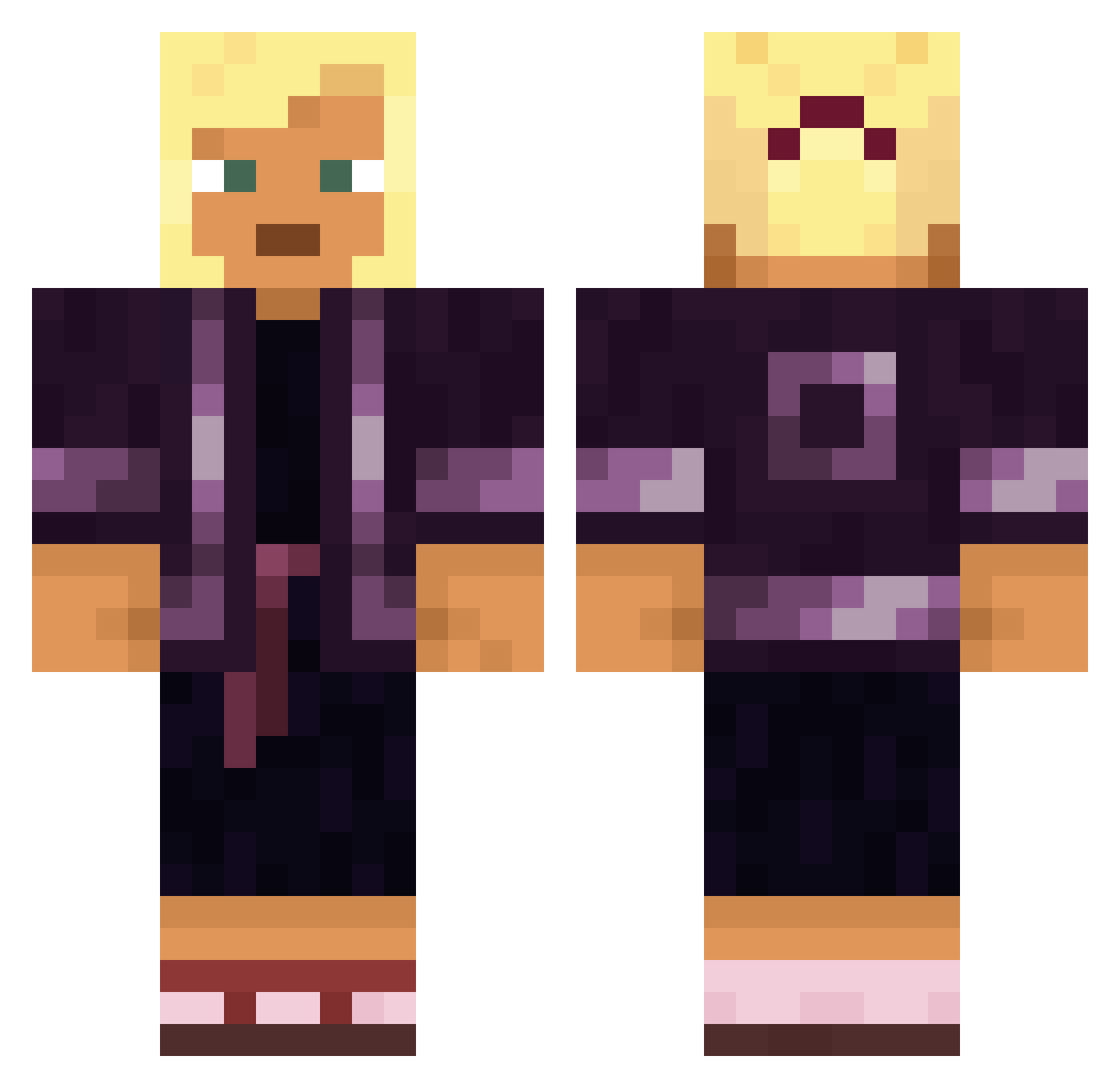
Current Minecraft skin of the player zxc_Ghoul_, loaded from the official Mojang API. Rotate the 3D model with your mouse or finger, then download the skin as a PNG file and use it in Minecraft: Bedrock Edition or Java Edition for free. When zxc_Ghoul_ changes their skin, this page updates automatically and the old skin stays in the history below.
Other players with this skin (1566)
zxc_Ghoul_ was the 631st player we have seen with this skin, first spotted on 09.09.2026. The same skin was seen on these players. Open a nickname to see their current skin and skin history.
 Saddam_Husein Yanky Saturniidae Rumpling BobTheKnob123 DocChristopher juiceparti Poplava Bigate Jkubo sizings Experimental 2bytwo AvdiDaddy69 Abstricted Ande E2ENCE Kubrand _Nom_M ev1an Tagel Gallbladder YEAKUB69 GAGATE misdemeanant JonJon Luiluiluilui100 Psittacidae jellycloud103 semitones
 Z03trope NescauBoll
 blewenderman Javadawg squidlesG Futtocks imoessa_ search95 Popularity Retraceable Seductiverabbit Creepmouse etceterini Juuuuuuuuuuuuude Doomsters xSuper_CupcakeXD Codergirl17 junhyung1535 I3k_1 Azareellp Miniodel SirKulinski Destroyer984 gazometer idleman julekniebianski tintinnabulant Coast Aldhamael Accourage
More Kimono Minecraft skins
How to install the zxc_Ghoul_ skin
- Press the Download button above to save the skin as a PNG file.
- Minecraft: Bedrock Edition (PE): open the Dressing Room from the main menu (or tap your character → Edit Character), go to Classic Skins → Owned, press the + (new skin) button, choose the downloaded PNG and pick the Classic (Steve) model. Works on PC and mobile; consoles cannot import custom skins.
- Minecraft: Java Edition: open the Minecraft Launcher, go to the Skins tab, click New Skin, load the PNG, pick the Classic (Steve) model and press Save & Use. You can also upload it at minecraft.net → Profile → Change Skin.
The skin does not show up after import - what should I do?
Restart Minecraft and open the Dressing Room again - imported skins sometimes appear only after a restart. Also make sure you selected the imported skin and picked the Classic (Steve) model.
Which model should I choose, Classic or Slim?
This skin is designed for the Classic (Steve) model. If you pick the wrong model, the arms of the skin will look stretched or squeezed.
Is the skin of zxc_Ghoul_ free to download?
Yes. Press Download, save the PNG file and use it in Minecraft: Bedrock Edition or Java Edition - no payment or registration needed. The skin also works on multiplayer servers and Realms.
More skins
Looking for more? Go back to all Minecraft skins and check the top skins of the week, month and all time, or find any player's skin by nickname.