
zexxy_ - Minecraft Skins & Skin History
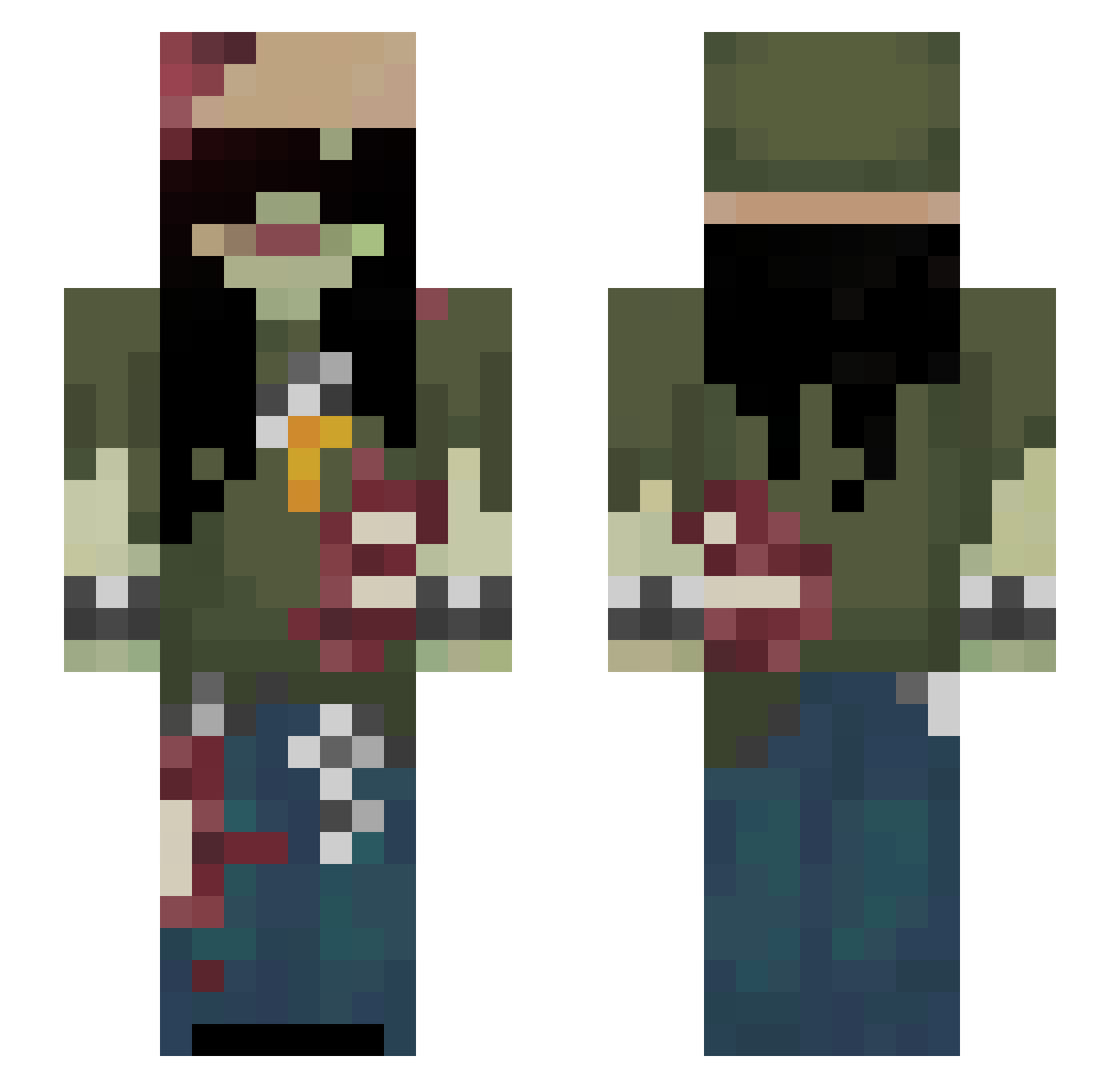
Current Minecraft skin of the player zexxy_, loaded from the official Mojang API. Rotate the 3D model with your mouse or finger, then download the skin as a PNG file and use it in Minecraft: Bedrock Edition or Java Edition for free. When zexxy_ changes their skin, this page updates automatically and the old skin stays in the history below.
Other players with this skin (76)
zexxy_ was the 35th player we have seen with this skin, first spotted on 18.09.2026. The same skin was seen on these players. Open a nickname to see their current skin and skin history.
 uravityz Oh_BonePlate dihhtap gvmw suncharred XXXZEUS_MK ola225 vwa Riley__14 shiro690 Greenman120 bonyshay skyyyyyyyy01 raddcatt Guest_2501 PoAfrykansku elijaahhx DROWSYEYED moyunzj2 mutetheworld Meryqusia pupcores hxnds BrombaIInni ozm123 YokaConqueror 1GE AtInject 0NEW_ ptrxz
 wavysha Presrod03 Sasmiii
 kchuv Zxchu zuzz_a Not_Gubster uerr 7lamyy_ J2157 KiiiiMC EXXN28 Bricovrr SleepyyWolfie
 Yume7419 k0szkoo Katteracts kadokuu
 Lucja_roza BoasSymph Guxta100030 SodaPopTab LQzix jadymeys khansa
 UtanYona swgrr
 sleepy_ry0 bravelittleant6 Moldd_
More Apocalypse Minecraft skins
How to install the zexxy_ skin
- Press the Download button above to save the skin as a PNG file.
- Minecraft: Bedrock Edition (PE): open the Dressing Room from the main menu (or tap your character → Edit Character), go to Classic Skins → Owned, press the + (new skin) button, choose the downloaded PNG and pick the Slim (Alex) model. Works on PC and mobile; consoles cannot import custom skins.
- Minecraft: Java Edition: open the Minecraft Launcher, go to the Skins tab, click New Skin, load the PNG, pick the Slim (Alex) model and press Save & Use. You can also upload it at minecraft.net → Profile → Change Skin.
The skin does not show up after import - what should I do?
Restart Minecraft and open the Dressing Room again - imported skins sometimes appear only after a restart. Also make sure you selected the imported skin and picked the Slim (Alex) model.
Which model should I choose, Classic or Slim?
This skin is designed for the Slim (Alex) model. If you pick the wrong model, the arms of the skin will look stretched or squeezed.
Is the skin of zexxy_ free to download?
Yes. Press Download, save the PNG file and use it in Minecraft: Bedrock Edition or Java Edition - no payment or registration needed. The skin also works on multiplayer servers and Realms.
More skins
Looking for more? Go back to all Minecraft skins and check the top skins of the week, month and all time, or find any player's skin by nickname.