
zShadow2k - Minecraft Skins & Skin History
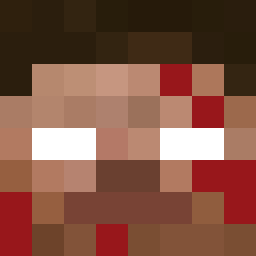
Current Minecraft skin of the player zShadow2k, loaded from the official Mojang API. Rotate the 3D model with your mouse or finger, then download the skin as a PNG file and use it in Minecraft: Bedrock Edition or Java Edition for free. When zShadow2k changes their skin, this page updates automatically and the old skin stays in the history below.

Other players with this skin (11555)
zShadow2k was the 2854th player we have seen with this skin, first spotted on 18.08.2026. The same skin was seen on these players. Open a nickname to see their current skin and skin history.
 LifeSubtracter
 Ciderrion crxcklord guygt Nidaren bookishness Nucican Alporistan67
 _Gimlimi_ _pickleninja Porkertron abror0 Crystalex04 BlackEagleBarki_ spongebobcsupo76 MrNerix
 Sizzlin_Squid YouSkonka420 Little35 LAKER1 whaha
 ZebYT Kostyanchek Alex2k171 YouWannaDie PhillFaubert heisenburger44 Chup_chups YAHOO_The_Fish72 clemeeee17 shykimchi EstonianPerson owataww MrJotaJota Notwantedbyfbi AngryKitten1876 uvydi_8915 riccis1 Niconstruct zhargmc OKJonnie Senamii shapelessleaf tortillachips00
 StuckBaton4536 Dromornis _TekBlood_
 bassstianek Nicolai2013 xMaUrOx Nelaxx InesLe Avsia4 sekxing6974 Minimaudit ksa1a th3r0achy BrickySky Kr1tzo JINKYU07
How to install the zShadow2k skin
- Press the Download button above to save the skin as a PNG file.
- Minecraft: Bedrock Edition (PE): open the Dressing Room from the main menu (or tap your character → Edit Character), go to Classic Skins → Owned, press the + (new skin) button, choose the downloaded PNG and pick the Classic (Steve) model. Works on PC and mobile; consoles cannot import custom skins.
- Minecraft: Java Edition: open the Minecraft Launcher, go to the Skins tab, click New Skin, load the PNG, pick the Classic (Steve) model and press Save & Use. You can also upload it at minecraft.net → Profile → Change Skin.
The skin does not show up after import - what should I do?
Restart Minecraft and open the Dressing Room again - imported skins sometimes appear only after a restart. Also make sure you selected the imported skin and picked the Classic (Steve) model.
Which model should I choose, Classic or Slim?
This skin is designed for the Classic (Steve) model. If you pick the wrong model, the arms of the skin will look stretched or squeezed.
Is the skin of zShadow2k free to download?
Yes. Press Download, save the PNG file and use it in Minecraft: Bedrock Edition or Java Edition - no payment or registration needed. The skin also works on multiplayer servers and Realms.
More skins
Looking for more? Go back to all Minecraft skins and check the top skins of the week, month and all time, or find any player's skin by nickname.