
yyundagger - Minecraft Skins & Skin History
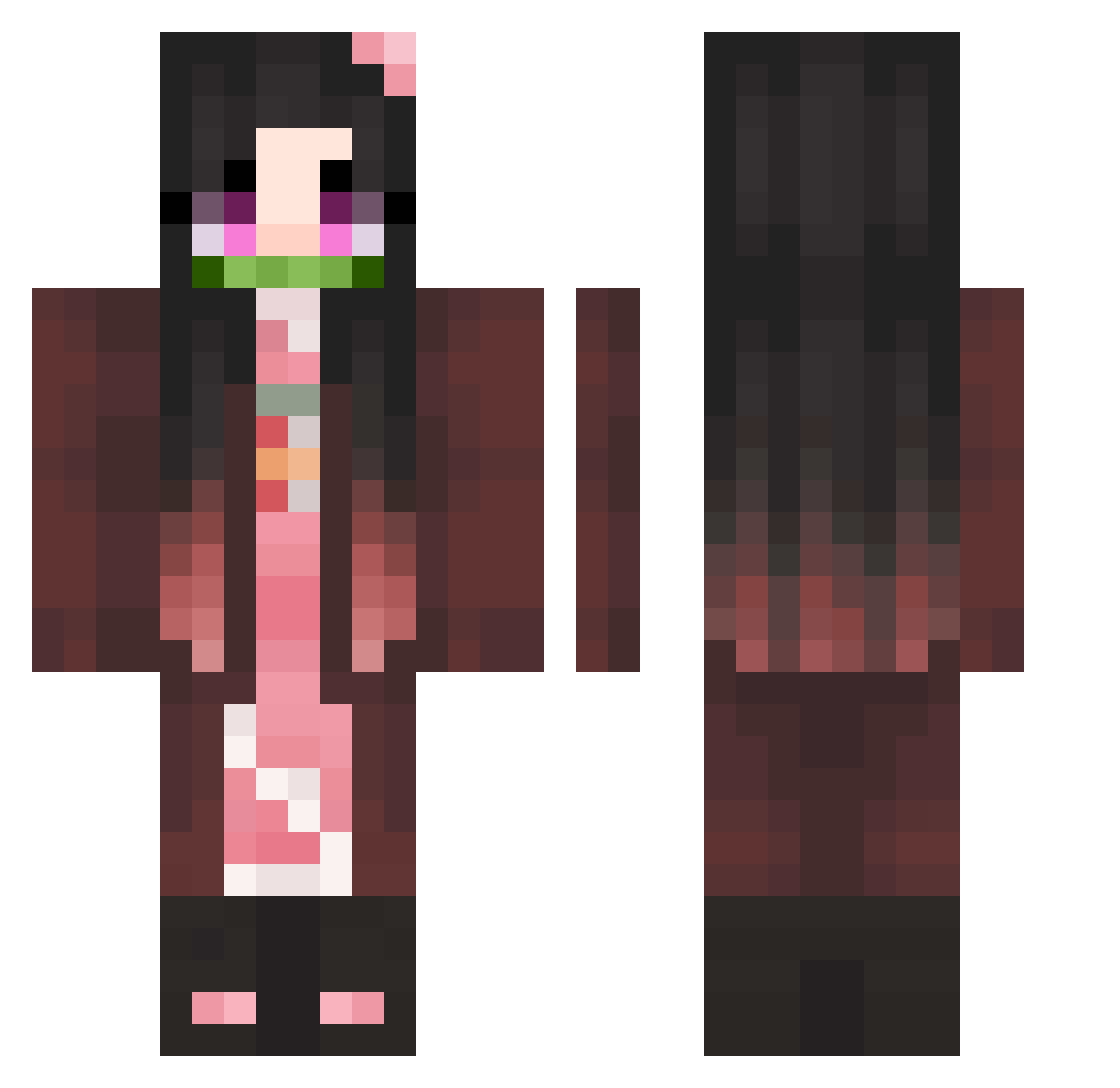
Current Minecraft skin of the player yyundagger, loaded from the official Mojang API. Rotate the 3D model with your mouse or finger, then download the skin as a PNG file and use it in Minecraft: Bedrock Edition or Java Edition for free. When yyundagger changes their skin, this page updates automatically and the old skin stays in the history below.
Other players with this skin (362)
yyundagger was the 299th player we have seen with this skin, first spotted on 18.10.2026. The same skin was seen on these players. Open a nickname to see their current skin and skin history.
 ZhaZha_0803 Naruto609 dingiri Goldendragon0925 Krisprollys Plumpens Handeo Kqine Bibibruh Comikazie firildom Suxnby SoniaPurple Intense_kiss MiniMissShiro Yuuki1998 Qutrapa Existkim poroping SeliCraft05 TimNB Timoo01 ryuuura SuminTheGreat kew1ssz jay_one8 O0ops0 AnanOuO durfkddl Natsuki014208541 Tomys24Cz Percept1onn phs129 hxesx Wolodya_2402 Deviss14 sirwhomstve Copterzero ChoonZick RealLights nayeonlol ToshikoUchiha ElDiablo96 mok2019 enola47 ChangYam RiotKaren Drenera Feeling_alive KimJongUnAlt2 _sojay_ zHeavenly_ Nezuco ohleef 1_Nezuko_1 Hireaz Mijosi HIKA_RI Chaboing_TV Inoueksoaz
More Nezuko Kamado Minecraft skins
See all 178 Nezuko Kamado skins
How to install the yyundagger skin
- Press the Download button above to save the skin as a PNG file.
- Minecraft: Bedrock Edition (PE): open the Dressing Room from the main menu (or tap your character → Edit Character), go to Classic Skins → Owned, press the + (new skin) button, choose the downloaded PNG and pick the Classic (Steve) model. Works on PC and mobile; consoles cannot import custom skins.
- Minecraft: Java Edition: open the Minecraft Launcher, go to the Skins tab, click New Skin, load the PNG, pick the Classic (Steve) model and press Save & Use. You can also upload it at minecraft.net → Profile → Change Skin.
The skin does not show up after import - what should I do?
Restart Minecraft and open the Dressing Room again - imported skins sometimes appear only after a restart. Also make sure you selected the imported skin and picked the Classic (Steve) model.
Which model should I choose, Classic or Slim?
This skin is designed for the Classic (Steve) model. If you pick the wrong model, the arms of the skin will look stretched or squeezed.
Is the skin of yyundagger free to download?
Yes. Press Download, save the PNG file and use it in Minecraft: Bedrock Edition or Java Edition - no payment or registration needed. The skin also works on multiplayer servers and Realms.
More skins
Looking for more? Go back to all Minecraft skins and check the top skins of the week, month and all time, or find any player's skin by nickname.