
yuri38400 - Minecraft Skins & Skin History
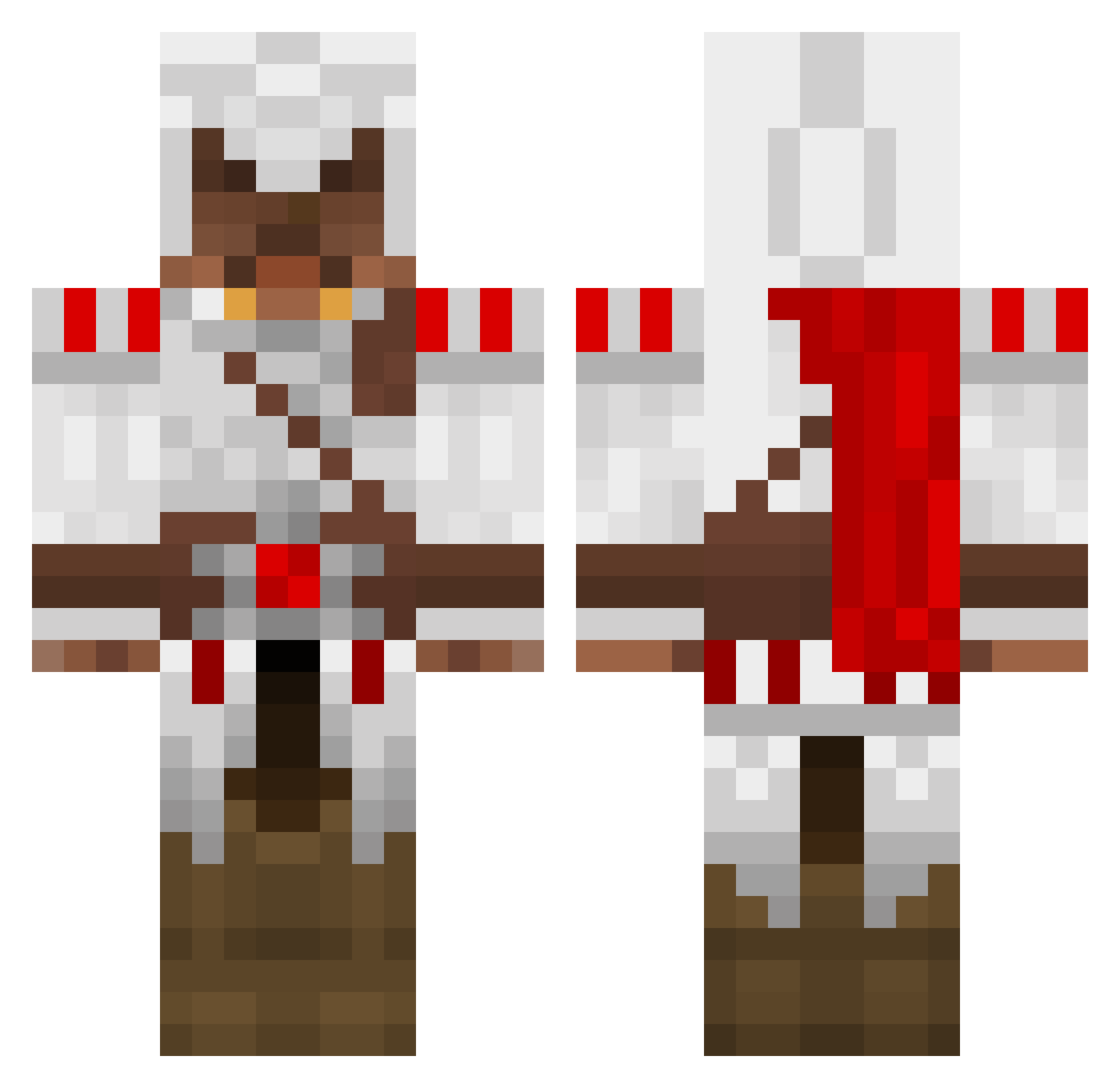
Current Minecraft skin of the player yuri38400, loaded from the official Mojang API. Rotate the 3D model with your mouse or finger, then download the skin as a PNG file and use it in Minecraft: Bedrock Edition or Java Edition for free. When yuri38400 changes their skin, this page updates automatically and the old skin stays in the history below.
Other players with this skin (1695)
yuri38400 was the 1684th player we have seen with this skin, first spotted on 19.11.2026. The same skin was seen on these players. Open a nickname to see their current skin and skin history.
 Gamers44 Max7Axel psykofire kakaplayer123 mattz112 DMC23 jojjewi jmblizz StuntmanMaik L3onh4rdt arabboy333 Phoenix7177 inhumankriso gigoi MC_alexander ojbobs Psychixxx BountyWing theman8880 Creedz MisterSteak Hammerheadjr kaden8989 leonidzzz NickieW Jayco69 fortune789 knightnight72 WayneACB Rastovali gonzo9822 caciquebr MrRiskris justgiant Hawteyh bloodyloco rek2004 zrand41 bazoo44 Wamexar alex632002 tannerderekb N_B_K833 squidamk eaglegamer247 Sentrified MATTM22 Hyperica joshkab15 MattWalsh Rocker628 J_Stape computers_Jiu gingy123321 menvatusan Matty12sx brackenz2000 NatheNight shanekelsall EHicks
More Altair Ibn La Ahad Minecraft skins
See all 226 Altair Ibn La Ahad skins
How to install the yuri38400 skin
- Press the Download button above to save the skin as a PNG file.
- Minecraft: Bedrock Edition (PE): open the Dressing Room from the main menu (or tap your character → Edit Character), go to Classic Skins → Owned, press the + (new skin) button, choose the downloaded PNG and pick the Classic (Steve) model. Works on PC and mobile; consoles cannot import custom skins.
- Minecraft: Java Edition: open the Minecraft Launcher, go to the Skins tab, click New Skin, load the PNG, pick the Classic (Steve) model and press Save & Use. You can also upload it at minecraft.net → Profile → Change Skin.
The skin does not show up after import - what should I do?
Restart Minecraft and open the Dressing Room again - imported skins sometimes appear only after a restart. Also make sure you selected the imported skin and picked the Classic (Steve) model.
Which model should I choose, Classic or Slim?
This skin is designed for the Classic (Steve) model. If you pick the wrong model, the arms of the skin will look stretched or squeezed.
Is the skin of yuri38400 free to download?
Yes. Press Download, save the PNG file and use it in Minecraft: Bedrock Edition or Java Edition - no payment or registration needed. The skin also works on multiplayer servers and Realms.
More skins
Looking for more? Go back to all Minecraft skins and check the top skins of the week, month and all time, or find any player's skin by nickname.