
xNear00 - Minecraft Skins & Skin History
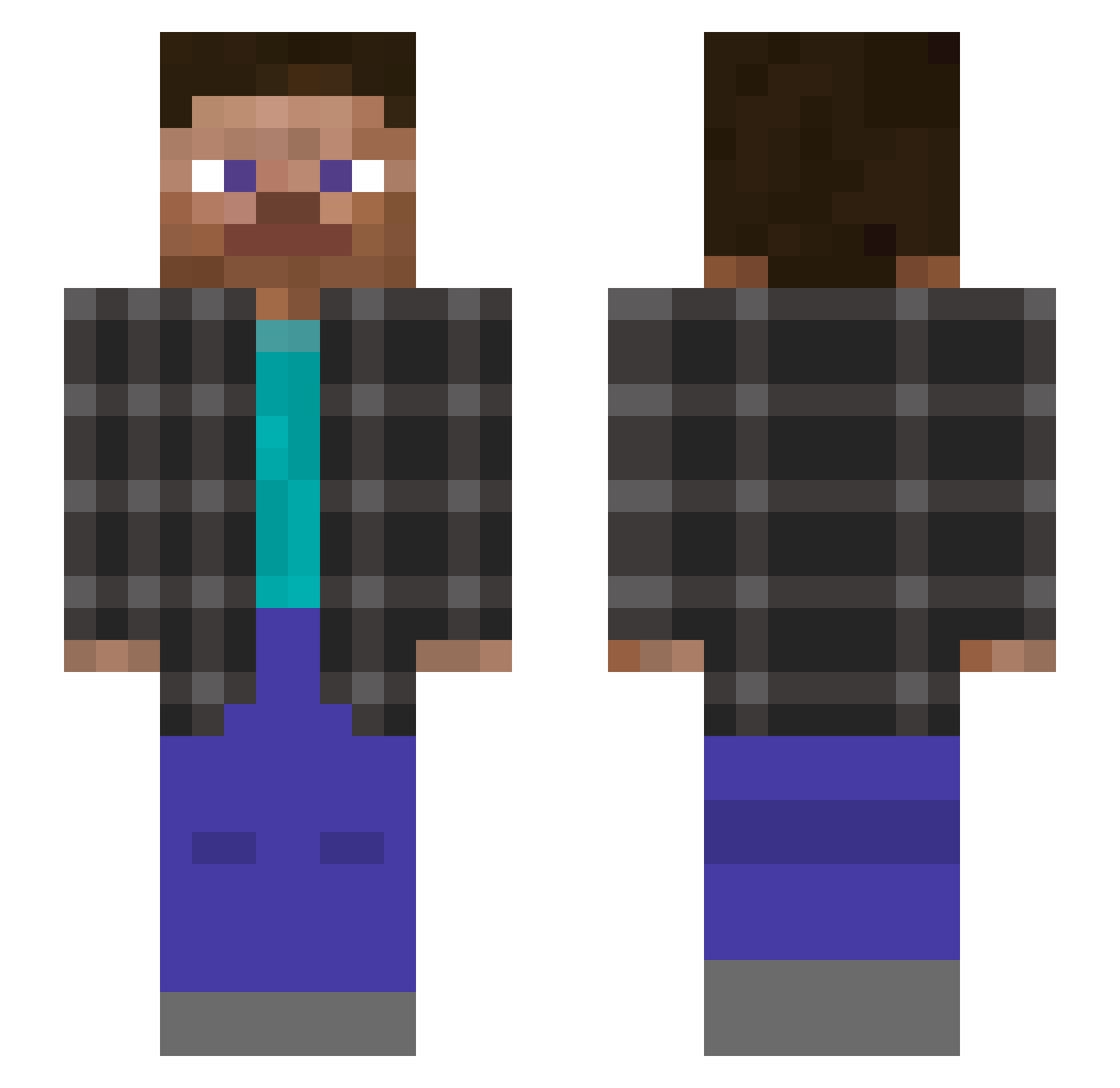
Current Minecraft skin of the player xNear00, loaded from the official Mojang API. Rotate the 3D model with your mouse or finger, then download the skin as a PNG file and use it in Minecraft: Bedrock Edition or Java Edition for free. When xNear00 changes their skin, this page updates automatically and the old skin stays in the history below.
Other players with this skin (137)
xNear00 was the 108th player we have seen with this skin, first spotted on 08.10.2026. The same skin was seen on these players. Open a nickname to see their current skin and skin history.
 xStar_kingx berrabrus10 Milangamer_123 DFG_165 SimplyNxah DUCKY_CROSS Rdr24 _trunfer_ BeckExist kiwiing lequrs ijfhnesjufhehfe imMrPeterK NoNight1 orfao p7tan 17astrox tatan71 maybe_hack MortalYou dirty47 TheBigLJB __Mjkl__ dumbFih agent_wly AlexFlorida ExoticFriedButte Twags012 Allu879 xF3lix123x ryjet nazwarobocza336 MrBigMen Kumza1 Diinus 3mbases MonkeyKing5492 IChrisA3 Moon_Pro_24 H1xi66 CamyJSaun vralio leomessi_0404 NOTGGGBBB Kakasza lea_caceres21 AhmadFil Monkstrr_ Pan_loczekk twAH64 Lordfoxyking vli123 OTHMAN_FPS Vindeta_PIVO Lyar_ IPKSI Mikifireblue 4mp3 Juliuszz BricZ1217
How to install the xNear00 skin
- Press the Download button above to save the skin as a PNG file.
- Minecraft: Bedrock Edition (PE): open the Dressing Room from the main menu (or tap your character → Edit Character), go to Classic Skins → Owned, press the + (new skin) button, choose the downloaded PNG and pick the Slim (Alex) model. Works on PC and mobile; consoles cannot import custom skins.
- Minecraft: Java Edition: open the Minecraft Launcher, go to the Skins tab, click New Skin, load the PNG, pick the Slim (Alex) model and press Save & Use. You can also upload it at minecraft.net → Profile → Change Skin.
The skin does not show up after import - what should I do?
Restart Minecraft and open the Dressing Room again - imported skins sometimes appear only after a restart. Also make sure you selected the imported skin and picked the Slim (Alex) model.
Which model should I choose, Classic or Slim?
This skin is designed for the Slim (Alex) model. If you pick the wrong model, the arms of the skin will look stretched or squeezed.
Is the skin of xNear00 free to download?
Yes. Press Download, save the PNG file and use it in Minecraft: Bedrock Edition or Java Edition - no payment or registration needed. The skin also works on multiplayer servers and Realms.
More skins
Looking for more? Go back to all Minecraft skins and check the top skins of the week, month and all time, or find any player's skin by nickname.