
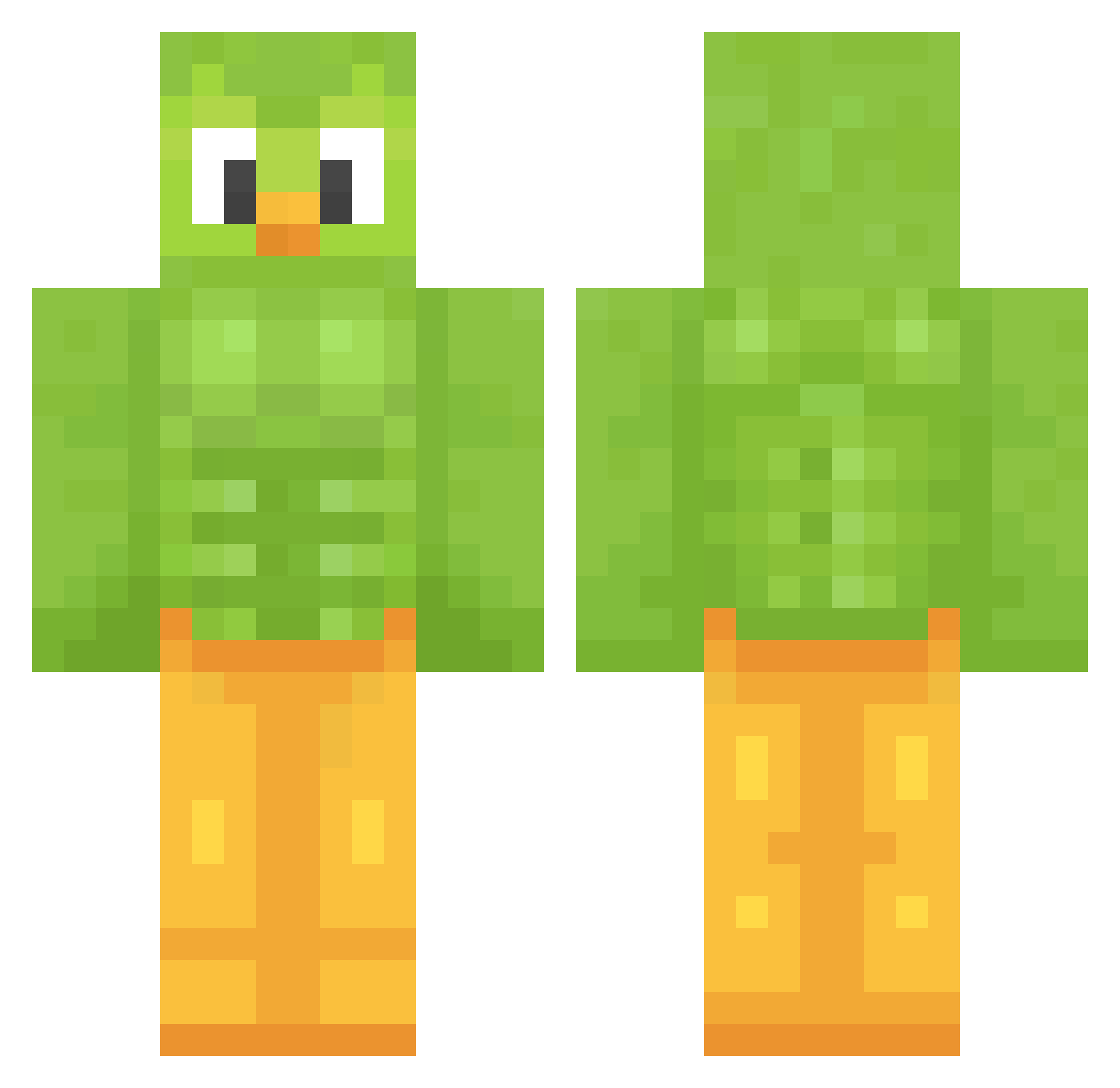
Current Minecraft skin of the player xElectric9177, loaded from the official Mojang API. Rotate the 3D model with your mouse or finger, then download the skin as a PNG file and use it in Minecraft: Bedrock Edition or Java Edition for free. When xElectric9177 changes their skin, this page updates automatically and the old skin stays in the history below.
Other players with this skin (1015)
xElectric9177 was the 143rd player we have seen with this skin, first spotted on 04.08.2026. The same skin was seen on these players. Open a nickname to see their current skin and skin history.
 neveryourtype Tuafo Ced_MC Reyiji
 Philbdo Xsa3asX Sleepy4859
 poepkiam TopHeadKiller123 DrVideoDude2 JzyDQYT SSU21 KampFireSong esty2218 BogiAgust S311 Tym0n_7 KokoStorm44 sababeli Eu_mesmoww ginormouspeanut loleloso Zeldr0x sharklover1023 wwaarruumm FinLayyyyy
 AlbertoRT_ Eastcapybara602 Kern2nd Amc1982 Creatorororo meliedog zirrocis27 blaze356 Verrino iGeorgeM Ozgur01oa Catucas nadtheship rugby_rager Pacha1516 wielkaROZGWIAZDA AscensionJT Blackbelt250 Lunar_Larry135 ChrPP_ Phelipe44 Pisces22484 davischmitz Liih
 FineshedAnt134 Thomas10017 Focuzy EoKansas kaylathebird BoJangleGlutten enene1006 StephanieTrelbog Cilhuk tweeterhead8
More Duo Minecraft skins
How to install the xElectric9177 skin
- Press the Download button above to save the skin as a PNG file.
- Minecraft: Bedrock Edition (PE): open the Dressing Room from the main menu (or tap your character → Edit Character), go to Classic Skins → Owned, press the + (new skin) button, choose the downloaded PNG and pick the Classic (Steve) model. Works on PC and mobile; consoles cannot import custom skins.
- Minecraft: Java Edition: open the Minecraft Launcher, go to the Skins tab, click New Skin, load the PNG, pick the Classic (Steve) model and press Save & Use. You can also upload it at minecraft.net → Profile → Change Skin.
The skin does not show up after import - what should I do?
Restart Minecraft and open the Dressing Room again - imported skins sometimes appear only after a restart. Also make sure you selected the imported skin and picked the Classic (Steve) model.
Which model should I choose, Classic or Slim?
This skin is designed for the Classic (Steve) model. If you pick the wrong model, the arms of the skin will look stretched or squeezed.
Is the skin of xElectric9177 free to download?
Yes. Press Download, save the PNG file and use it in Minecraft: Bedrock Edition or Java Edition - no payment or registration needed. The skin also works on multiplayer servers and Realms.
More skins
Looking for more? Go back to all Minecraft skins and check the top skins of the week, month and all time, or find any player's skin by nickname.