
wesboyy12 - Minecraft Skins & Skin History
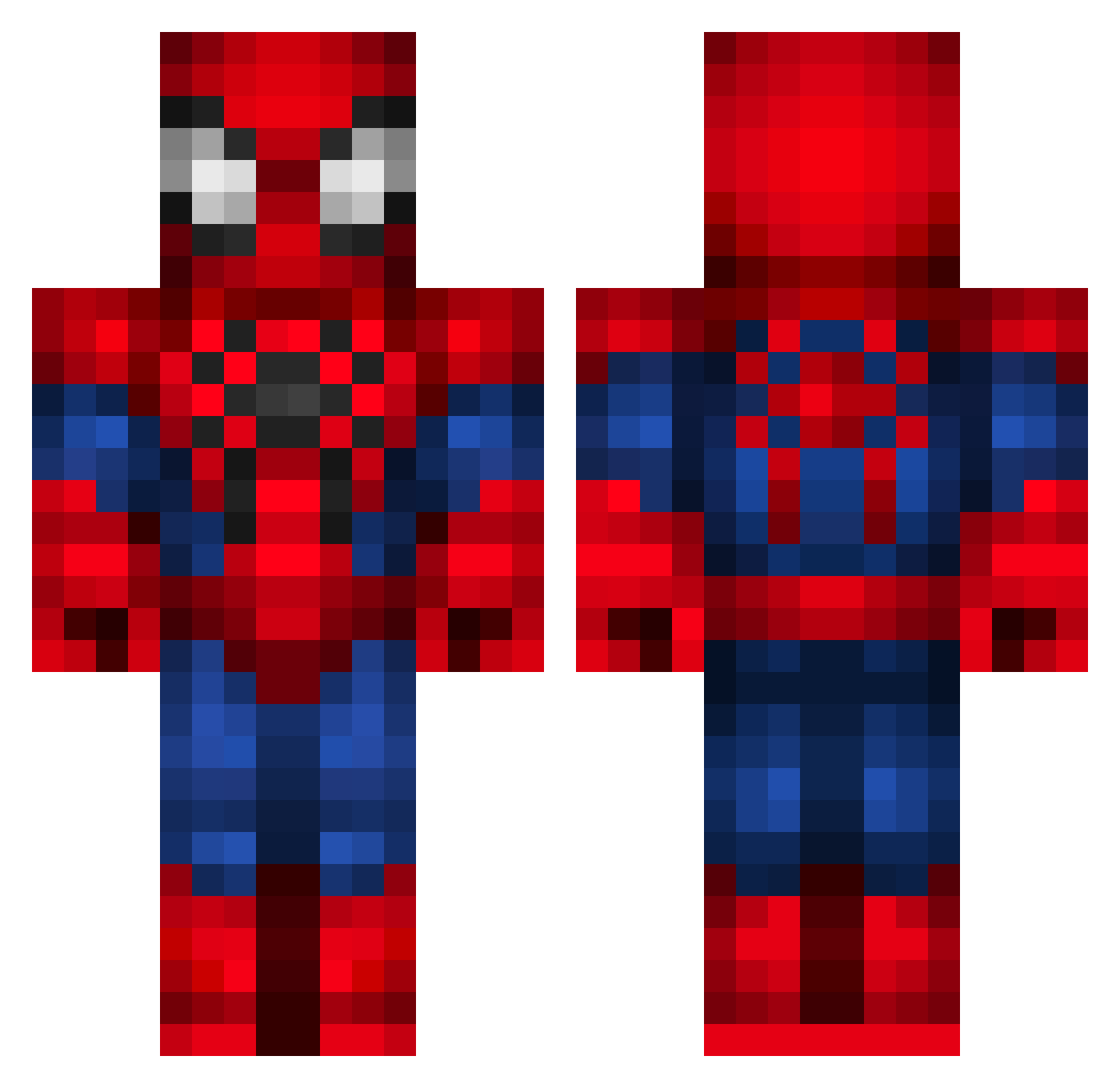
Current Minecraft skin of the player wesboyy12, loaded from the official Mojang API. Rotate the 3D model with your mouse or finger, then download the skin as a PNG file and use it in Minecraft: Bedrock Edition or Java Edition for free. When wesboyy12 changes their skin, this page updates automatically and the old skin stays in the history below.
Other players with this skin (68)
wesboyy12 was the 26th player we have seen with this skin, first spotted on 02.09.2026. The same skin was seen on these players. Open a nickname to see their current skin and skin history.
 Kloetenteddy BreadhunterZ PortalTangent moonkush itstheOG xflcy thematthewlaw peanutbutter8888 FeebleSwampNK 8eB HaonTheGreat LEONMEX17 MagicMikeX Doctor_Who116 I__Cri ElectricJumper AlphA_WolF_34 budimann1 RANFL13 tsmith801 Megamat04 CoolGamer0910 Archetypeless MyHero1337 DUKE2211 CamFazBear Protonic95 ItsMexxyy Spider_Man666 Khigzy GreenGuy55 AceMaverick626 JeanGrabin MyNameIsTreats Mordi_Myntevik JampieRookworst Hardy_Boy4 TheBestOliAndGus PistonFrank GeorgeH0811 HataMag brady_auer Yulderim ilovecigs ChrisWarner97 ChaosLordGod Spooky7980 rufisium yuri0819 creepyturtle101 Zaddyy Saowill BrinBrin20 TBNSfrag LiLMaCCy Seahawk11 booksun ScopezLad Nostalgialol Zephikel
More Spider-Man Minecraft skins
How to install the wesboyy12 skin
- Press the Download button above to save the skin as a PNG file.
- Minecraft: Bedrock Edition (PE): open the Dressing Room from the main menu (or tap your character → Edit Character), go to Classic Skins → Owned, press the + (new skin) button, choose the downloaded PNG and pick the Classic (Steve) model. Works on PC and mobile; consoles cannot import custom skins.
- Minecraft: Java Edition: open the Minecraft Launcher, go to the Skins tab, click New Skin, load the PNG, pick the Classic (Steve) model and press Save & Use. You can also upload it at minecraft.net → Profile → Change Skin.
The skin does not show up after import - what should I do?
Restart Minecraft and open the Dressing Room again - imported skins sometimes appear only after a restart. Also make sure you selected the imported skin and picked the Classic (Steve) model.
Which model should I choose, Classic or Slim?
This skin is designed for the Classic (Steve) model. If you pick the wrong model, the arms of the skin will look stretched or squeezed.
Is the skin of wesboyy12 free to download?
Yes. Press Download, save the PNG file and use it in Minecraft: Bedrock Edition or Java Edition - no payment or registration needed. The skin also works on multiplayer servers and Realms.
More skins
Looking for more? Go back to all Minecraft skins and check the top skins of the week, month and all time, or find any player's skin by nickname.