
wako0 - Minecraft Skins & Skin History
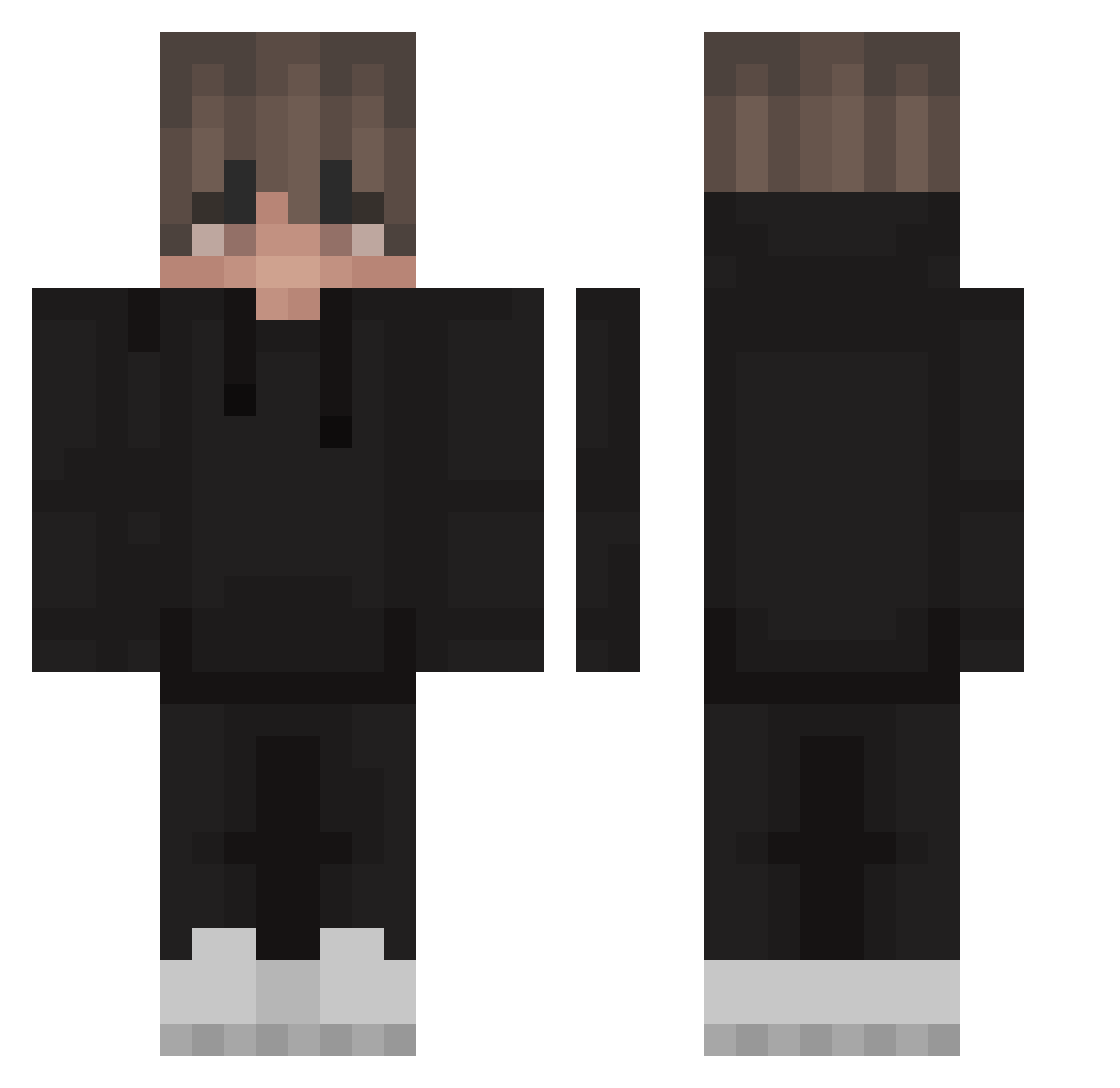
Current Minecraft skin of the player wako0, loaded from the official Mojang API. Rotate the 3D model with your mouse or finger, then download the skin as a PNG file and use it in Minecraft: Bedrock Edition or Java Edition for free. When wako0 changes their skin, this page updates automatically and the old skin stays in the history below.
Other players with this skin (220)
wako0 was the 40th player we have seen with this skin, first spotted on 12.08.2026. The same skin was seen on these players. Open a nickname to see their current skin and skin history.
 Zolys Dark_SideXxX fangerpl EmphaticDoom PrimusPrimorum FirerayTV vxTaps Mijek dujiev RenegadeGamerx MADdj4202 shyhp AndySuhh Neqzz Nazdnaz IRedStarI Mambukk diogo_gamer07 ThibaudMA solar2137 Sphxyal tlyr Flexit090 Swixyy77 TopShotGamer waycozy catshop12 NekrosFk94 ForwardGT 9k1_ Sethlucky Johannes423 Piter200 LavinJR ImaDOORable6969 SteroidAP Itz_bulka_67 Slffur2 CutiePieDeni DavidAlpha29 ImNotJeshaDev ImMythic_ Bercik2 its_bou Dragnah_ Crak3nn Sakzii its_furiousdoggy nflzmn rodjiox EternalDrift
 Jadgeee Daaaannyyy
 splash1490 F83701 alyvio Bonjin_games JohnSeed26 Alanisko OrbitZ__
How to install the wako0 skin
- Press the Download button above to save the skin as a PNG file.
- Minecraft: Bedrock Edition (PE): open the Dressing Room from the main menu (or tap your character → Edit Character), go to Classic Skins → Owned, press the + (new skin) button, choose the downloaded PNG and pick the Classic (Steve) model. Works on PC and mobile; consoles cannot import custom skins.
- Minecraft: Java Edition: open the Minecraft Launcher, go to the Skins tab, click New Skin, load the PNG, pick the Classic (Steve) model and press Save & Use. You can also upload it at minecraft.net → Profile → Change Skin.
The skin does not show up after import - what should I do?
Restart Minecraft and open the Dressing Room again - imported skins sometimes appear only after a restart. Also make sure you selected the imported skin and picked the Classic (Steve) model.
Which model should I choose, Classic or Slim?
This skin is designed for the Classic (Steve) model. If you pick the wrong model, the arms of the skin will look stretched or squeezed.
Is the skin of wako0 free to download?
Yes. Press Download, save the PNG file and use it in Minecraft: Bedrock Edition or Java Edition - no payment or registration needed. The skin also works on multiplayer servers and Realms.
More skins
Looking for more? Go back to all Minecraft skins and check the top skins of the week, month and all time, or find any player's skin by nickname.