
vvmelony - Minecraft Skins & Skin History
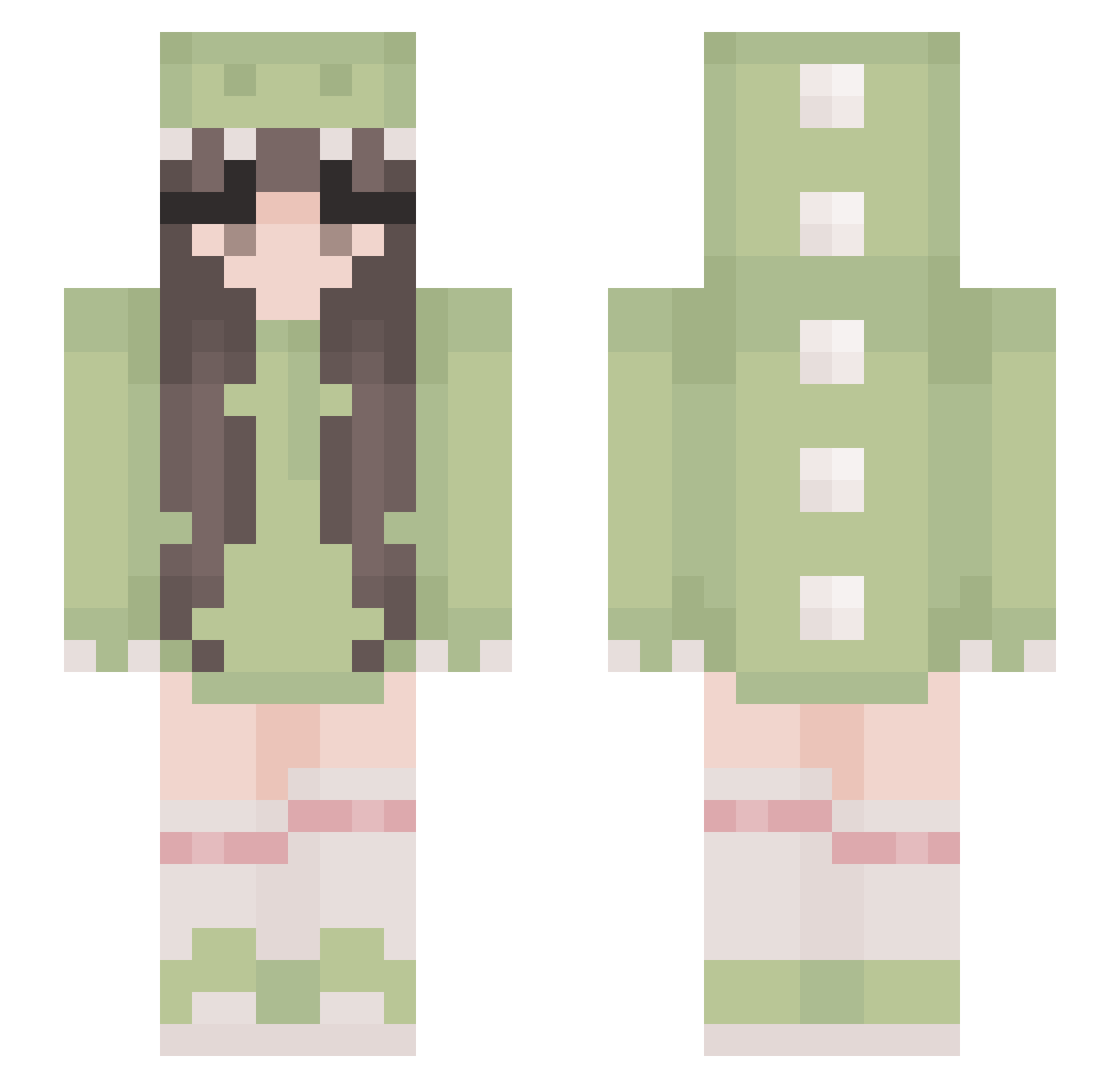
Current Minecraft skin of the player vvmelony, loaded from the official Mojang API. Rotate the 3D model with your mouse or finger, then download the skin as a PNG file and use it in Minecraft: Bedrock Edition or Java Edition for free. When vvmelony changes their skin, this page updates automatically and the old skin stays in the history below.
Other players with this skin (529)
vvmelony was the 157th player we have seen with this skin, first spotted on 28.08.2026. The same skin was seen on these players. Open a nickname to see their current skin and skin history.
 jessiefoley Reekazoids fefee_ Krys707 AriTheSquid Megan_Teddy skschlrhdi itsjessinx JasmineLemmon LuLuu01 toebeans21 lxdll cazara Hyrule_MAN Kiriasaurus Solma96 Wagyoe Bifriel oleilani xoSophia Mebali Oliviapreston789 Cai_VA julia05 Anmin23461627 Nexsdd deukkae SearTadpole411 Godzzilla xX_Isabella_Xx miyurou karlitaaw brigade03 Zar_Nophal evie_a kluseczka12 MiyuTheFroen Dinogirl4242 Pikiss I_Like_Dino Bee_TwT Apivich president_climp grungepoptarts DaylightNina mousemegz d1rtle Violet_Moon98 lafoker bobacat392 Nepsa8 NinaRue03 Islvia laerke245 Starthulu traveloverdeath Din0Niinja Wildcherryz AmberLeeDavis bbutterccup
More Cute Minecraft skins
How to install the vvmelony skin
- Press the Download button above to save the skin as a PNG file.
- Minecraft: Bedrock Edition (PE): open the Dressing Room from the main menu (or tap your character → Edit Character), go to Classic Skins → Owned, press the + (new skin) button, choose the downloaded PNG and pick the Slim (Alex) model. Works on PC and mobile; consoles cannot import custom skins.
- Minecraft: Java Edition: open the Minecraft Launcher, go to the Skins tab, click New Skin, load the PNG, pick the Slim (Alex) model and press Save & Use. You can also upload it at minecraft.net → Profile → Change Skin.
The skin does not show up after import - what should I do?
Restart Minecraft and open the Dressing Room again - imported skins sometimes appear only after a restart. Also make sure you selected the imported skin and picked the Slim (Alex) model.
Which model should I choose, Classic or Slim?
This skin is designed for the Slim (Alex) model. If you pick the wrong model, the arms of the skin will look stretched or squeezed.
Is the skin of vvmelony free to download?
Yes. Press Download, save the PNG file and use it in Minecraft: Bedrock Edition or Java Edition - no payment or registration needed. The skin also works on multiplayer servers and Realms.
More skins
Looking for more? Go back to all Minecraft skins and check the top skins of the week, month and all time, or find any player's skin by nickname.