
vif0nAXE - Minecraft Skins & Skin History
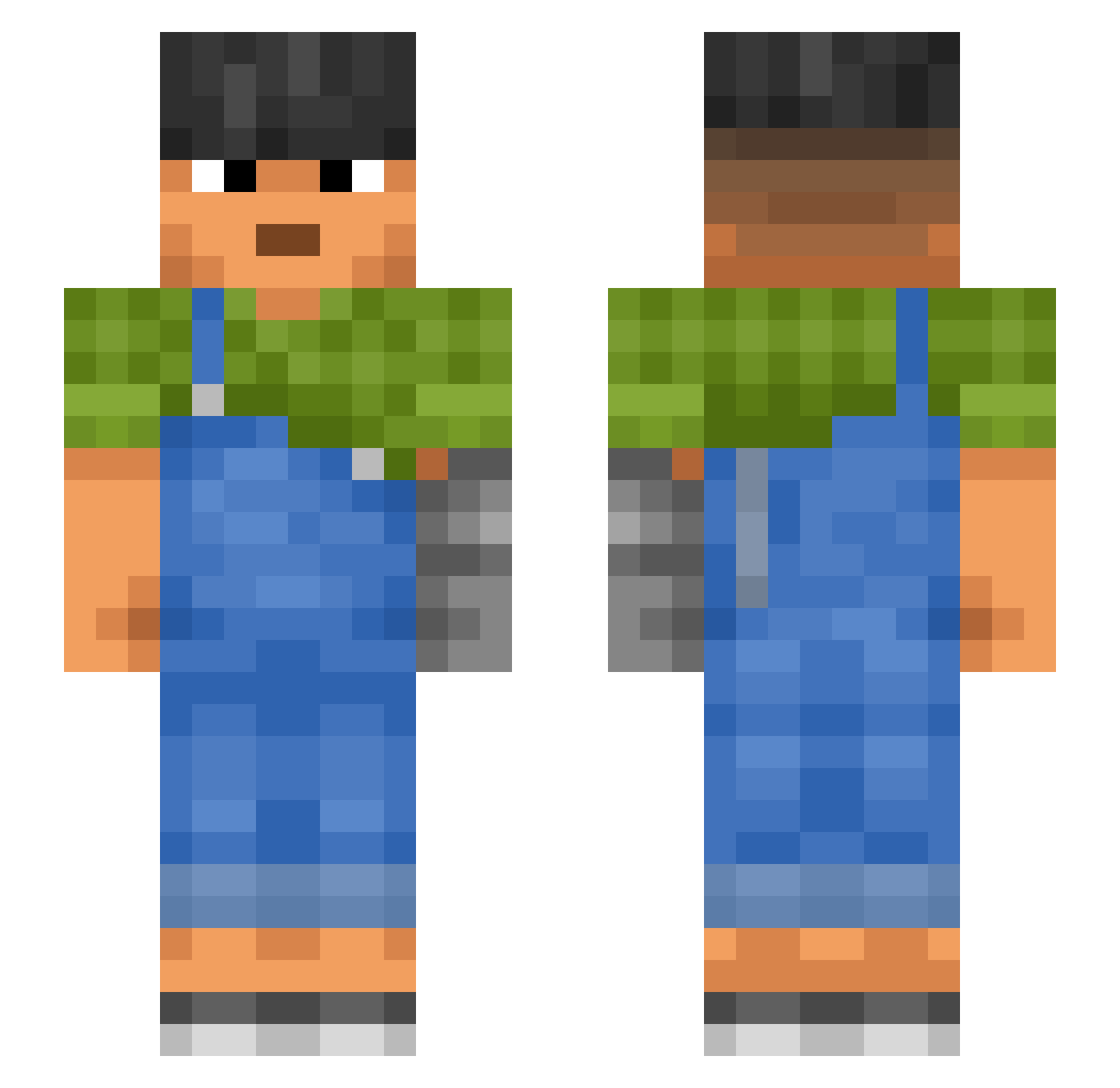
Current Minecraft skin of the player vif0nAXE, loaded from the official Mojang API. Rotate the 3D model with your mouse or finger, then download the skin as a PNG file and use it in Minecraft: Bedrock Edition or Java Edition for free. When vif0nAXE changes their skin, this page updates automatically and the old skin stays in the history below.
Other players with this skin (990)
vif0nAXE was the 290th player we have seen with this skin, first spotted on 25.08.2026. The same skin was seen on these players. Open a nickname to see their current skin and skin history.
 Thugtavious
 secludedness Cheapo Lisbon Manta_015 Rikugun_SansTar nat0p0tat0 LocoWeeds mcpiec zoological LallerSF stumer SirDiesaLot2 c3cin savvas Oliver7653 dioz_ RubinErin Speed_ShouYin_ marsdzn Throstles sum_taffy robetth melllina SEAT234 Zitter ManUtdBoy_ WolfBoy_VN AHHH12 lil_dum_bright PurpleOwl Guyer GetRektByMySkill Duckboat Totorosales Kradess Solemnest Slovat TUNNELLER Lammergeyer salvations hckk farksss Skags Forstdead HimTofman Novelty Porkery Flextoxx Kserencjusz_Idol LaiLai0326
 ChoTiMel Darraign biddaddyd Joie arimcr Igitur turcois Lasking Ousynou
More Prosthetic Arm Minecraft skins
See all 71 Prosthetic Arm skins
How to install the vif0nAXE skin
- Press the Download button above to save the skin as a PNG file.
- Minecraft: Bedrock Edition (PE): open the Dressing Room from the main menu (or tap your character → Edit Character), go to Classic Skins → Owned, press the + (new skin) button, choose the downloaded PNG and pick the Slim (Alex) model. Works on PC and mobile; consoles cannot import custom skins.
- Minecraft: Java Edition: open the Minecraft Launcher, go to the Skins tab, click New Skin, load the PNG, pick the Slim (Alex) model and press Save & Use. You can also upload it at minecraft.net → Profile → Change Skin.
The skin does not show up after import - what should I do?
Restart Minecraft and open the Dressing Room again - imported skins sometimes appear only after a restart. Also make sure you selected the imported skin and picked the Slim (Alex) model.
Which model should I choose, Classic or Slim?
This skin is designed for the Slim (Alex) model. If you pick the wrong model, the arms of the skin will look stretched or squeezed.
Is the skin of vif0nAXE free to download?
Yes. Press Download, save the PNG file and use it in Minecraft: Bedrock Edition or Java Edition - no payment or registration needed. The skin also works on multiplayer servers and Realms.
More skins
Looking for more? Go back to all Minecraft skins and check the top skins of the week, month and all time, or find any player's skin by nickname.