
victori_31 - Minecraft Skins & Skin History
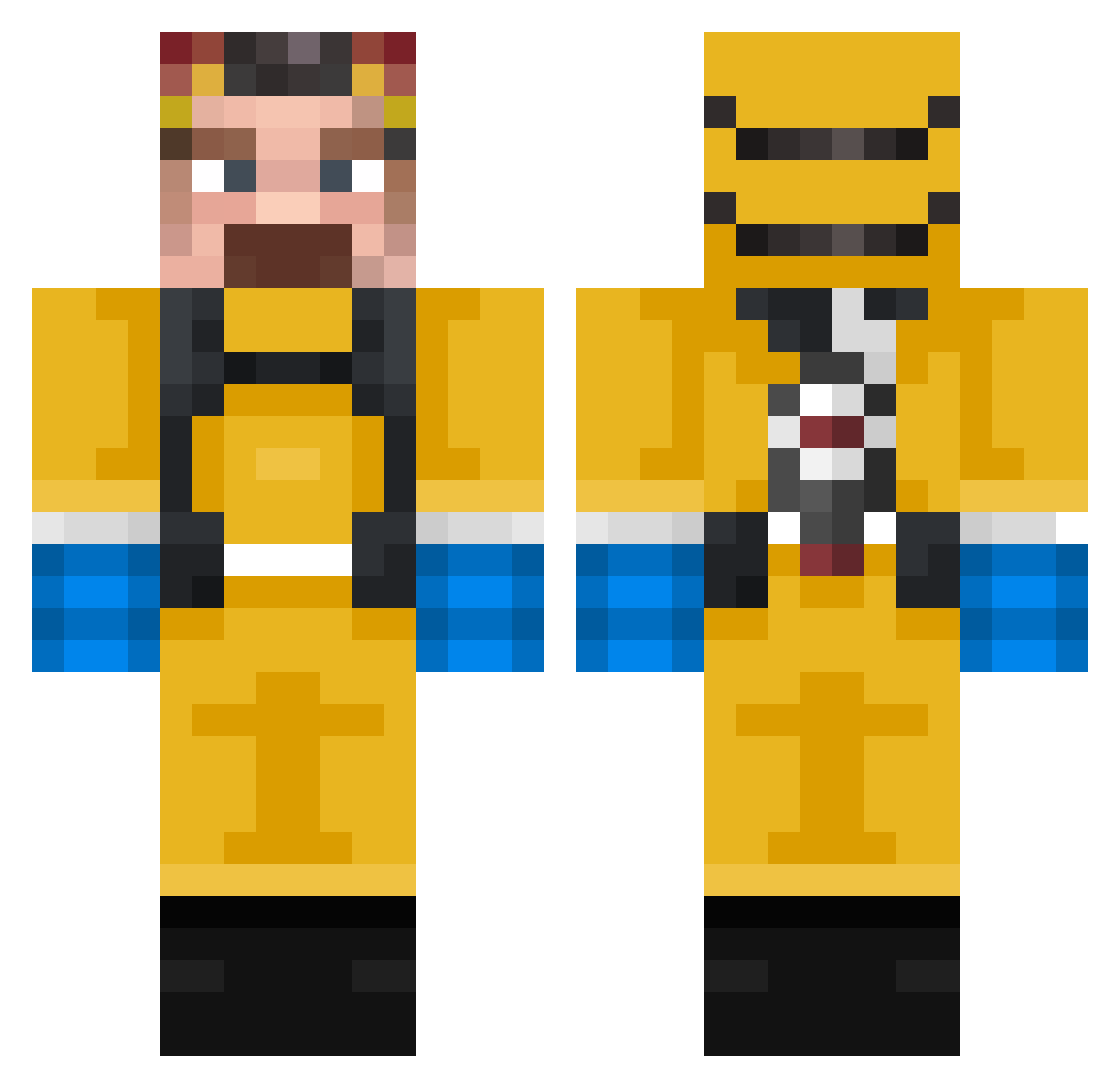
Current Minecraft skin of the player victori_31, loaded from the official Mojang API. Rotate the 3D model with your mouse or finger, then download the skin as a PNG file and use it in Minecraft: Bedrock Edition or Java Edition for free. When victori_31 changes their skin, this page updates automatically and the old skin stays in the history below.
Other players with this skin (388)
victori_31 was the 379th player we have seen with this skin, first spotted on 15.11.2026. The same skin was seen on these players. Open a nickname to see their current skin and skin history.
 Horizon____ QG_sage Chumbawumba99 dexoooooo Ceebas caccca Quentrax vifego6 PaepaeXD faelOproprio Geo2hd stef4nn miki2009PL mat505 WalfinesR Moducer ThomasP07 biglightbulb1234 RaulsitoVasilon WaltherWhite7777 CombattWombatt Ugljesa_ Mckgrant cabbit_idk ObamaGaming224 yTUbo deaftunes JonSmithTheGreat _evien_ Wabakihunn Tech_Q FreshWood69 josh2muchsauce flypin Lordgenome_ alvaritogpr JoseGaming20 3liano Falcon_3001 WalterWhite0110 MojoJoo blaker3536 420WeedMuncher69 Inferino Walter_Whitman Dylanblietz methamfetamin Lukeosaurus1 de1vyet97 Nexus9123 Water_Weight Noooobik_ ThoughtWig Micanik93 LeenerWeener DrPraule teoradice Azepteur Mariolka1122 Joeyjojrshabado
More Walter White Minecraft skins
See all 681 Walter White skins
How to install the victori_31 skin
- Press the Download button above to save the skin as a PNG file.
- Minecraft: Bedrock Edition (PE): open the Dressing Room from the main menu (or tap your character → Edit Character), go to Classic Skins → Owned, press the + (new skin) button, choose the downloaded PNG and pick the Classic (Steve) model. Works on PC and mobile; consoles cannot import custom skins.
- Minecraft: Java Edition: open the Minecraft Launcher, go to the Skins tab, click New Skin, load the PNG, pick the Classic (Steve) model and press Save & Use. You can also upload it at minecraft.net → Profile → Change Skin.
The skin does not show up after import - what should I do?
Restart Minecraft and open the Dressing Room again - imported skins sometimes appear only after a restart. Also make sure you selected the imported skin and picked the Classic (Steve) model.
Which model should I choose, Classic or Slim?
This skin is designed for the Classic (Steve) model. If you pick the wrong model, the arms of the skin will look stretched or squeezed.
Is the skin of victori_31 free to download?
Yes. Press Download, save the PNG file and use it in Minecraft: Bedrock Edition or Java Edition - no payment or registration needed. The skin also works on multiplayer servers and Realms.
More skins
Looking for more? Go back to all Minecraft skins and check the top skins of the week, month and all time, or find any player's skin by nickname.