
tzi_Amp9b_02_02 - Minecraft Skins & Skin History
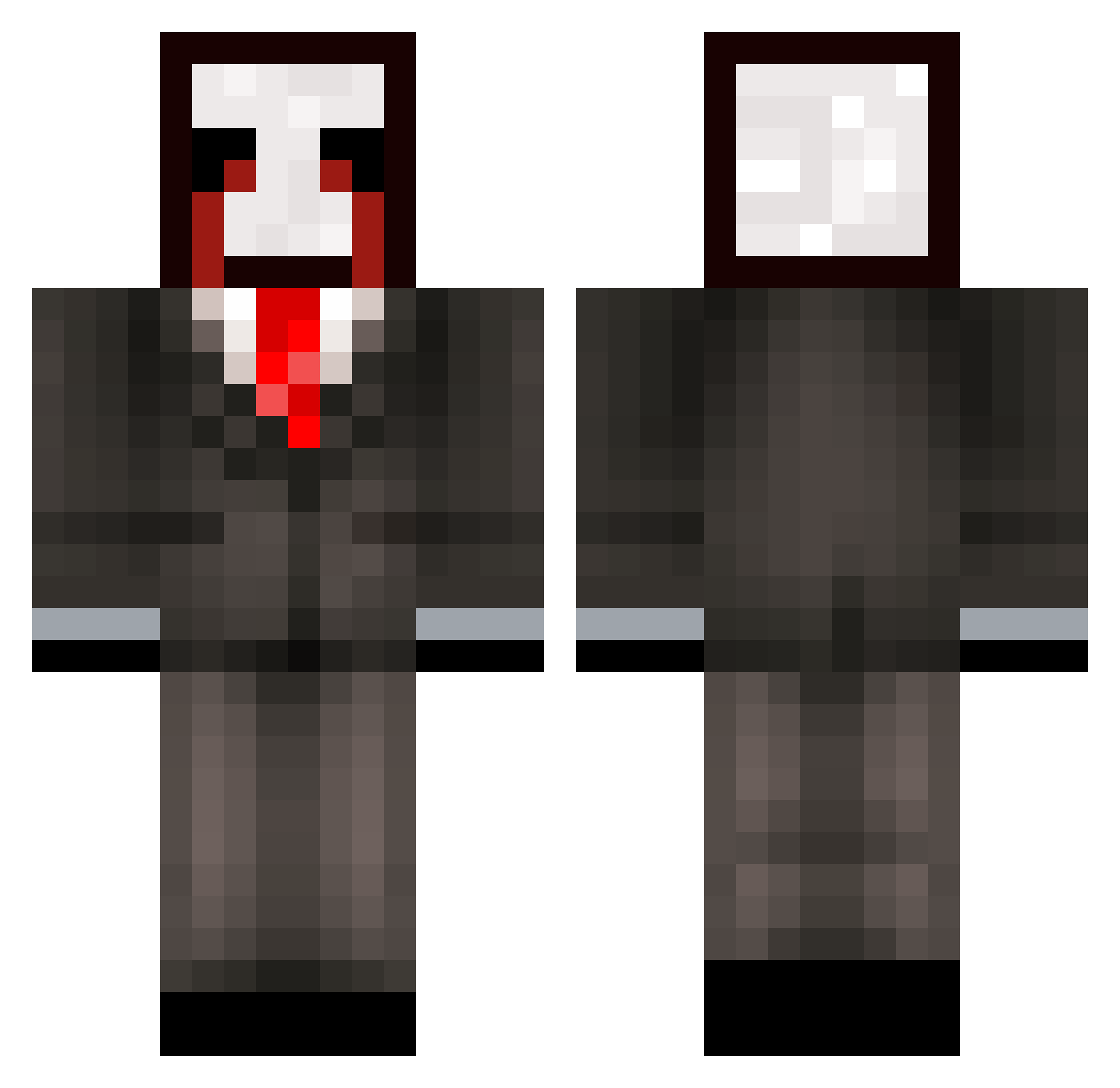
Current Minecraft skin of the player tzi_Amp9b_02_02, loaded from the official Mojang API. Rotate the 3D model with your mouse or finger, then download the skin as a PNG file and use it in Minecraft: Bedrock Edition or Java Edition for free. When tzi_Amp9b_02_02 changes their skin, this page updates automatically and the old skin stays in the history below.
Other players with this skin (287)
tzi_Amp9b_02_02 was the 283rd player we have seen with this skin, first spotted on 17.10.2026. The same skin was seen on these players. Open a nickname to see their current skin and skin history.
 457_Houzz_6us gtd_msmc_cxa BLUDOSISBEST PASIRy82qq2g3k3m evm_msmc_tu3 g8u_Abdou_5q9 slich_melodic891 NoiceBigBoss1 az_9OC0Z_10_04 g2t_msmc_eu1 LinhEdgeorpUwU Goral_shallow629 meow_zeUFB_20 Sv2zazM4eiYMbSv2 JACKULA_PLAYZ Entitilo_pbUSb codet_i_6 az_SBja5_09_13 r7y_msmc_blt talles0talarmed spp_msmc_0ll 3le_msmc_3j4 4ic_King_cuw xthonkismevNOA S4N712011 cwo_msmc_7jw qle_msmc_sip LinhGsxfw0101 The_Aditya_Yt 5w6_shadow_qkd 0vh_msmc_qo3 1fh_msmc_wju MAL_nFjDIa lee_msmc_csb Weembuu lomp_urb LinhltNYW1230 scopmops Vetranoall40 w2y_msmc_icm tzi_hdi30_01_21 wpf_gLp0Z_10_05 Linhapzpe0117 Shok3rzzz DBNZ2029 liloishereVexuwg iol_msmc_jgf Sbarbaro_curly73 a5o_msmc_2gb raveAEMdb97V NazaaTso 9dz_msmc_gie LinhkHhrc1227 meow_DnhHx_02 meowalt_rlRsT_07 qfv_nicegen_y3a cwy_msmc_sd0 LinhVex7r6UwU LinhtfLpR0118 mogged_OUyZc
More Slenderman Minecraft skins
How to install the tzi_Amp9b_02_02 skin
- Press the Download button above to save the skin as a PNG file.
- Minecraft: Bedrock Edition (PE): open the Dressing Room from the main menu (or tap your character → Edit Character), go to Classic Skins → Owned, press the + (new skin) button, choose the downloaded PNG and pick the Classic (Steve) model. Works on PC and mobile; consoles cannot import custom skins.
- Minecraft: Java Edition: open the Minecraft Launcher, go to the Skins tab, click New Skin, load the PNG, pick the Classic (Steve) model and press Save & Use. You can also upload it at minecraft.net → Profile → Change Skin.
The skin does not show up after import - what should I do?
Restart Minecraft and open the Dressing Room again - imported skins sometimes appear only after a restart. Also make sure you selected the imported skin and picked the Classic (Steve) model.
Which model should I choose, Classic or Slim?
This skin is designed for the Classic (Steve) model. If you pick the wrong model, the arms of the skin will look stretched or squeezed.
Is the skin of tzi_Amp9b_02_02 free to download?
Yes. Press Download, save the PNG file and use it in Minecraft: Bedrock Edition or Java Edition - no payment or registration needed. The skin also works on multiplayer servers and Realms.
More skins
Looking for more? Go back to all Minecraft skins and check the top skins of the week, month and all time, or find any player's skin by nickname.