
tw0z - Minecraft Skins & Skin History
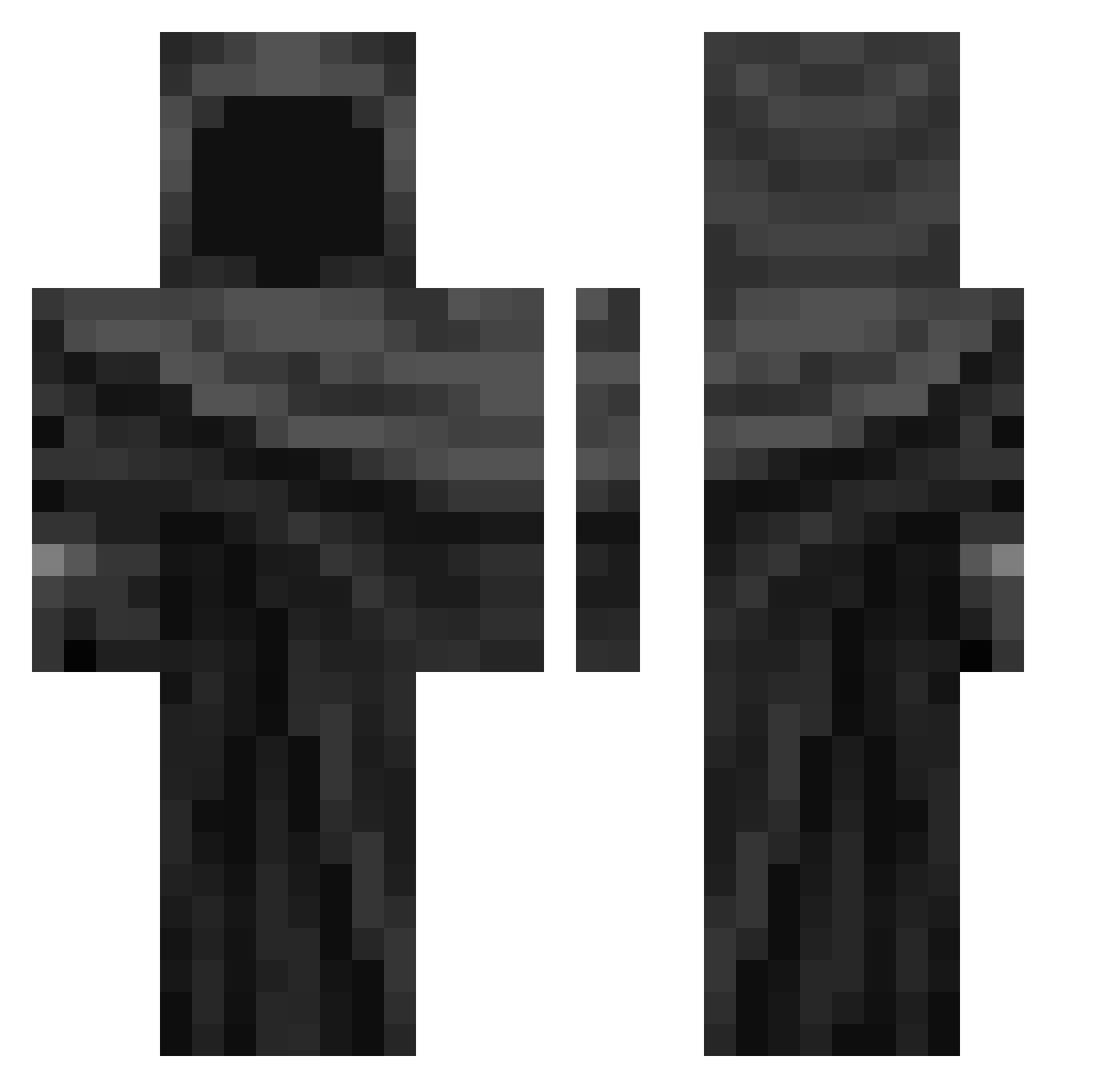
Current Minecraft skin of the player tw0z, loaded from the official Mojang API. Rotate the 3D model with your mouse or finger, then download the skin as a PNG file and use it in Minecraft: Bedrock Edition or Java Edition for free. When tw0z changes their skin, this page updates automatically and the old skin stays in the history below.
Other players with this skin (343)
tw0z was the 312th player we have seen with this skin, first spotted on 25.10.2026. The same skin was seen on these players. Open a nickname to see their current skin and skin history.
 M7mdss xXRaStAfLaSh_666 GOKAYSOLDAAT 694iq caprafore mptff just_baridah Tima24_ _DrEmmettBrown KG970 allenjack TinyRickk mostro872 Ksj_it tsut shokon226 Pinguspaghetti subzero28 eokon Kwengflow Fede2502 sakune0P ArKi0918 Sxilver molangm MikeSwiss TomasRoar irunman _x_m Beckman_123 gatoxus pika199510 shesoutofmyreach BangMekk KeVinVorteX Oxify1 G356 MDEREK39 eqwieopqf Jonahmue2010 TraaxVI Ayamiba Hadesiak531 ChildrenEater12 Xetany Diddyboyjj Loki136 Miku_Anime grzybion Alanox337 AlicebanD SOG77 JoHuynen Genvvy Goofy2423 Bananabol Alokda pcpvr Poryty__ LK_ZOORO_
More Cloak Minecraft skins
How to install the tw0z skin
- Press the Download button above to save the skin as a PNG file.
- Minecraft: Bedrock Edition (PE): open the Dressing Room from the main menu (or tap your character → Edit Character), go to Classic Skins → Owned, press the + (new skin) button, choose the downloaded PNG and pick the Classic (Steve) model. Works on PC and mobile; consoles cannot import custom skins.
- Minecraft: Java Edition: open the Minecraft Launcher, go to the Skins tab, click New Skin, load the PNG, pick the Classic (Steve) model and press Save & Use. You can also upload it at minecraft.net → Profile → Change Skin.
The skin does not show up after import - what should I do?
Restart Minecraft and open the Dressing Room again - imported skins sometimes appear only after a restart. Also make sure you selected the imported skin and picked the Classic (Steve) model.
Which model should I choose, Classic or Slim?
This skin is designed for the Classic (Steve) model. If you pick the wrong model, the arms of the skin will look stretched or squeezed.
Is the skin of tw0z free to download?
Yes. Press Download, save the PNG file and use it in Minecraft: Bedrock Edition or Java Edition - no payment or registration needed. The skin also works on multiplayer servers and Realms.
More skins
Looking for more? Go back to all Minecraft skins and check the top skins of the week, month and all time, or find any player's skin by nickname.