
tozami1 - Minecraft Skins & Skin History
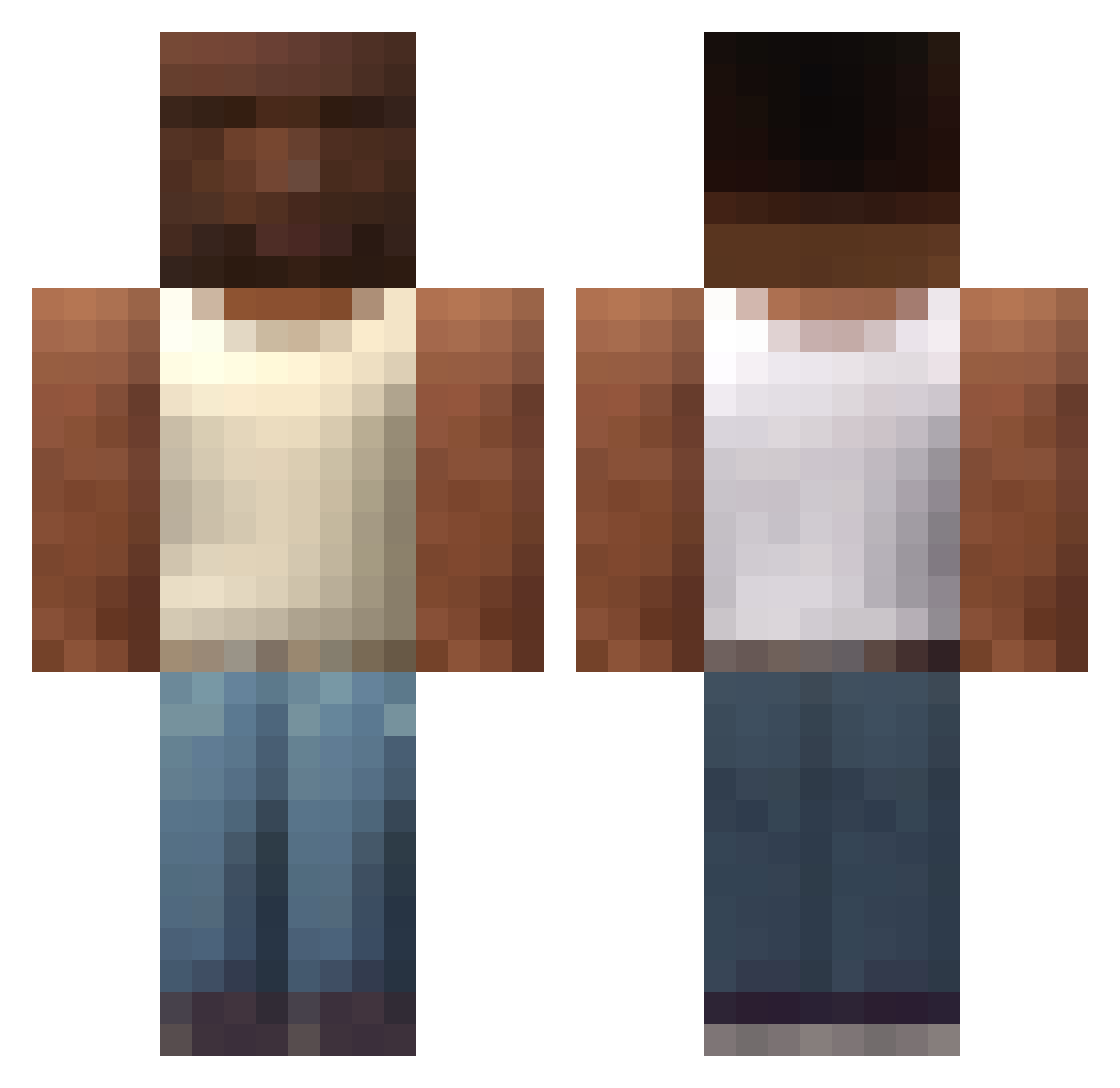
Current Minecraft skin of the player tozami1, loaded from the official Mojang API. Rotate the 3D model with your mouse or finger, then download the skin as a PNG file and use it in Minecraft: Bedrock Edition or Java Edition for free. When tozami1 changes their skin, this page updates automatically and the old skin stays in the history below.
Other players with this skin (749)
tozami1 was the 662nd player we have seen with this skin, first spotted on 09.11.2026. The same skin was seen on these players. Open a nickname to see their current skin and skin history.
 luancf ju4ngoat Klocur Ch3f2 tanrikanirtan68 Fuego444 untilifoundu Anrikk Nabilah norbulas liondaclaro Kikofixe Neckslice pl4k4l_67 MiNiMEENi getKil Boom1150 uzbektashkent322 hoon7463 Prriortitorico elpo_2 efecans09 Mauup MrChxchx jhj0928 amelieeeeeeeee AbdihamAlzaheer SuperS9 Joaco07 Castellanso MANCHERST_UNITED Dxvin15 akagamiShanks666 gabas123 Azekif Mau4004 Lthreesy Mthdb01 maxcamer123 ThomyDZ Clocharly Chabreck B1ork AshtonHall90 gaelpbalo123 JulTider ytrxwz Just_Cat44 xScHmiDtYoo Ametito RapidFire0 jdipa tubelo onlineelf Koth99 ren3puente Luizok2 _Fozter sit1simple Eltomx
More San Andreas Minecraft skins
How to install the tozami1 skin
- Press the Download button above to save the skin as a PNG file.
- Minecraft: Bedrock Edition (PE): open the Dressing Room from the main menu (or tap your character → Edit Character), go to Classic Skins → Owned, press the + (new skin) button, choose the downloaded PNG and pick the Classic (Steve) model. Works on PC and mobile; consoles cannot import custom skins.
- Minecraft: Java Edition: open the Minecraft Launcher, go to the Skins tab, click New Skin, load the PNG, pick the Classic (Steve) model and press Save & Use. You can also upload it at minecraft.net → Profile → Change Skin.
The skin does not show up after import - what should I do?
Restart Minecraft and open the Dressing Room again - imported skins sometimes appear only after a restart. Also make sure you selected the imported skin and picked the Classic (Steve) model.
Which model should I choose, Classic or Slim?
This skin is designed for the Classic (Steve) model. If you pick the wrong model, the arms of the skin will look stretched or squeezed.
Is the skin of tozami1 free to download?
Yes. Press Download, save the PNG file and use it in Minecraft: Bedrock Edition or Java Edition - no payment or registration needed. The skin also works on multiplayer servers and Realms.
More skins
Looking for more? Go back to all Minecraft skins and check the top skins of the week, month and all time, or find any player's skin by nickname.