
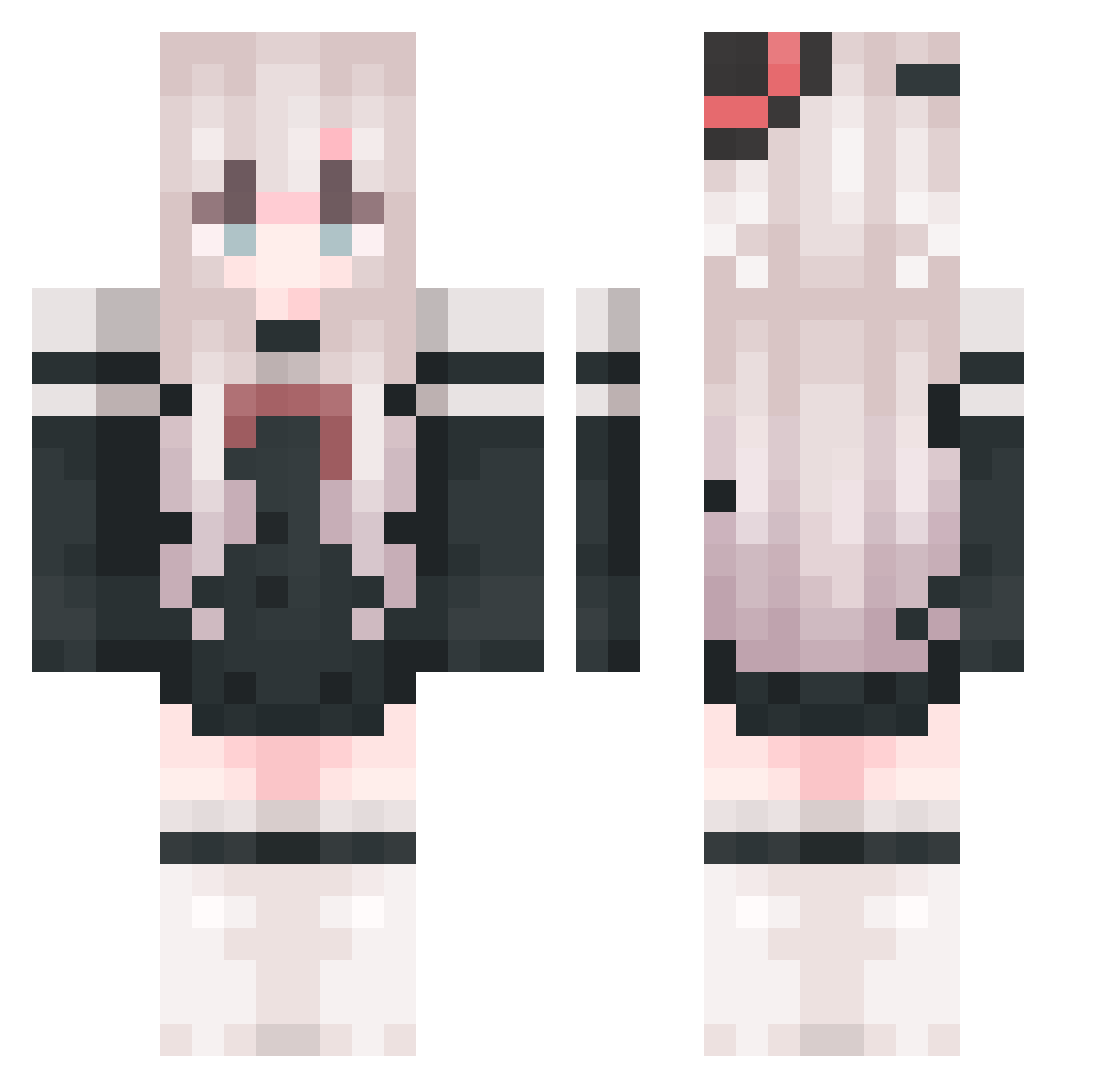
Current Minecraft skin of the player tiange114514, loaded from the official Mojang API. Rotate the 3D model with your mouse or finger, then download the skin as a PNG file and use it in Minecraft: Bedrock Edition or Java Edition for free. When tiange114514 changes their skin, this page updates automatically and the old skin stays in the history below.
Other players with this skin (760)
tiange114514 was the 191st player we have seen with this skin, first spotted on 14.08.2026. The same skin was seen on these players. Open a nickname to see their current skin and skin history.
 Elysian_Astra _CamEllliA_ Lyona_ swetery Yuan_Lanlin MoonLight0530 Irving_HuTao yiranUOU
 wusuowei2 Chen_Cen DanTuiRen chikalilly Parad9x RaiNightx Vesperia01 mike3927 ddone ri_chang_bai_gei 12Hydrogen Eva223 SignifYd WEIZICHAO mzlmg
 LIZABW Little_peiguin X_Y_C_F LoveDarling111 wlwc05 XiaoYiZi LBYNDBB _kubao_ yuanzhang02 jinglong01 roper22 FunnyNote00 Bunker_937 Sryllll_awa dongdongyu12
 frogwang Lies74 qiuning123 Yajiee1998 fengjiu99 AwAzk Consualo SAN_LING__ kiskice 35659 Cmingrixiang chenfeina celestial_maid dustyflower asakisama123 IceCream2025 Sarasina Mikeyxxxx XXXHH11 SHASHAPrincess_ Elaina34 Lyinne
More Top Hat Minecraft skins
How to install the tiange114514 skin
- Press the Download button above to save the skin as a PNG file.
- Minecraft: Bedrock Edition (PE): open the Dressing Room from the main menu (or tap your character → Edit Character), go to Classic Skins → Owned, press the + (new skin) button, choose the downloaded PNG and pick the Classic (Steve) model. Works on PC and mobile; consoles cannot import custom skins.
- Minecraft: Java Edition: open the Minecraft Launcher, go to the Skins tab, click New Skin, load the PNG, pick the Classic (Steve) model and press Save & Use. You can also upload it at minecraft.net → Profile → Change Skin.
The skin does not show up after import - what should I do?
Restart Minecraft and open the Dressing Room again - imported skins sometimes appear only after a restart. Also make sure you selected the imported skin and picked the Classic (Steve) model.
Which model should I choose, Classic or Slim?
This skin is designed for the Classic (Steve) model. If you pick the wrong model, the arms of the skin will look stretched or squeezed.
Is the skin of tiange114514 free to download?
Yes. Press Download, save the PNG file and use it in Minecraft: Bedrock Edition or Java Edition - no payment or registration needed. The skin also works on multiplayer servers and Realms.
More skins
Looking for more? Go back to all Minecraft skins and check the top skins of the week, month and all time, or find any player's skin by nickname.