
theskinnerman - Minecraft Skins & Skin History
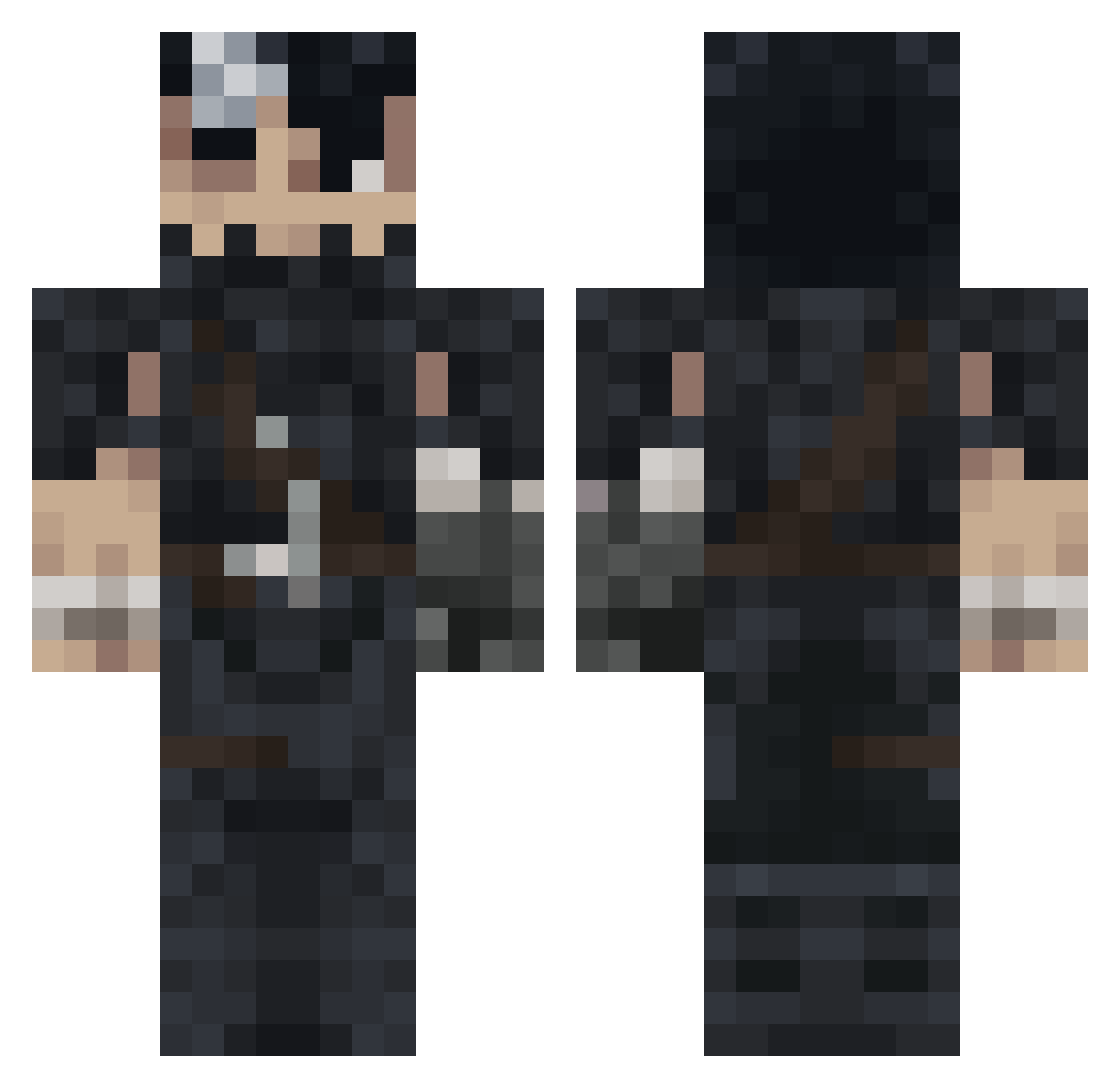
Current Minecraft skin of the player theskinnerman, loaded from the official Mojang API. Rotate the 3D model with your mouse or finger, then download the skin as a PNG file and use it in Minecraft: Bedrock Edition or Java Edition for free. When theskinnerman changes their skin, this page updates automatically and the old skin stays in the history below.
Other players with this skin (992)
theskinnerman was the 206th player we have seen with this skin, first spotted on 15.08.2026. The same skin was seen on these players. Open a nickname to see their current skin and skin history.
 Zakses Opa046 FreakDruid Omega_25 UncleBrenni Kota_Litten iissu Difalt1 Excsh r7ciz SwayziiTK Valentinns 13e4111 JustMeFabio Galaxy_Swordsman FildonQ Taki_HD pickleRX Joe_4206911 Lost_Haven LUCKYLUCKE2 CerberusGx Saikaa__ UCM99 Zokared Allansaid Tibas1999 wow4iik PotatoSlayer08 K0renay ZagulaBiggs ManIloveFideos19 lebypun egg1232 Shir026 xnxm2 El_Jefe1234 LeMargarida YAZEED119 kxsana GODMATINHAS Eleaz4r Packhno22 AceEditz despaired_ sony_pain_R apexistakennn
 FunkyBanana64 bydarky10 HannyaMask1 GeneiJin Cank_y hugommeira Talaani matiisiu DerpDin0 Federicoxx monsterock Twuris Seniox1
More Guts Minecraft skins
How to install the theskinnerman skin
- Press the Download button above to save the skin as a PNG file.
- Minecraft: Bedrock Edition (PE): open the Dressing Room from the main menu (or tap your character → Edit Character), go to Classic Skins → Owned, press the + (new skin) button, choose the downloaded PNG and pick the Classic (Steve) model. Works on PC and mobile; consoles cannot import custom skins.
- Minecraft: Java Edition: open the Minecraft Launcher, go to the Skins tab, click New Skin, load the PNG, pick the Classic (Steve) model and press Save & Use. You can also upload it at minecraft.net → Profile → Change Skin.
The skin does not show up after import - what should I do?
Restart Minecraft and open the Dressing Room again - imported skins sometimes appear only after a restart. Also make sure you selected the imported skin and picked the Classic (Steve) model.
Which model should I choose, Classic or Slim?
This skin is designed for the Classic (Steve) model. If you pick the wrong model, the arms of the skin will look stretched or squeezed.
Is the skin of theskinnerman free to download?
Yes. Press Download, save the PNG file and use it in Minecraft: Bedrock Edition or Java Edition - no payment or registration needed. The skin also works on multiplayer servers and Realms.
More skins
Looking for more? Go back to all Minecraft skins and check the top skins of the week, month and all time, or find any player's skin by nickname.