
teapotteo - Minecraft Skins & Skin History
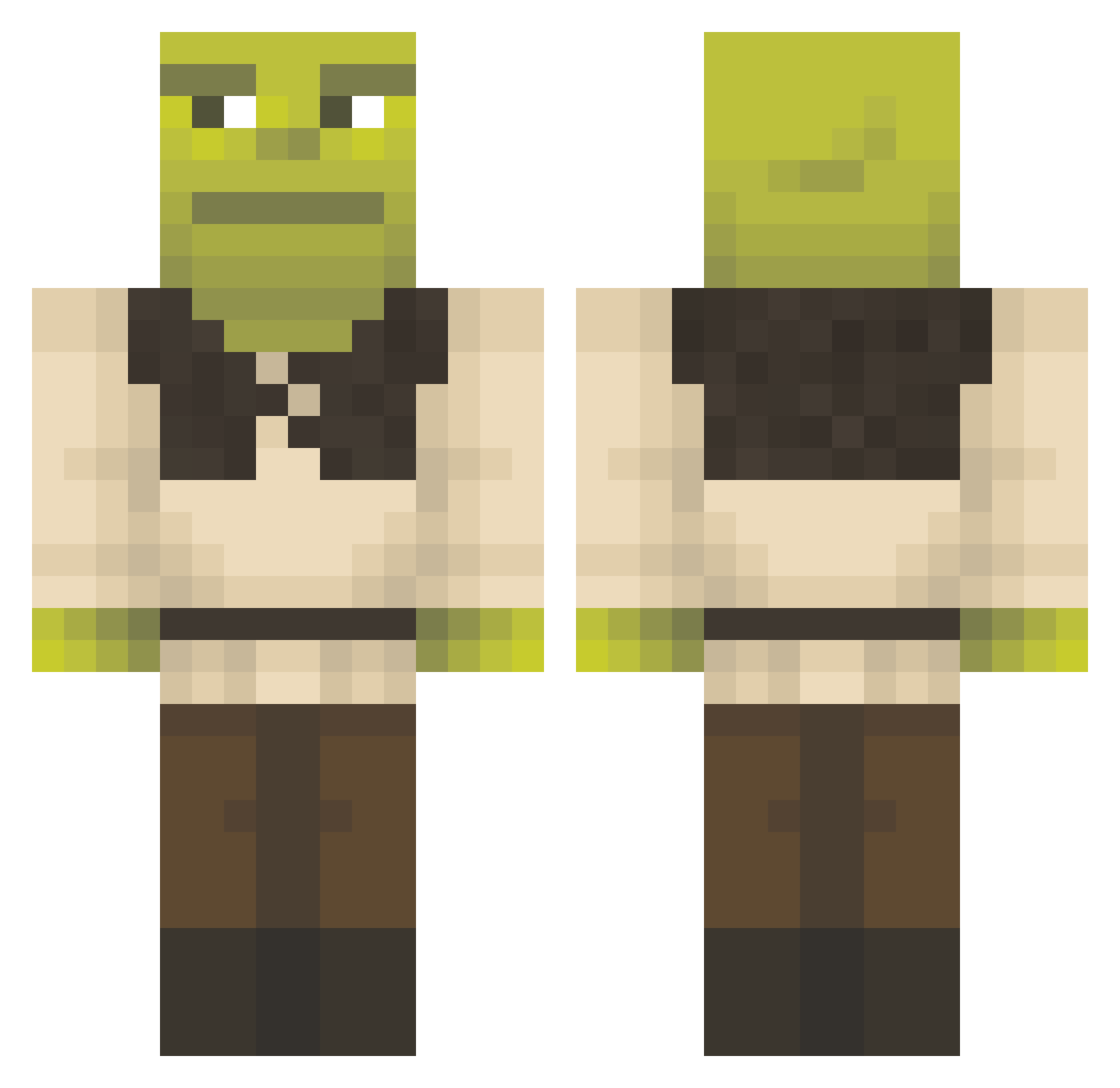
Current Minecraft skin of the player teapotteo, loaded from the official Mojang API. Rotate the 3D model with your mouse or finger, then download the skin as a PNG file and use it in Minecraft: Bedrock Edition or Java Edition for free. When teapotteo changes their skin, this page updates automatically and the old skin stays in the history below.
Other players with this skin (1156)
teapotteo was the 76th player we have seen with this skin, first spotted on 30.07.2026. The same skin was seen on these players. Open a nickname to see their current skin and skin history.
 DiamondGman01 pappapoes willthompson
 Eduardone rasmos999 Gacuu WadimsRod KaYoZeXe Groobbyy Gmoney0121 Jetapollo_YEEHAW Kuronyx22 Ahydgame jorlion1 eninaright Theblackknight08 moneybaggmetz gonzizZ mr_matland_ KarlJohan714 Lanauvi Reeenix MrHayBay Jokair974 momomoped Timigj jaylyn11 chickenab venusanaa ShrekFl1x_nChill Sano_55 Penabad lillaxkatie KitaJeDobrej55 Terrabade TheJuan9 CJansen1 yourlocalturk kulebaka_ Viideer_ Telor99 kiwikiana elisethebeast01 Timotheusss Putling1 Bymathews99 tavo45 Kosith00 Jangmann AGGIEBQ2014 NIKE2064 javierlo Mateito danidcsa NunezFam5 CONNERxz SmallCamel farnilhas braaaga0409 Texcalibour
More Shrek Minecraft skins
How to install the teapotteo skin
- Press the Download button above to save the skin as a PNG file.
- Minecraft: Bedrock Edition (PE): open the Dressing Room from the main menu (or tap your character → Edit Character), go to Classic Skins → Owned, press the + (new skin) button, choose the downloaded PNG and pick the Classic (Steve) model. Works on PC and mobile; consoles cannot import custom skins.
- Minecraft: Java Edition: open the Minecraft Launcher, go to the Skins tab, click New Skin, load the PNG, pick the Classic (Steve) model and press Save & Use. You can also upload it at minecraft.net → Profile → Change Skin.
The skin does not show up after import - what should I do?
Restart Minecraft and open the Dressing Room again - imported skins sometimes appear only after a restart. Also make sure you selected the imported skin and picked the Classic (Steve) model.
Which model should I choose, Classic or Slim?
This skin is designed for the Classic (Steve) model. If you pick the wrong model, the arms of the skin will look stretched or squeezed.
Is the skin of teapotteo free to download?
Yes. Press Download, save the PNG file and use it in Minecraft: Bedrock Edition or Java Edition - no payment or registration needed. The skin also works on multiplayer servers and Realms.
More skins
Looking for more? Go back to all Minecraft skins and check the top skins of the week, month and all time, or find any player's skin by nickname.