
tantely - Minecraft Skins & Skin History
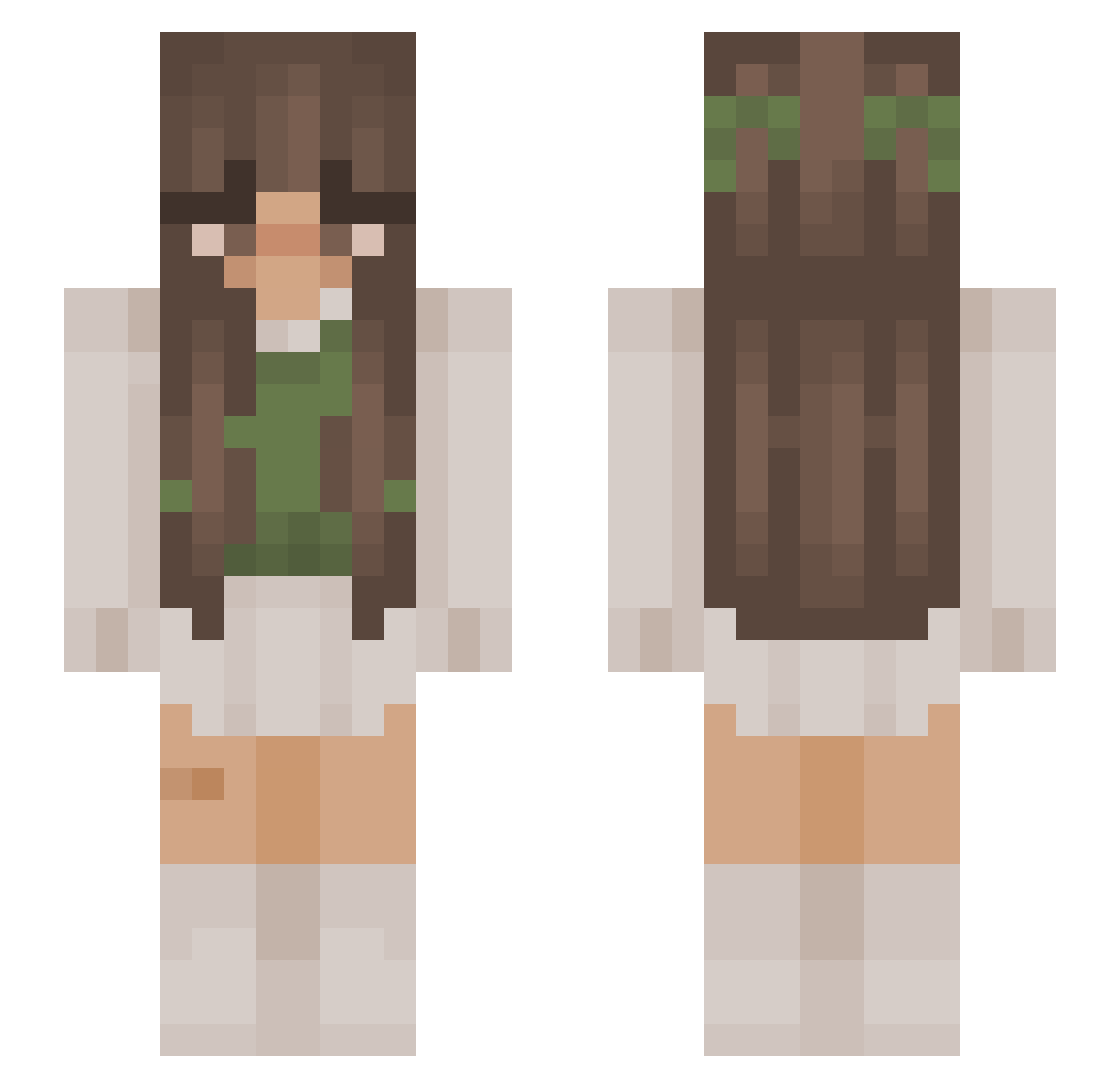
Current Minecraft skin of the player tantely, loaded from the official Mojang API. Rotate the 3D model with your mouse or finger, then download the skin as a PNG file and use it in Minecraft: Bedrock Edition or Java Edition for free. When tantely changes their skin, this page updates automatically and the old skin stays in the history below.
Other players with this skin (1077)
tantely was the 1018th player we have seen with this skin, first spotted on 05.11.2026. The same skin was seen on these players. Open a nickname to see their current skin and skin history.
 Jonesy9k nxhle Nerea_112 MikaLaLune kush_goblin420 araselxo _AMORE_ danio102 colonelclaire fxrelya iicinnamonbunii Lois_dv Nottpeachyy swhtella kayyllleee zvabnyk domiehxx Anexsi AllytheElephant kaylixir Bubblesinthesky natluvsabel DaisyBel_ Sparkly1 lynvi Soffeloffen_ Aly0903 ItzAilena iaaara SweetStorme Nitrorme Cascas19 Chombiee kv2bn eloriell BeautyFairy26 Zevestra Ponya_Art Alexsandyx RysGuilty celestialdream3r thedaisycactus Ma2dyx Kiara_rhr dolyx Greys_Kay s4mmikat3 dapperfrog3 iChengyu supringle Alice1988 Frogetsalot Tayalynnk meganthedinosaur jords714 TheMajlczixx UndeadGamer04 henotjulia ssb0521 pedotopop
More Cottagecore Minecraft skins
See all 7028 Cottagecore skins
How to install the tantely skin
- Press the Download button above to save the skin as a PNG file.
- Minecraft: Bedrock Edition (PE): open the Dressing Room from the main menu (or tap your character → Edit Character), go to Classic Skins → Owned, press the + (new skin) button, choose the downloaded PNG and pick the Slim (Alex) model. Works on PC and mobile; consoles cannot import custom skins.
- Minecraft: Java Edition: open the Minecraft Launcher, go to the Skins tab, click New Skin, load the PNG, pick the Slim (Alex) model and press Save & Use. You can also upload it at minecraft.net → Profile → Change Skin.
The skin does not show up after import - what should I do?
Restart Minecraft and open the Dressing Room again - imported skins sometimes appear only after a restart. Also make sure you selected the imported skin and picked the Slim (Alex) model.
Which model should I choose, Classic or Slim?
This skin is designed for the Slim (Alex) model. If you pick the wrong model, the arms of the skin will look stretched or squeezed.
Is the skin of tantely free to download?
Yes. Press Download, save the PNG file and use it in Minecraft: Bedrock Edition or Java Edition - no payment or registration needed. The skin also works on multiplayer servers and Realms.
More skins
Looking for more? Go back to all Minecraft skins and check the top skins of the week, month and all time, or find any player's skin by nickname.