
stud_y - Minecraft Skins & Skin History
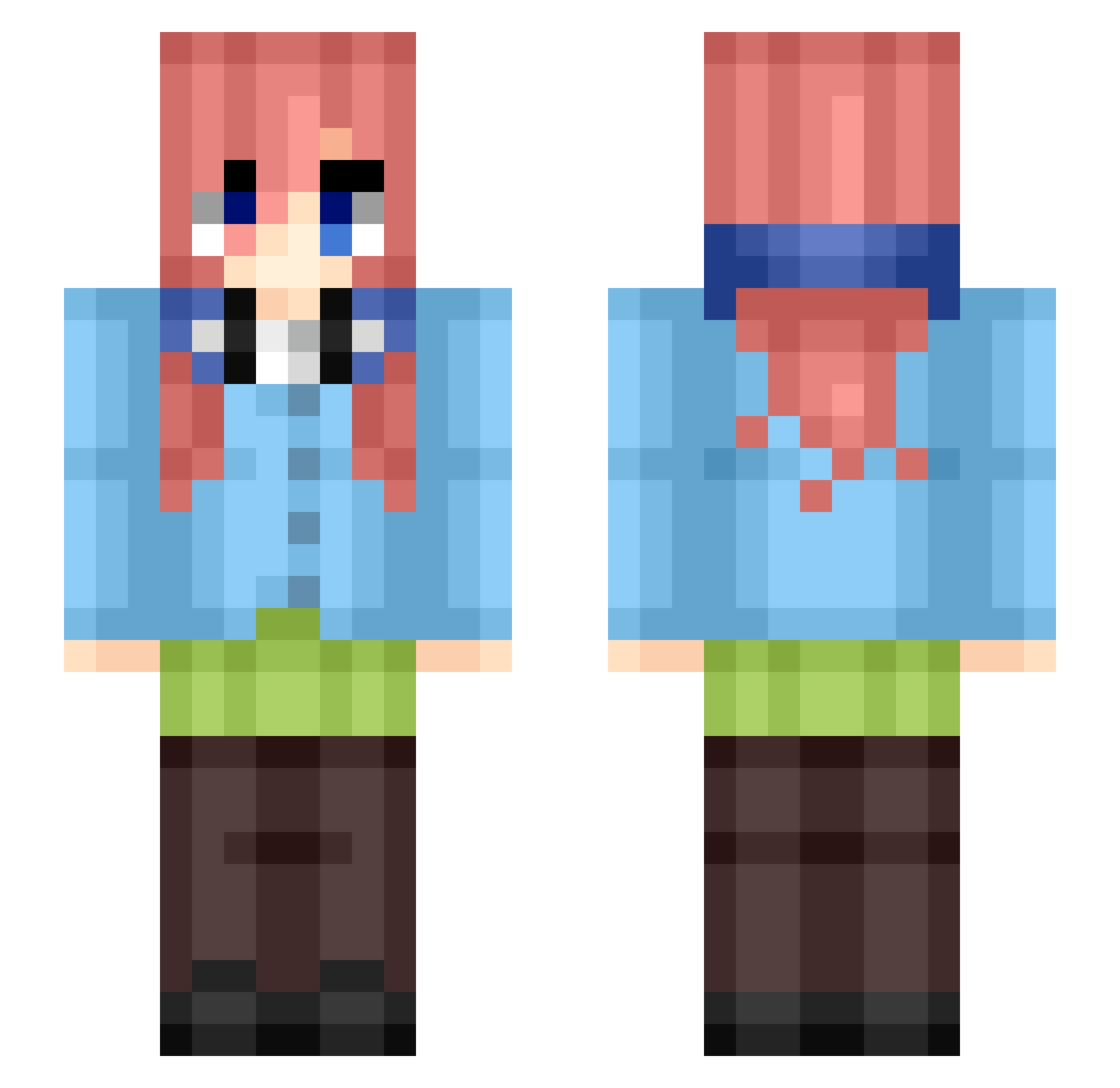
Current Minecraft skin of the player stud_y, loaded from the official Mojang API. Rotate the 3D model with your mouse or finger, then download the skin as a PNG file and use it in Minecraft: Bedrock Edition or Java Edition for free. When stud_y changes their skin, this page updates automatically and the old skin stays in the history below.
Other players with this skin (433)
stud_y was the 147th player we have seen with this skin, first spotted on 29.08.2026. The same skin was seen on these players. Open a nickname to see their current skin and skin history.
 zaldor34 SungbayMC MiKuNaKaNo17 AlexNakano d9ck frisssie rem1x_1337 johnng1017 emilianodxs ElGamesMC Sr_Barrito SpartanKeny117 batozelmiguel
 superspeedmalak Lobytop
 Mr_Penguin_Z KumalalaKumalaIa Agus204 KlaysAX AlphaRunker XRex_27 TurboToaster10 CozyEleven Machapeato Grim_Ruben Dan4lk Denizz123 MiguelDR03 Uta07CR KatwithagatX Kaikenga Tuty17 RadjaShiqnal Outlaww Rexwyy JURSoon_ 999Dome
 PrincePotato1243 awicksamdah Miku2424000 MEWTWOCALIENTE Dreadlight_27 ethabho Zalvaro09 PrinceJacob2007 Elwantiago777 WashedASF neshshui player_papa2 sagame9829 HOFN pyzacavn rockstarred YTROCKY1 Kozmozz413 AyKayAy_SoT izDeku Al3xF4ilZ0ne iMiku_Nakano Lher_dx
More Miku Nakano Minecraft skins
How to install the stud_y skin
- Press the Download button above to save the skin as a PNG file.
- Minecraft: Bedrock Edition (PE): open the Dressing Room from the main menu (or tap your character → Edit Character), go to Classic Skins → Owned, press the + (new skin) button, choose the downloaded PNG and pick the Slim (Alex) model. Works on PC and mobile; consoles cannot import custom skins.
- Minecraft: Java Edition: open the Minecraft Launcher, go to the Skins tab, click New Skin, load the PNG, pick the Slim (Alex) model and press Save & Use. You can also upload it at minecraft.net → Profile → Change Skin.
The skin does not show up after import - what should I do?
Restart Minecraft and open the Dressing Room again - imported skins sometimes appear only after a restart. Also make sure you selected the imported skin and picked the Slim (Alex) model.
Which model should I choose, Classic or Slim?
This skin is designed for the Slim (Alex) model. If you pick the wrong model, the arms of the skin will look stretched or squeezed.
Is the skin of stud_y free to download?
Yes. Press Download, save the PNG file and use it in Minecraft: Bedrock Edition or Java Edition - no payment or registration needed. The skin also works on multiplayer servers and Realms.
More skins
Looking for more? Go back to all Minecraft skins and check the top skins of the week, month and all time, or find any player's skin by nickname.