
stelgato - Minecraft Skins & Skin History
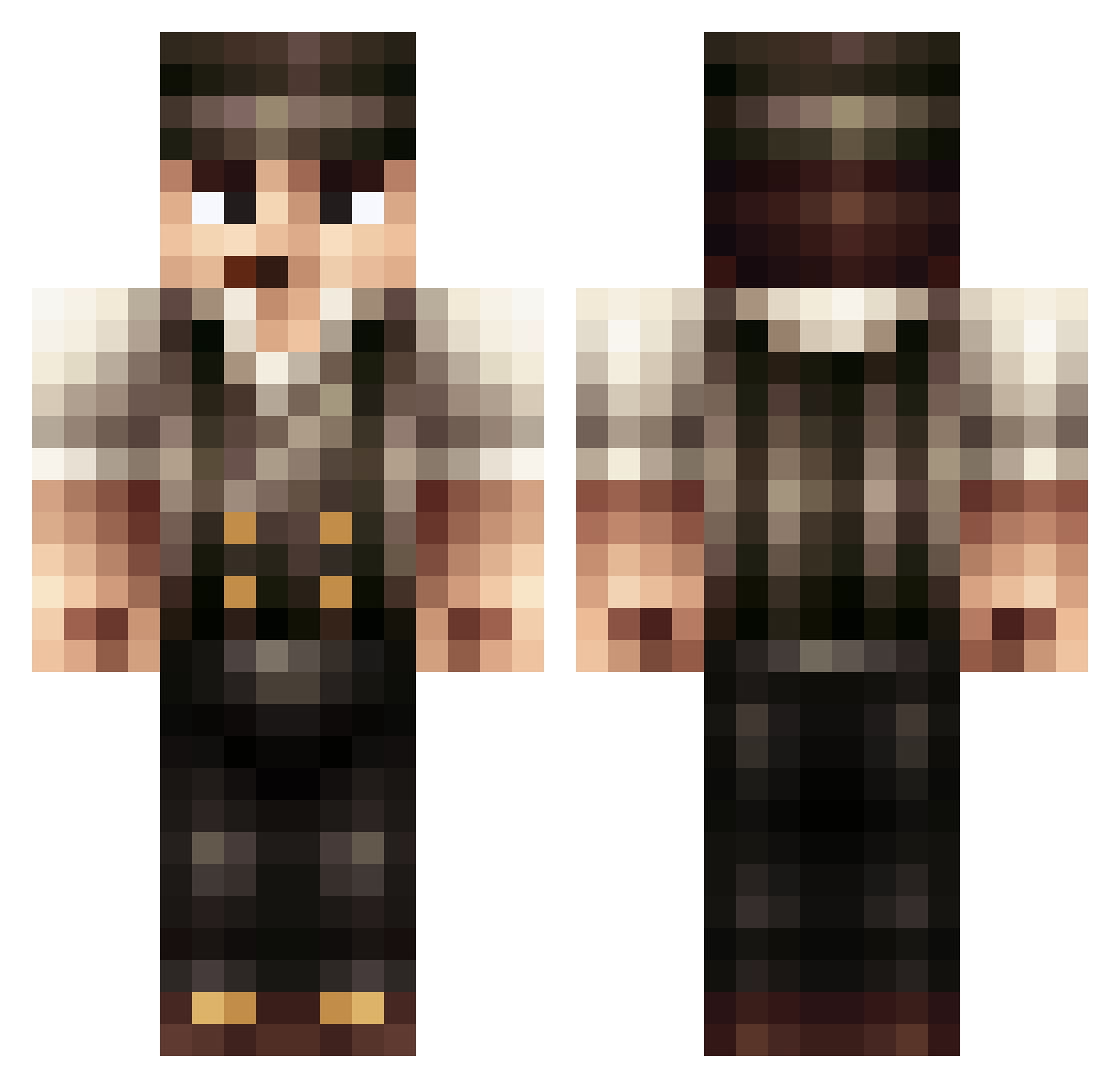
Current Minecraft skin of the player stelgato, loaded from the official Mojang API. Rotate the 3D model with your mouse or finger, then download the skin as a PNG file and use it in Minecraft: Bedrock Edition or Java Edition for free. When stelgato changes their skin, this page updates automatically and the old skin stays in the history below.
Other players with this skin (397)
stelgato was the 108th player we have seen with this skin, first spotted on 20.08.2026. The same skin was seen on these players. Open a nickname to see their current skin and skin history.
 RetroPower64 DeceivedSenses Sloaner01 Sunua Alqppo xWARDENx DaBudda Aeretex seekeruk SeaSide96 Bakshi_ mhdpro1 Tim_9_6 F1nalF1ght gamerjack11234 inget_namn AdmosSvg Slein3000 Nomek3d Setsugai_San frakmar Carl_Qc Tobzan shardsx rodiii123 Andyboxxx Faingx SneakySnake001 Benm1888 ScalettaLV Trickery02 BlackDeadDragon Jorrun JohnSickness dsteveie12 invader68 MRSaB SenorBushyBuns Im_Psych Ganja_Boy is305 MREP1C3000 Stormfighter06 nightravenwing I_Caligula_I Davidje_ Boilersmith CrazyLary10 treinkaper BEASTS2012 BakedBeanBoy Dorumcraft projectblackwolf gonox legionario98 McHitler drawarf_monkey Teoooh Mox77 Financreg
More Peaky Blinders Minecraft skins
See all 107 Peaky Blinders skins
How to install the stelgato skin
- Press the Download button above to save the skin as a PNG file.
- Minecraft: Bedrock Edition (PE): open the Dressing Room from the main menu (or tap your character → Edit Character), go to Classic Skins → Owned, press the + (new skin) button, choose the downloaded PNG and pick the Classic (Steve) model. Works on PC and mobile; consoles cannot import custom skins.
- Minecraft: Java Edition: open the Minecraft Launcher, go to the Skins tab, click New Skin, load the PNG, pick the Classic (Steve) model and press Save & Use. You can also upload it at minecraft.net → Profile → Change Skin.
The skin does not show up after import - what should I do?
Restart Minecraft and open the Dressing Room again - imported skins sometimes appear only after a restart. Also make sure you selected the imported skin and picked the Classic (Steve) model.
Which model should I choose, Classic or Slim?
This skin is designed for the Classic (Steve) model. If you pick the wrong model, the arms of the skin will look stretched or squeezed.
Is the skin of stelgato free to download?
Yes. Press Download, save the PNG file and use it in Minecraft: Bedrock Edition or Java Edition - no payment or registration needed. The skin also works on multiplayer servers and Realms.
More skins
Looking for more? Go back to all Minecraft skins and check the top skins of the week, month and all time, or find any player's skin by nickname.