
soysoy0720 - Minecraft Skins & Skin History
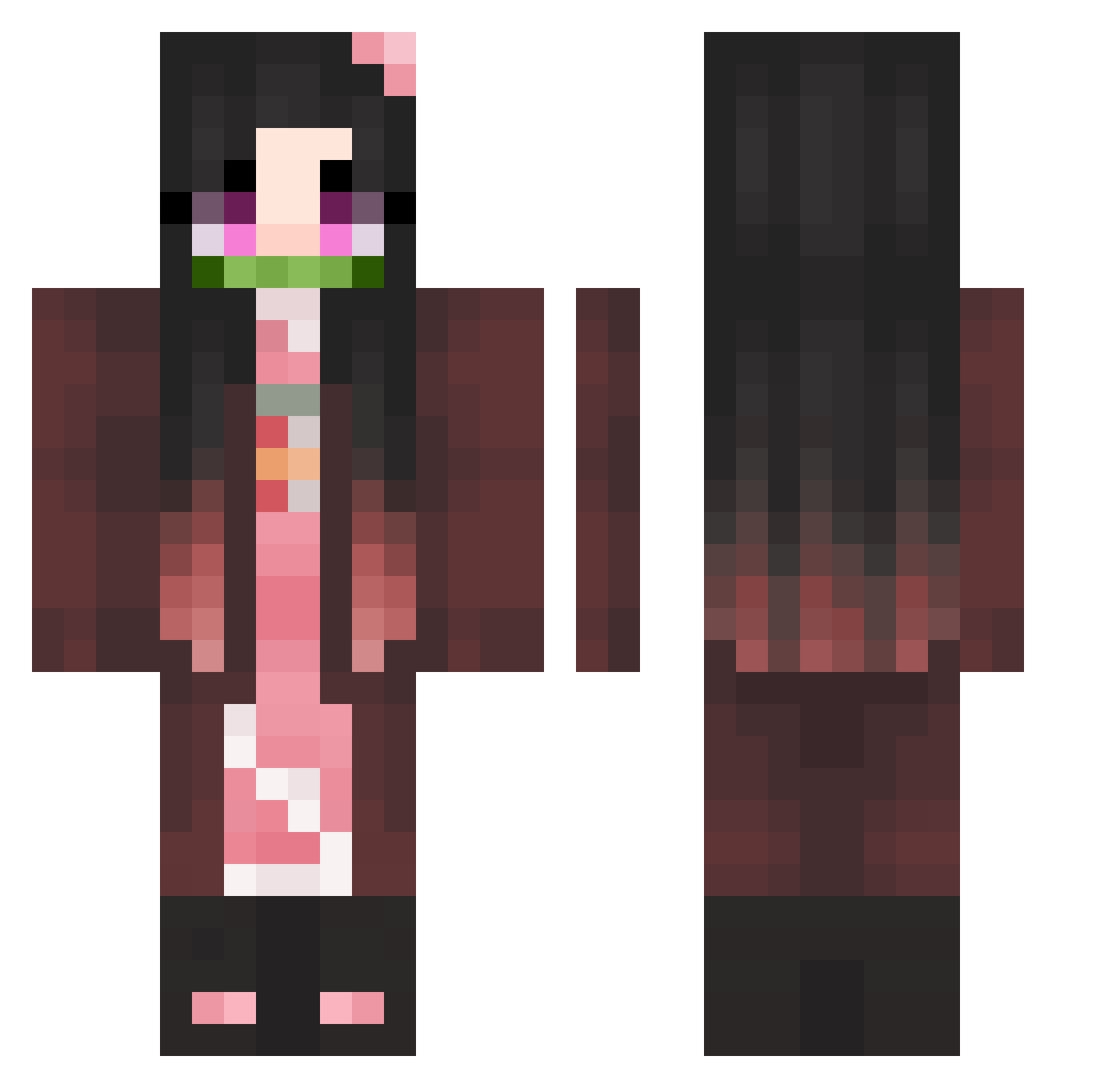
Current Minecraft skin of the player soysoy0720, loaded from the official Mojang API. Rotate the 3D model with your mouse or finger, then download the skin as a PNG file and use it in Minecraft: Bedrock Edition or Java Edition for free. When soysoy0720 changes their skin, this page updates automatically and the old skin stays in the history below.
Other players with this skin (461)
soysoy0720 was the 390th player we have seen with this skin, first spotted on 05.11.2026. The same skin was seen on these players. Open a nickname to see their current skin and skin history.
 SelaMela _mahry_ frostyfaust An_Lan2333 MOONWhale88 weejoiner BiNaRnS606 Strike_172 pk695475 aFiffi ZEENI12 natalia2809 Tsynia Hardisim0_0 TrapAnimeBooty glass3542 Teamoamixer asuna2412 Bla3ce oBooTo Yasumiina Luxxxi Madsic tsaiyh0701 maggda24 SpookyCHO5EN_ NoShtSherlock ZeroNezuko Yotsuki1 itsmiyuna Chiken_2003 loco_we ElegantLunch SapphicSirens ponpon1563 SHnezuko Nezukochan93 JONNI_NOOB U_AENA OVERRAIN3 LeeDobby ehdgus5907 Solata00 LacusCIyne ddaai purpledurplw AN_NING Yanok05 PlazminBubregg BIGFIREBALLL Gnartrainer BIGbank4 BlackJackWolf K_jemin amandarine_ chlozzs EnchantressArwen GhostFamily rockergirl203 jaayull121
More Nezuko Kamado Minecraft skins
See all 208 Nezuko Kamado skins
How to install the soysoy0720 skin
- Press the Download button above to save the skin as a PNG file.
- Minecraft: Bedrock Edition (PE): open the Dressing Room from the main menu (or tap your character → Edit Character), go to Classic Skins → Owned, press the + (new skin) button, choose the downloaded PNG and pick the Classic (Steve) model. Works on PC and mobile; consoles cannot import custom skins.
- Minecraft: Java Edition: open the Minecraft Launcher, go to the Skins tab, click New Skin, load the PNG, pick the Classic (Steve) model and press Save & Use. You can also upload it at minecraft.net → Profile → Change Skin.
The skin does not show up after import - what should I do?
Restart Minecraft and open the Dressing Room again - imported skins sometimes appear only after a restart. Also make sure you selected the imported skin and picked the Classic (Steve) model.
Which model should I choose, Classic or Slim?
This skin is designed for the Classic (Steve) model. If you pick the wrong model, the arms of the skin will look stretched or squeezed.
Is the skin of soysoy0720 free to download?
Yes. Press Download, save the PNG file and use it in Minecraft: Bedrock Edition or Java Edition - no payment or registration needed. The skin also works on multiplayer servers and Realms.
More skins
Looking for more? Go back to all Minecraft skins and check the top skins of the week, month and all time, or find any player's skin by nickname.