
southbank14 - Minecraft Skins & Skin History
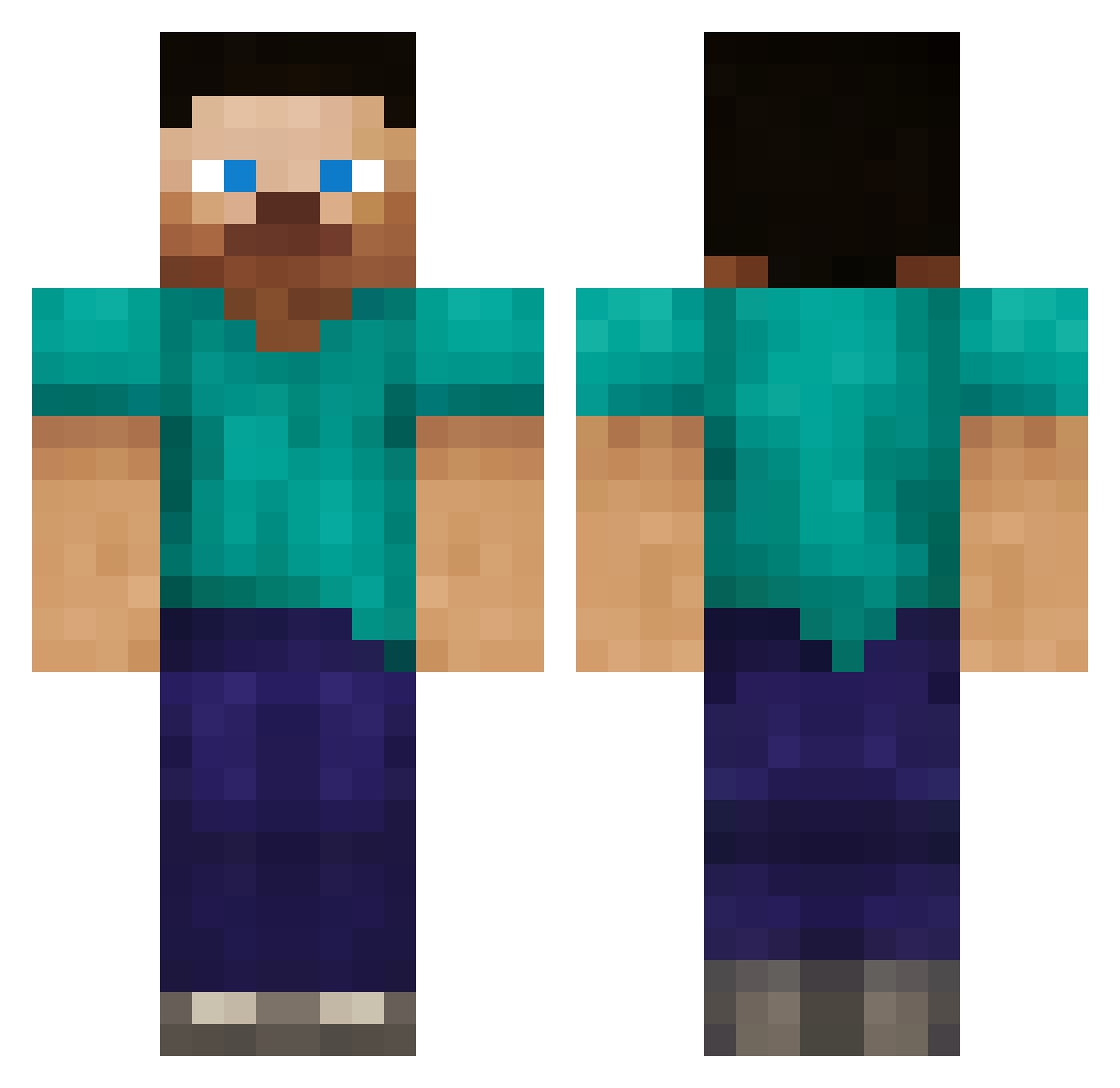
Current Minecraft skin of the player southbank14, loaded from the official Mojang API. Rotate the 3D model with your mouse or finger, then download the skin as a PNG file and use it in Minecraft: Bedrock Edition or Java Edition for free. When southbank14 changes their skin, this page updates automatically and the old skin stays in the history below.
Other players with this skin (431)
southbank14 was the 429th player we have seen with this skin, first spotted on 19.11.2026. The same skin was seen on these players. Open a nickname to see their current skin and skin history.
 Zwiebel9783 AlmierEscandon Theo_Kappa dallas61280 rearle Mugalous kyguy1 tomyboy10 GingerFury_420 WhtRonin72 LtJon aSanctuary Kaksnelikantti dylan2ko nightfighta joe0990 Jeffspawner IBeGod hiredgrunt666 MeltedMelon Wifing Evan2004J BigTrace marsh701 Royal_Beef_ Thracian stinger_jeremy ChBaTr Cow_S1ayer stefanstein Nomoov derpysunya amyjfrey AryaShark Blmoore94 OzN_FFox Ryson2004 kpwhit714 NOR_A1EX sampson1329 BlockheadLapi creeper904454 deadedd98 nicholaskonk DesertHawk1 ReuterHD AVACADOCHIEF1 PAJIP alexsi445 BBooni TheRussianGerman M_C_Never dudeabledude glaynia iloveabbie fierceseahorse ianonbaseball 88warriors Rockjay Asnjorn
How to install the southbank14 skin
- Press the Download button above to save the skin as a PNG file.
- Minecraft: Bedrock Edition (PE): open the Dressing Room from the main menu (or tap your character → Edit Character), go to Classic Skins → Owned, press the + (new skin) button, choose the downloaded PNG and pick the Classic (Steve) model. Works on PC and mobile; consoles cannot import custom skins.
- Minecraft: Java Edition: open the Minecraft Launcher, go to the Skins tab, click New Skin, load the PNG, pick the Classic (Steve) model and press Save & Use. You can also upload it at minecraft.net → Profile → Change Skin.
The skin does not show up after import - what should I do?
Restart Minecraft and open the Dressing Room again - imported skins sometimes appear only after a restart. Also make sure you selected the imported skin and picked the Classic (Steve) model.
Which model should I choose, Classic or Slim?
This skin is designed for the Classic (Steve) model. If you pick the wrong model, the arms of the skin will look stretched or squeezed.
Is the skin of southbank14 free to download?
Yes. Press Download, save the PNG file and use it in Minecraft: Bedrock Edition or Java Edition - no payment or registration needed. The skin also works on multiplayer servers and Realms.
More skins
Looking for more? Go back to all Minecraft skins and check the top skins of the week, month and all time, or find any player's skin by nickname.