
sos007 - Minecraft Skins & Skin History
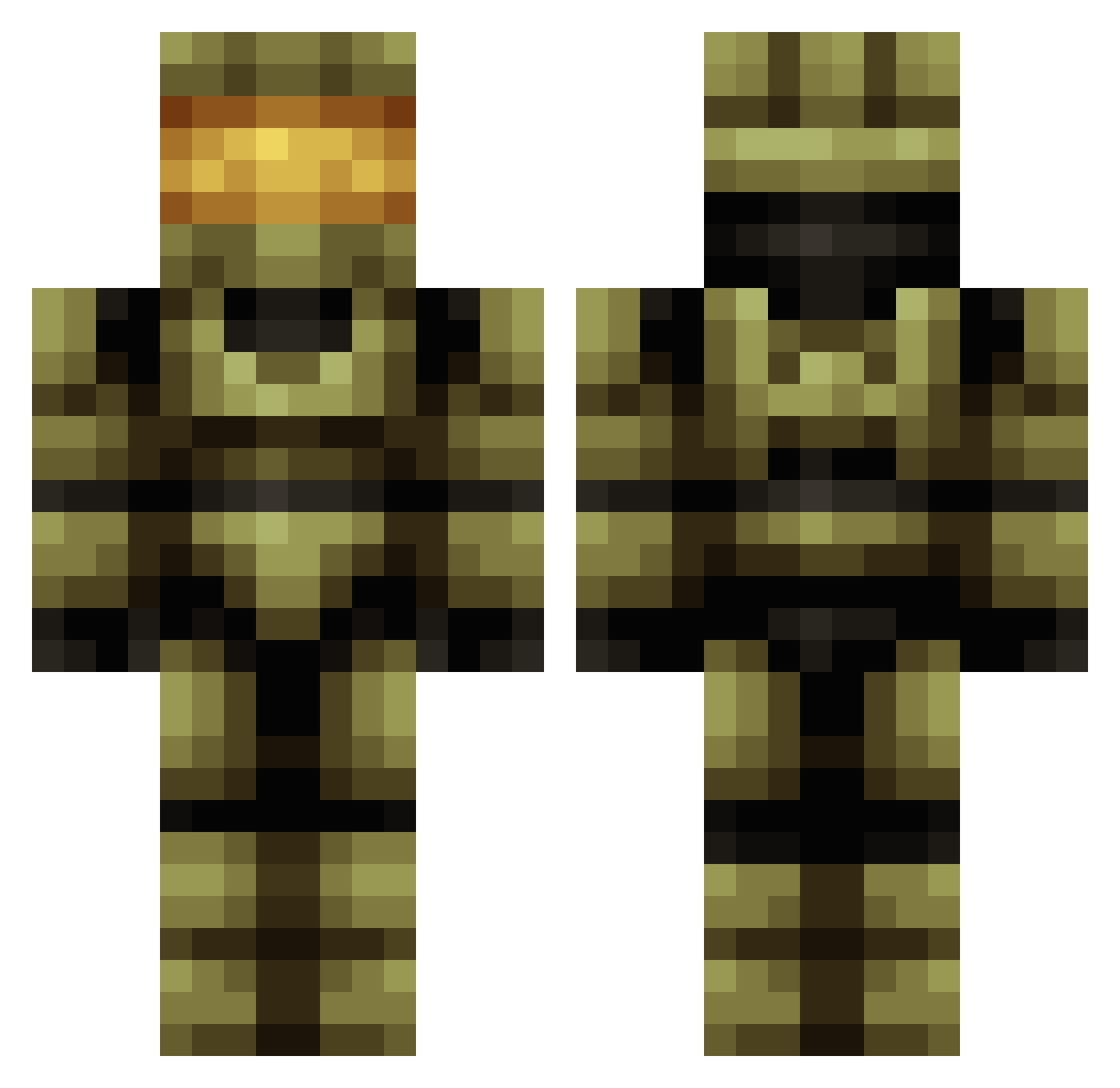
Current Minecraft skin of the player sos007, loaded from the official Mojang API. Rotate the 3D model with your mouse or finger, then download the skin as a PNG file and use it in Minecraft: Bedrock Edition or Java Edition for free. When sos007 changes their skin, this page updates automatically and the old skin stays in the history below.
Other players with this skin (683)
sos007 was the 604th player we have seen with this skin, first spotted on 26.10.2026. The same skin was seen on these players. Open a nickname to see their current skin and skin history.
 MonkeyDRowdy GLOWBOX457 wichoHD BearPunchin Amenazigi lostindenver bettridgeb14 evo360 _SerK_ ShivOza ninjapirahna Hacker1702 Thariom KVDude1014 Tom_1992 halohijacker asiancowboy3 Choochbag zhutter JBandKG1969 RichieDude07 mylkkast763 Tatapup Grongox lynobot skatawandi HappyLenny Maniac122 sandsnper roryvilla bigbadbluebanana mister_mo alvareer RaggaeWorldGoats RathOfApophis Reneagomez DBLB_Crouse miso7 BrandonBatman technic83 metalheadchick RegalBaton40234 Zpower500 CaptainJustin511 TheLobster001 Canna_Bus James_Washburn Gunman1703 Dead_Phish rosscograham MacBrac Estrives Anthoony rogue221 Headless_SparK S4NDMAN fpslover12365789 halochris47 rubben09 TheIceSoldier
More Master Chief Minecraft skins
See all 537 Master Chief skins
How to install the sos007 skin
- Press the Download button above to save the skin as a PNG file.
- Minecraft: Bedrock Edition (PE): open the Dressing Room from the main menu (or tap your character → Edit Character), go to Classic Skins → Owned, press the + (new skin) button, choose the downloaded PNG and pick the Classic (Steve) model. Works on PC and mobile; consoles cannot import custom skins.
- Minecraft: Java Edition: open the Minecraft Launcher, go to the Skins tab, click New Skin, load the PNG, pick the Classic (Steve) model and press Save & Use. You can also upload it at minecraft.net → Profile → Change Skin.
The skin does not show up after import - what should I do?
Restart Minecraft and open the Dressing Room again - imported skins sometimes appear only after a restart. Also make sure you selected the imported skin and picked the Classic (Steve) model.
Which model should I choose, Classic or Slim?
This skin is designed for the Classic (Steve) model. If you pick the wrong model, the arms of the skin will look stretched or squeezed.
Is the skin of sos007 free to download?
Yes. Press Download, save the PNG file and use it in Minecraft: Bedrock Edition or Java Edition - no payment or registration needed. The skin also works on multiplayer servers and Realms.
More skins
Looking for more? Go back to all Minecraft skins and check the top skins of the week, month and all time, or find any player's skin by nickname.