
snakex50 - Minecraft Skins & Skin History
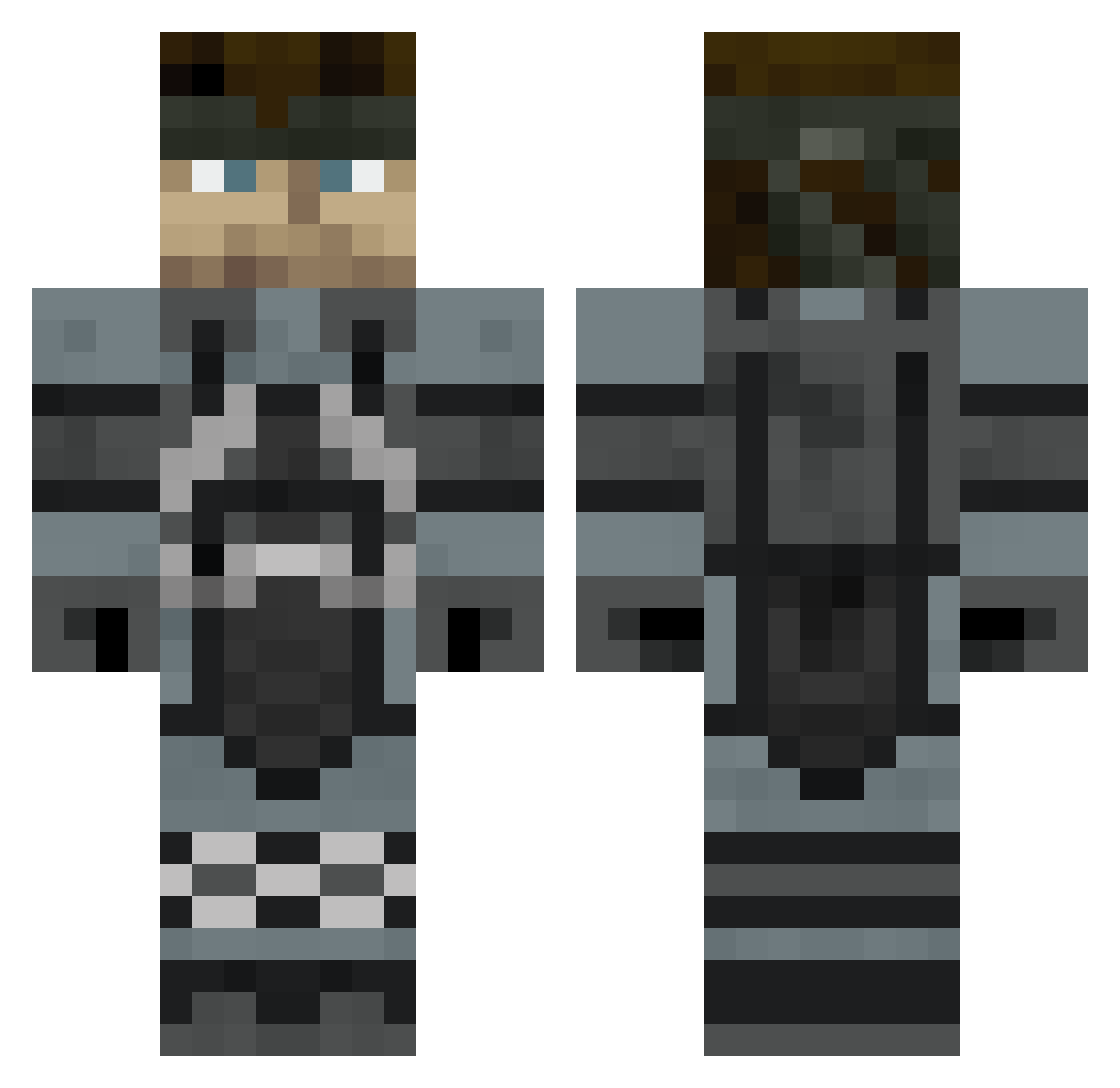
Current Minecraft skin of the player snakex50, loaded from the official Mojang API. Rotate the 3D model with your mouse or finger, then download the skin as a PNG file and use it in Minecraft: Bedrock Edition or Java Edition for free. When snakex50 changes their skin, this page updates automatically and the old skin stays in the history below.
Other players with this skin (421)
snakex50 was the 207th player we have seen with this skin, first spotted on 04.09.2026. The same skin was seen on these players. Open a nickname to see their current skin and skin history.
 causingdday999 Dawre99 O0BA3 Deathskees Reaper_x666x Galikoho EmmanuelSV12 pal64 hammerhead128 VirulentVillain bleboop StormFront15 GO_GIANTS vivininja Rty1993 xTwinBladE unsungmaniac DarthTader Lewistar96 BassGuitarHero35 dewsy94 HeckermanLuL breytoner debakon xTurtleV2 DJess91 Falcon_uk brianspic Messier8 os500 Mikenificent AlmightyWinner xkramz Urbane_Guerrilla Thuja86 daniel25282 sibakenya katayama waukee Captain_Dandy BrinkLol Senzai3 jiangkun SaintLloyd Brycedavey Jwr93 The_Lone_N00b Bloukhe Venega violinbow3 noahf1897 FireArm15 dodgerfan4eva chaoschaser21 ThirdOperator icarusburns snakeinvault Walesmon SerialTux RealJason
More Snake Minecraft skins
How to install the snakex50 skin
- Press the Download button above to save the skin as a PNG file.
- Minecraft: Bedrock Edition (PE): open the Dressing Room from the main menu (or tap your character → Edit Character), go to Classic Skins → Owned, press the + (new skin) button, choose the downloaded PNG and pick the Classic (Steve) model. Works on PC and mobile; consoles cannot import custom skins.
- Minecraft: Java Edition: open the Minecraft Launcher, go to the Skins tab, click New Skin, load the PNG, pick the Classic (Steve) model and press Save & Use. You can also upload it at minecraft.net → Profile → Change Skin.
The skin does not show up after import - what should I do?
Restart Minecraft and open the Dressing Room again - imported skins sometimes appear only after a restart. Also make sure you selected the imported skin and picked the Classic (Steve) model.
Which model should I choose, Classic or Slim?
This skin is designed for the Classic (Steve) model. If you pick the wrong model, the arms of the skin will look stretched or squeezed.
Is the skin of snakex50 free to download?
Yes. Press Download, save the PNG file and use it in Minecraft: Bedrock Edition or Java Edition - no payment or registration needed. The skin also works on multiplayer servers and Realms.
More skins
Looking for more? Go back to all Minecraft skins and check the top skins of the week, month and all time, or find any player's skin by nickname.