
sleepysharon - Minecraft Skins & Skin History
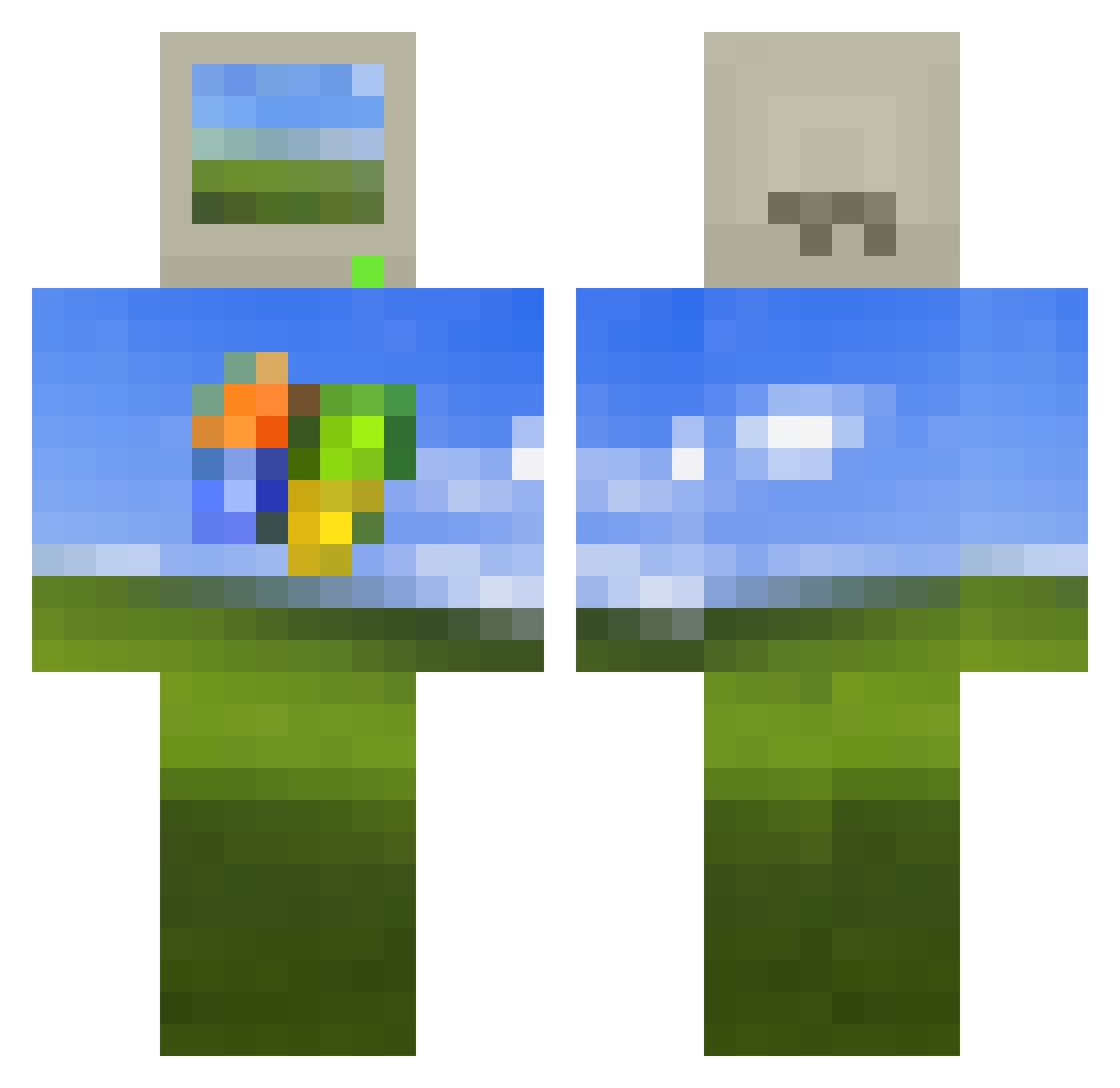
Current Minecraft skin of the player sleepysharon, loaded from the official Mojang API. Rotate the 3D model with your mouse or finger, then download the skin as a PNG file and use it in Minecraft: Bedrock Edition or Java Edition for free. When sleepysharon changes their skin, this page updates automatically and the old skin stays in the history below.
Other players with this skin (514)
sleepysharon was the 331st player we have seen with this skin, first spotted on 04.10.2026. The same skin was seen on these players. Open a nickname to see their current skin and skin history.
 sneakxo ctrl_alt_love Roderi Ahkahg 2yuuuu ROLBA_tmobile orihami Hizara1 FLYPW angrytoast2 Vo1dTraDE crushr11 Windowsdude ColicSpartan4433 ProcrastiNation9 ohmypc Yaposhk Nephi9 xuanzhang Fantox400 matei1998 kaydecripe LQS720 Trippzy Lobotomite74572 1PierreQuiRoule1 skibidigyatrizz JaqStoot jjkke3 Jimmycheng123 so0b1a CatgirlKell3r __malak Look0223 0nixum golden1wonder chroolon DenisAnarchist TheStarGlasses chinocapt3 Spaceportal1 Elvn_011 pirozhok21 louis12363 Fruxwan DOCMANS ABraSSive Danzy7 fireeflyy NotYourGF Funkuakero xMateeo2k Chowda300 LeeCham skoofloo GammaGaminations Northuestern Tagzho_TB henchmankevin angecsk
More Windows XP Minecraft skins
How to install the sleepysharon skin
- Press the Download button above to save the skin as a PNG file.
- Minecraft: Bedrock Edition (PE): open the Dressing Room from the main menu (or tap your character → Edit Character), go to Classic Skins → Owned, press the + (new skin) button, choose the downloaded PNG and pick the Classic (Steve) model. Works on PC and mobile; consoles cannot import custom skins.
- Minecraft: Java Edition: open the Minecraft Launcher, go to the Skins tab, click New Skin, load the PNG, pick the Classic (Steve) model and press Save & Use. You can also upload it at minecraft.net → Profile → Change Skin.
The skin does not show up after import - what should I do?
Restart Minecraft and open the Dressing Room again - imported skins sometimes appear only after a restart. Also make sure you selected the imported skin and picked the Classic (Steve) model.
Which model should I choose, Classic or Slim?
This skin is designed for the Classic (Steve) model. If you pick the wrong model, the arms of the skin will look stretched or squeezed.
Is the skin of sleepysharon free to download?
Yes. Press Download, save the PNG file and use it in Minecraft: Bedrock Edition or Java Edition - no payment or registration needed. The skin also works on multiplayer servers and Realms.
More skins
Looking for more? Go back to all Minecraft skins and check the top skins of the week, month and all time, or find any player's skin by nickname.