
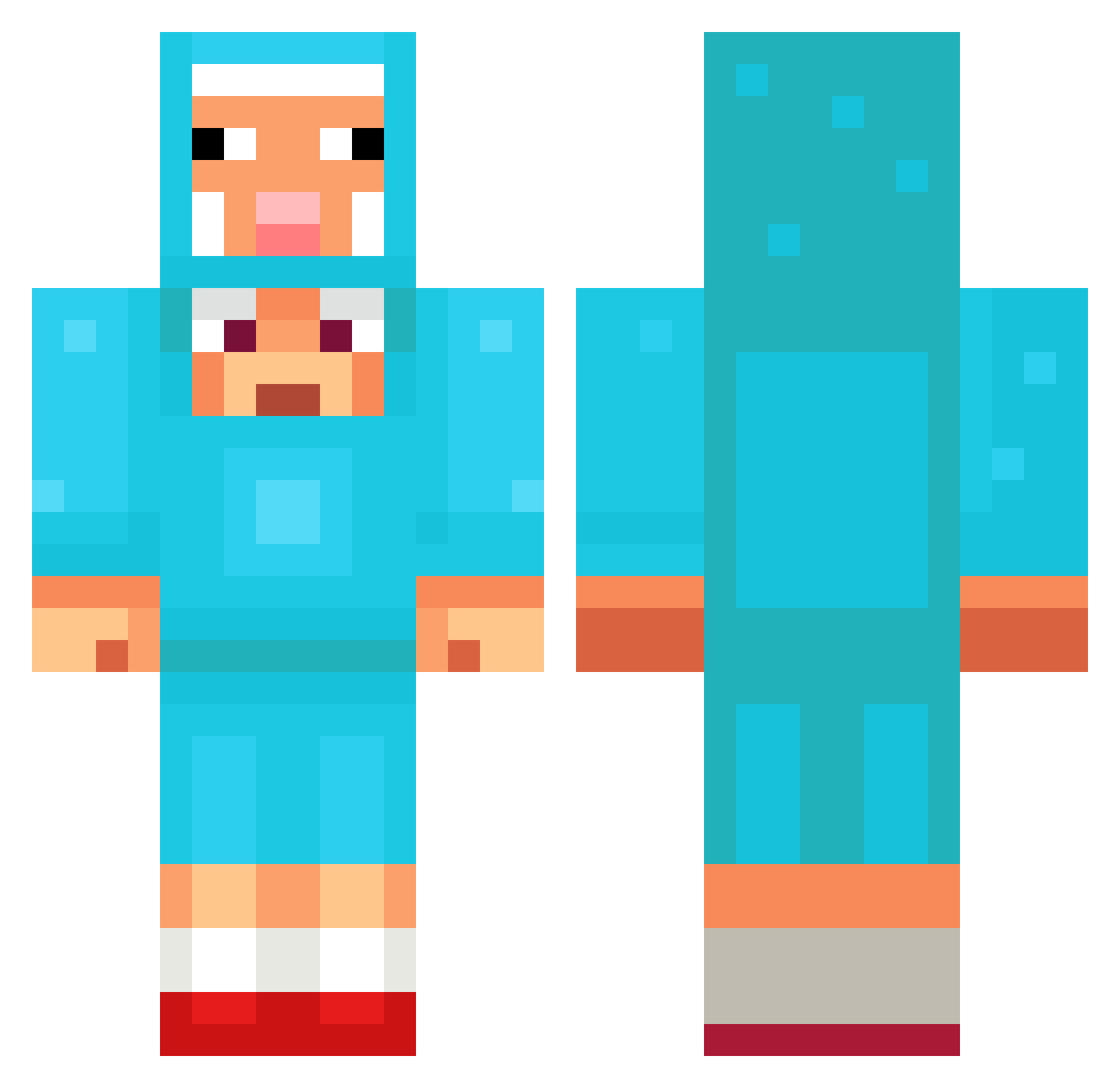
Current Minecraft skin of the player sindary, loaded from the official Mojang API. Rotate the 3D model with your mouse or finger, then download the skin as a PNG file and use it in Minecraft: Bedrock Edition or Java Edition for free. When sindary changes their skin, this page updates automatically and the old skin stays in the history below.
Other players with this skin (1027)
sindary was the 389th player we have seen with this skin, first spotted on 26.08.2026. The same skin was seen on these players. Open a nickname to see their current skin and skin history.
 HoiIsReal _64_ Sennpokemon Sungyoul5586 dreams8286 _StreamStation1 Same_G suiiiiiiiii85555 mrndnns008 TheLastHit ktgttt Er1c10 Polarfizt IssaEgg chinchillacheese banlaai AlannSalesBR1
 Koomzy2905 Cravinhos_ Luan_2016 tigerpro999 luizsags12344
 lIlllllIllIlIIIl
 PixelCatcher57 LolleFee Zaedrit Foxn73 Awesomenick3637 royal_meow YoussefPikachu Rewer95 Yujio_ metcx mirooweel LeonardoOoooop popcat2211 WillyMCWonks Drachenlort123 ThunderKing96X thuwanon Orinthor Maco251 Frontier_Zero Panitom AZtokpansa_ UnbeatenMoss687 polo123464 leth4l_ Seung_Min_01 brbremmerme
 sweethaert iziwin123 vladcow1 ghkd0610 haciek3 HeroKai666 Simpletoad jumongi Isotammm Henuj
More Sheep Minecraft skins
How to install the sindary skin
- Press the Download button above to save the skin as a PNG file.
- Minecraft: Bedrock Edition (PE): open the Dressing Room from the main menu (or tap your character → Edit Character), go to Classic Skins → Owned, press the + (new skin) button, choose the downloaded PNG and pick the Classic (Steve) model. Works on PC and mobile; consoles cannot import custom skins.
- Minecraft: Java Edition: open the Minecraft Launcher, go to the Skins tab, click New Skin, load the PNG, pick the Classic (Steve) model and press Save & Use. You can also upload it at minecraft.net → Profile → Change Skin.
The skin does not show up after import - what should I do?
Restart Minecraft and open the Dressing Room again - imported skins sometimes appear only after a restart. Also make sure you selected the imported skin and picked the Classic (Steve) model.
Which model should I choose, Classic or Slim?
This skin is designed for the Classic (Steve) model. If you pick the wrong model, the arms of the skin will look stretched or squeezed.
Is the skin of sindary free to download?
Yes. Press Download, save the PNG file and use it in Minecraft: Bedrock Edition or Java Edition - no payment or registration needed. The skin also works on multiplayer servers and Realms.
More skins
Looking for more? Go back to all Minecraft skins and check the top skins of the week, month and all time, or find any player's skin by nickname.