
Current Minecraft skin of the player shadowsponge, loaded from the official Mojang API. Rotate the 3D model with your mouse or finger, then download the skin as a PNG file and use it in Minecraft: Bedrock Edition or Java Edition for free. When shadowsponge changes their skin, this page updates automatically and the old skin stays in the history below.
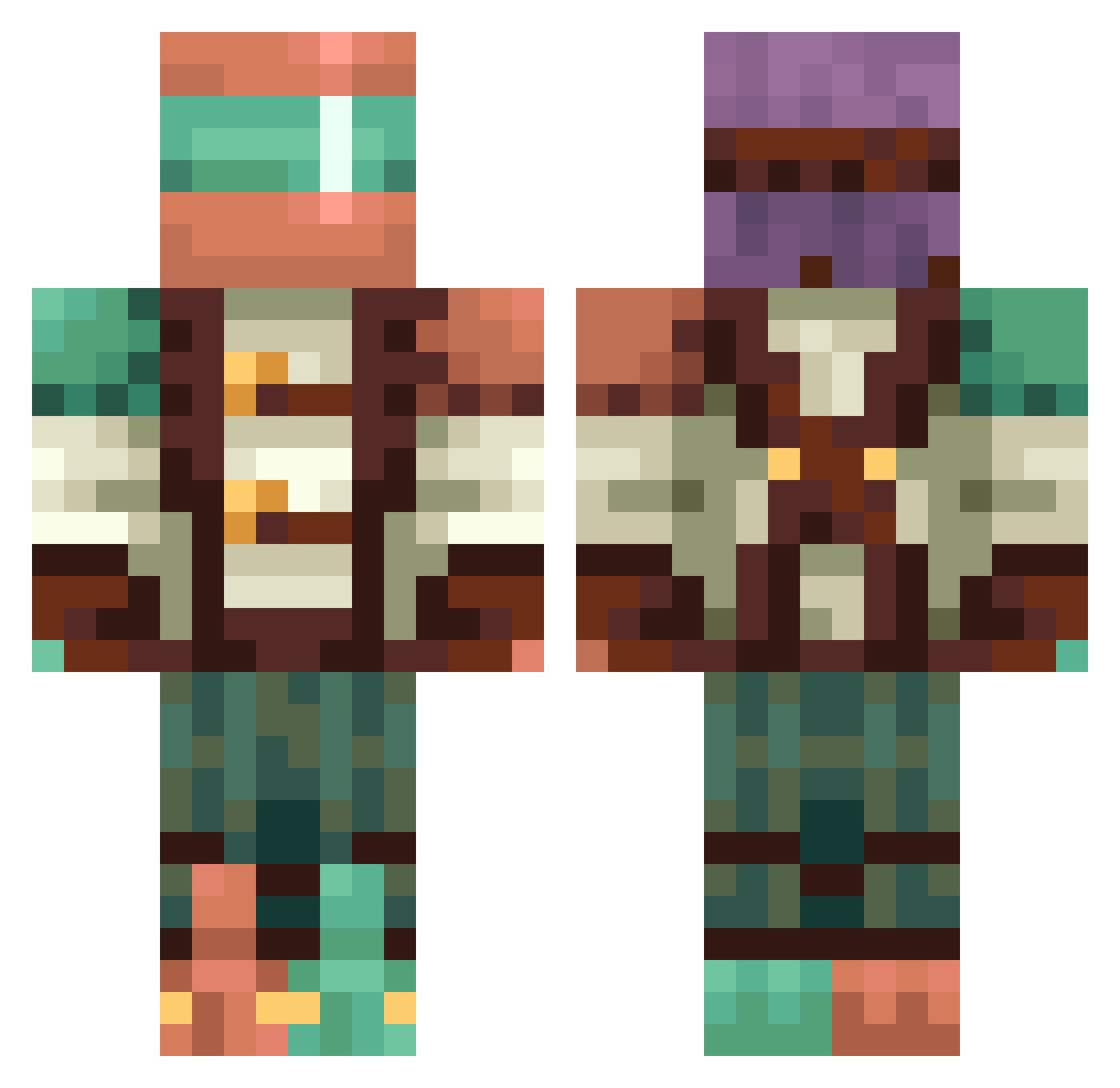
Other players with this skin (365)
shadowsponge was the 77th player we have seen with this skin, first spotted on 10.08.2026. The same skin was seen on these players. Open a nickname to see their current skin and skin history.
 KakarotBlue NSX_XEN xithium VAVAVAVAVAV
 CaLbee_ay_non69
 CHUNKY_7
 Revolver_FOX R3ALADON aulmais Murtch jacobson zarv__ Obamaseocond Voidless18 dkfmzksk Dumyum1
 GrodyGravy blasianmagic LeethalMiner Nim_Star zeta1233 Butttoucher30000 HuesZero ltsK4D3N Gambit1_4 MCFSE Jak_Tomo
 supershashasha luismcc1 Providence1234 bnick9650 CerealApple4533 NearTimkills Krizunft daizu5 elimlch40 TurtlesaurusMC Mr_Deep1
 PCBRODER BeefStewda DKdonkey CoolTrepur123_YT PopoWnin GreenGenie25 VMAXwill SomeRandomLeaf sveinarr ZoxTicT Leonidas3468 LeoTusi RetailRow123 Jasonsfiction Unknownplayer52 Hurikaine HALO453 Freeeeeeeesh BlueSkyStar Fo707 YolaMola Marriiio123
More Explorer Minecraft skins
How to install the shadowsponge skin
- Press the Download button above to save the skin as a PNG file.
- Minecraft: Bedrock Edition (PE): open the Dressing Room from the main menu (or tap your character → Edit Character), go to Classic Skins → Owned, press the + (new skin) button, choose the downloaded PNG and pick the Classic (Steve) model. Works on PC and mobile; consoles cannot import custom skins.
- Minecraft: Java Edition: open the Minecraft Launcher, go to the Skins tab, click New Skin, load the PNG, pick the Classic (Steve) model and press Save & Use. You can also upload it at minecraft.net → Profile → Change Skin.
The skin does not show up after import - what should I do?
Restart Minecraft and open the Dressing Room again - imported skins sometimes appear only after a restart. Also make sure you selected the imported skin and picked the Classic (Steve) model.
Which model should I choose, Classic or Slim?
This skin is designed for the Classic (Steve) model. If you pick the wrong model, the arms of the skin will look stretched or squeezed.
Is the skin of shadowsponge free to download?
Yes. Press Download, save the PNG file and use it in Minecraft: Bedrock Edition or Java Edition - no payment or registration needed. The skin also works on multiplayer servers and Realms.
More skins
Looking for more? Go back to all Minecraft skins and check the top skins of the week, month and all time, or find any player's skin by nickname.