
ruvyn - Minecraft Skins & Skin History
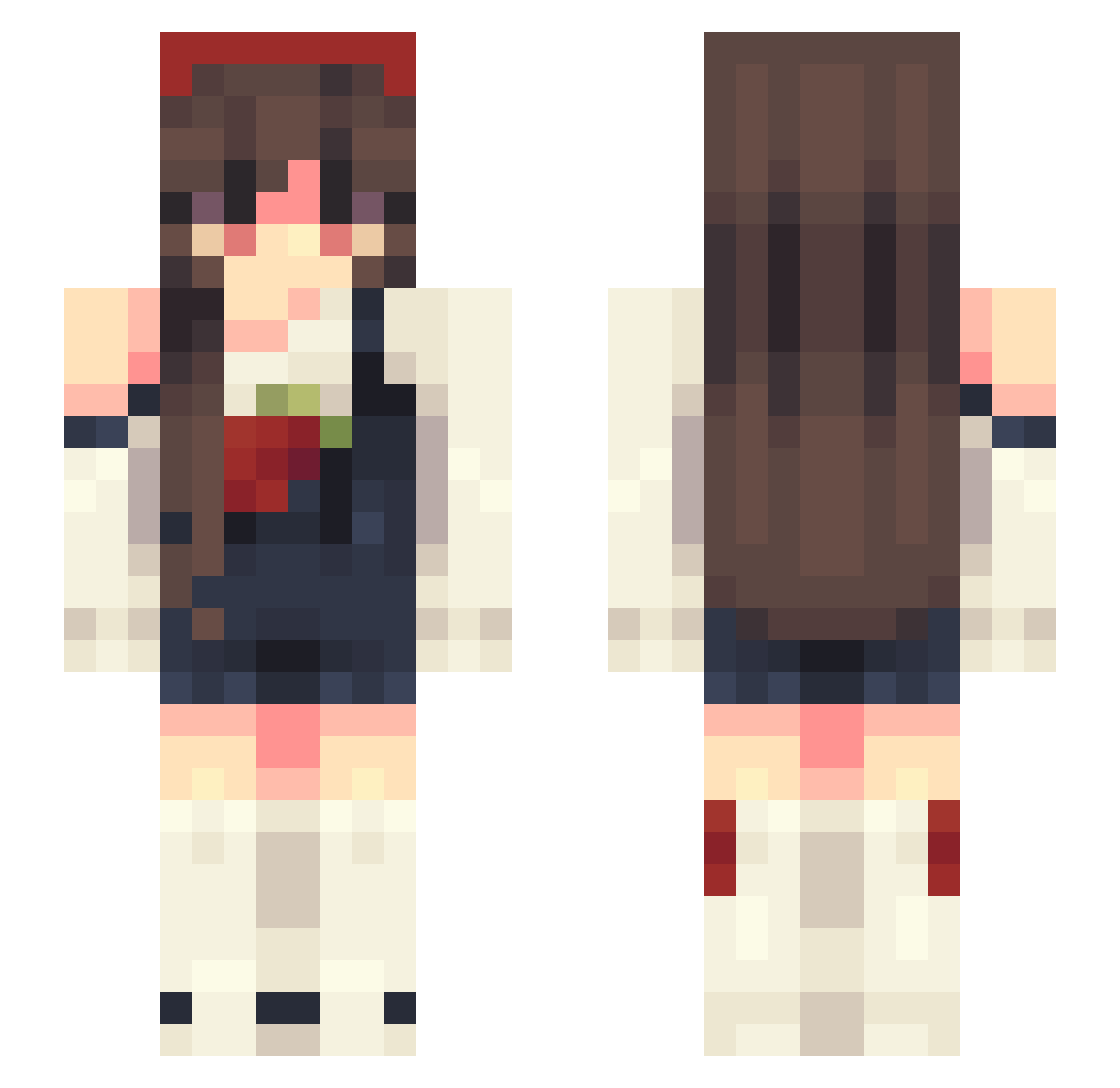
Current Minecraft skin of the player ruvyn, loaded from the official Mojang API. Rotate the 3D model with your mouse or finger, then download the skin as a PNG file and use it in Minecraft: Bedrock Edition or Java Edition for free. When ruvyn changes their skin, this page updates automatically and the old skin stays in the history below.
Other players with this skin (64)
ruvyn was the 44th player we have seen with this skin, first spotted on 03.10.2026. The same skin was seen on these players. Open a nickname to see their current skin and skin history.
 bwearie Brillitoz Kumi_24 geekygirl246 HoeusInDoeus xC0ZYx yk0117 Maresa69 Vespurra AkashaOkami Scarmiau vanessa5088 xSolariis ThaizS2 Jaxvop Gr8Bingus BananaNeko ovwn StarDustHollow Macyluvs PUIIXC blacw Artizea Reedutee nini_123 15lu bobi88 Kathegamer gksduwls TheSinfulMary Fiaschi SarahDawned Deables Peperonajj Dino2251j Bellqs ItszBlue Meemeen
 CESSNNA junbbi LilNyami Duckeysss
 xae_blueberry BellaaRose_ Mako178 Hxnii WillowChap lovelyxann caitl4nd Du68
 Phoenix1570
 Shouen
 ImAClown_ fibie ermiliaduh whoizznik MelanyAleks22 Momo_cojojo Dayan0a Zlessu
More Strawberry Minecraft skins
How to install the ruvyn skin
- Press the Download button above to save the skin as a PNG file.
- Minecraft: Bedrock Edition (PE): open the Dressing Room from the main menu (or tap your character → Edit Character), go to Classic Skins → Owned, press the + (new skin) button, choose the downloaded PNG and pick the Slim (Alex) model. Works on PC and mobile; consoles cannot import custom skins.
- Minecraft: Java Edition: open the Minecraft Launcher, go to the Skins tab, click New Skin, load the PNG, pick the Slim (Alex) model and press Save & Use. You can also upload it at minecraft.net → Profile → Change Skin.
The skin does not show up after import - what should I do?
Restart Minecraft and open the Dressing Room again - imported skins sometimes appear only after a restart. Also make sure you selected the imported skin and picked the Slim (Alex) model.
Which model should I choose, Classic or Slim?
This skin is designed for the Slim (Alex) model. If you pick the wrong model, the arms of the skin will look stretched or squeezed.
Is the skin of ruvyn free to download?
Yes. Press Download, save the PNG file and use it in Minecraft: Bedrock Edition or Java Edition - no payment or registration needed. The skin also works on multiplayer servers and Realms.
More skins
Looking for more? Go back to all Minecraft skins and check the top skins of the week, month and all time, or find any player's skin by nickname.