
randomtung03 - Minecraft Skins & Skin History
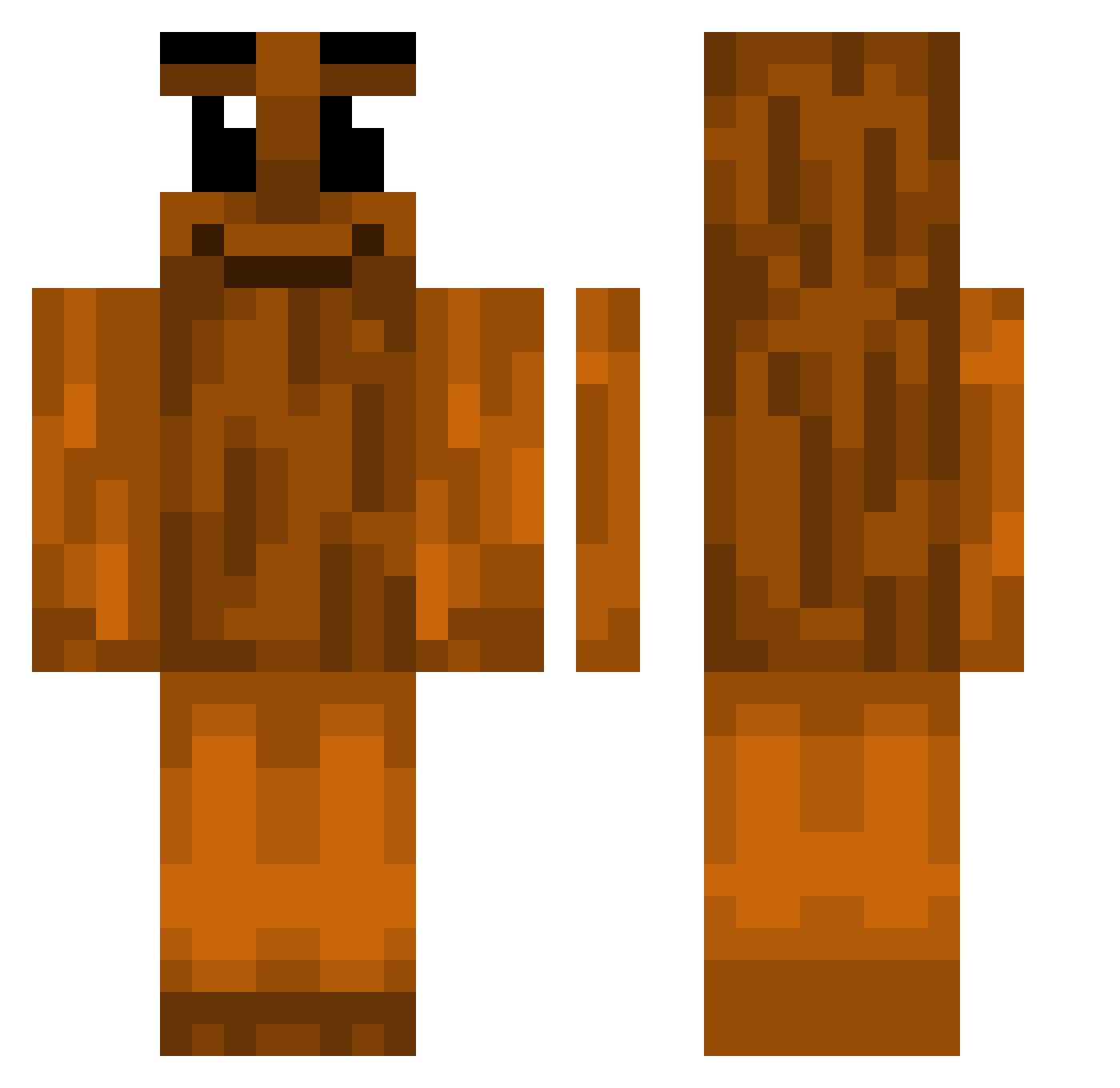
Current Minecraft skin of the player randomtung03, loaded from the official Mojang API. Rotate the 3D model with your mouse or finger, then download the skin as a PNG file and use it in Minecraft: Bedrock Edition or Java Edition for free. When randomtung03 changes their skin, this page updates automatically and the old skin stays in the history below.
Other players with this skin (338)
randomtung03 was the 25th player we have seen with this skin, first spotted on 29.07.2026. The same skin was seen on these players. Open a nickname to see their current skin and skin history.
 dihcenter
 sus_noah C_Crafter12 SkxllTriz
 YuhZokuYT Vr7q Markensteinas throughthewireye XuroCup
 IIsal Ocekuno luckcr
 s4raphim NARDDOG12 loxyy7
 Swain69 DreyMov41 TrippleT_MC Sitruuuna tvinci 1asav LixouZ FardLord elitebarbrian
 TwistedMC_ ttyfdvd Haikoxtp kljae_
 Geilomatico87 szwedzik201
 Crytopsy147 Luchito5000
 rodrigobtorres KisielMalinowy_ str8boykel RecongniZ TungTungTungz iMigSSj secnnd vLaD10_ Surtor_ vbum5 idkkrist The_Jacobrbj xiuwmi
 PooScooper911 biggestchad4 kubajak123 Ananas1233 BossFruit manvv3l eviltungtungtung ninkss
 MabTime2 NewgabYork SigmaSahur67 s_oy mcDavidX Peuphoo
 Brok_Oganga
More Oak Log Minecraft skins
How to install the randomtung03 skin
- Press the Download button above to save the skin as a PNG file.
- Minecraft: Bedrock Edition (PE): open the Dressing Room from the main menu (or tap your character → Edit Character), go to Classic Skins → Owned, press the + (new skin) button, choose the downloaded PNG and pick the Classic (Steve) model. Works on PC and mobile; consoles cannot import custom skins.
- Minecraft: Java Edition: open the Minecraft Launcher, go to the Skins tab, click New Skin, load the PNG, pick the Classic (Steve) model and press Save & Use. You can also upload it at minecraft.net → Profile → Change Skin.
The skin does not show up after import - what should I do?
Restart Minecraft and open the Dressing Room again - imported skins sometimes appear only after a restart. Also make sure you selected the imported skin and picked the Classic (Steve) model.
Which model should I choose, Classic or Slim?
This skin is designed for the Classic (Steve) model. If you pick the wrong model, the arms of the skin will look stretched or squeezed.
Is the skin of randomtung03 free to download?
Yes. Press Download, save the PNG file and use it in Minecraft: Bedrock Edition or Java Edition - no payment or registration needed. The skin also works on multiplayer servers and Realms.
More skins
Looking for more? Go back to all Minecraft skins and check the top skins of the week, month and all time, or find any player's skin by nickname.