
qk932 - Minecraft Skins & Skin History
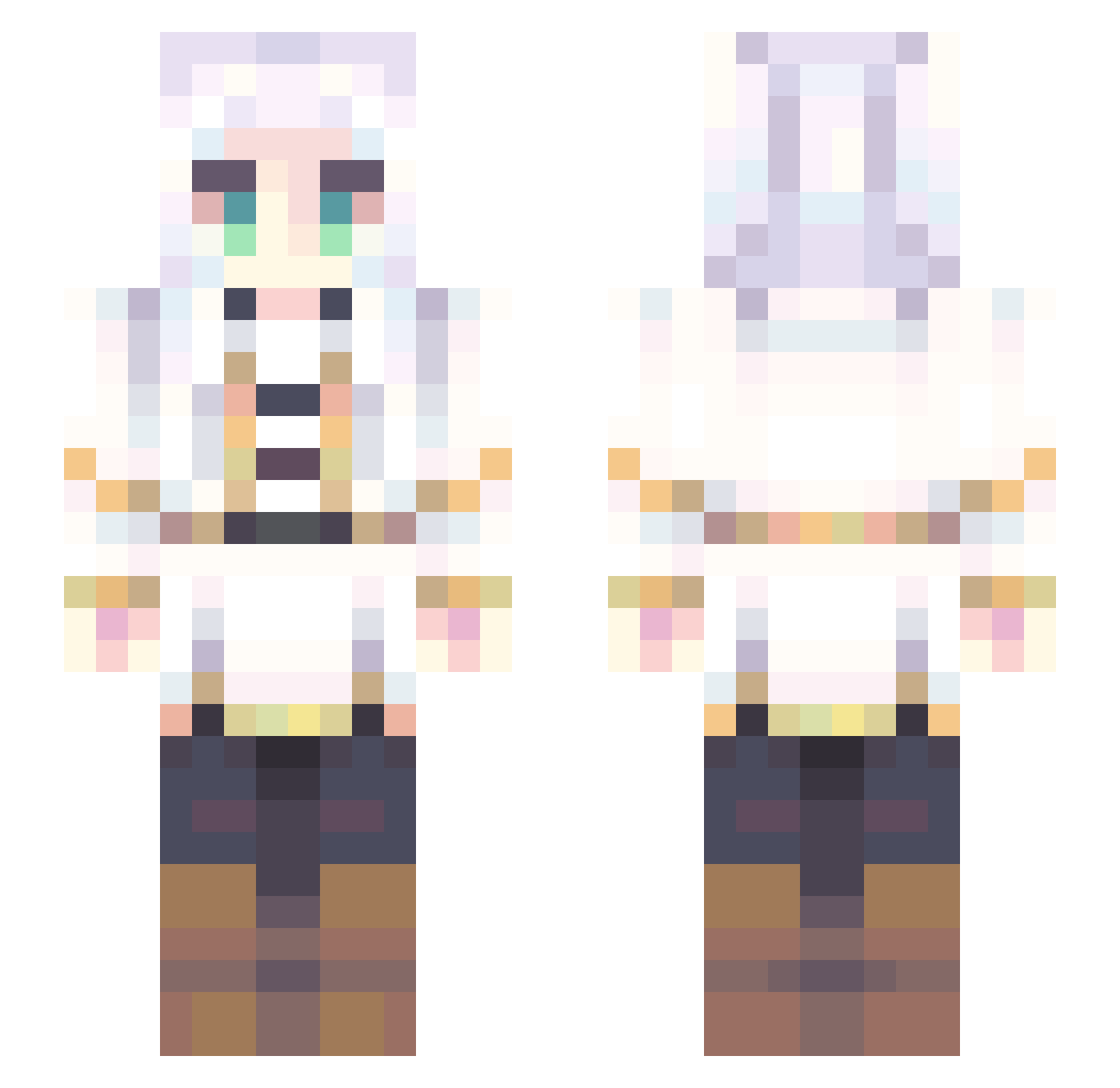
Current Minecraft skin of the player qk932, loaded from the official Mojang API. Rotate the 3D model with your mouse or finger, then download the skin as a PNG file and use it in Minecraft: Bedrock Edition or Java Edition for free. When qk932 changes their skin, this page updates automatically and the old skin stays in the history below.
Other players with this skin (707)
qk932 was the 266th player we have seen with this skin, first spotted on 01.09.2026. The same skin was seen on these players. Open a nickname to see their current skin and skin history.
 Jhondesu Niger1anNinja
 Deltoides Chamchwi Friejin FlyingKappa AFrierenEnjoyer Kirkboy10 azzoux melusine1793 BlessedMaiden Osaka_desu Grumv F1u4fle LittleAdru Kawaeo knightdumal To_Avalon Huut_ charliekirkbard cinderrrrxd Wasted595 lovelysheep0707 NAKAD0701 Ame_Desu Tr1ppyMex1can77 nbolq Marcos666 exstatix ShiftySchwifty69 iilzy PetiteRere cincolilypad MakoFromSiskatr Pinjatsu macruh Twopants FrierenQWQ TAFUTO2025 WinMusic LukasBfdia _Exoduss_ grisha_xolin DonMarvin_ Icelandkung8448 Yoyoisgenius Franxsss EmceeWeeb IwantCompot atatis Sabbykiwi al_fine KeczerV ichinya
 Temki Olka169 Blameds sailormoon448 BulochkaT julzypoolzy
More Fantasy Minecraft skins
How to install the qk932 skin
- Press the Download button above to save the skin as a PNG file.
- Minecraft: Bedrock Edition (PE): open the Dressing Room from the main menu (or tap your character → Edit Character), go to Classic Skins → Owned, press the + (new skin) button, choose the downloaded PNG and pick the Slim (Alex) model. Works on PC and mobile; consoles cannot import custom skins.
- Minecraft: Java Edition: open the Minecraft Launcher, go to the Skins tab, click New Skin, load the PNG, pick the Slim (Alex) model and press Save & Use. You can also upload it at minecraft.net → Profile → Change Skin.
The skin does not show up after import - what should I do?
Restart Minecraft and open the Dressing Room again - imported skins sometimes appear only after a restart. Also make sure you selected the imported skin and picked the Slim (Alex) model.
Which model should I choose, Classic or Slim?
This skin is designed for the Slim (Alex) model. If you pick the wrong model, the arms of the skin will look stretched or squeezed.
Is the skin of qk932 free to download?
Yes. Press Download, save the PNG file and use it in Minecraft: Bedrock Edition or Java Edition - no payment or registration needed. The skin also works on multiplayer servers and Realms.
More skins
Looking for more? Go back to all Minecraft skins and check the top skins of the week, month and all time, or find any player's skin by nickname.