
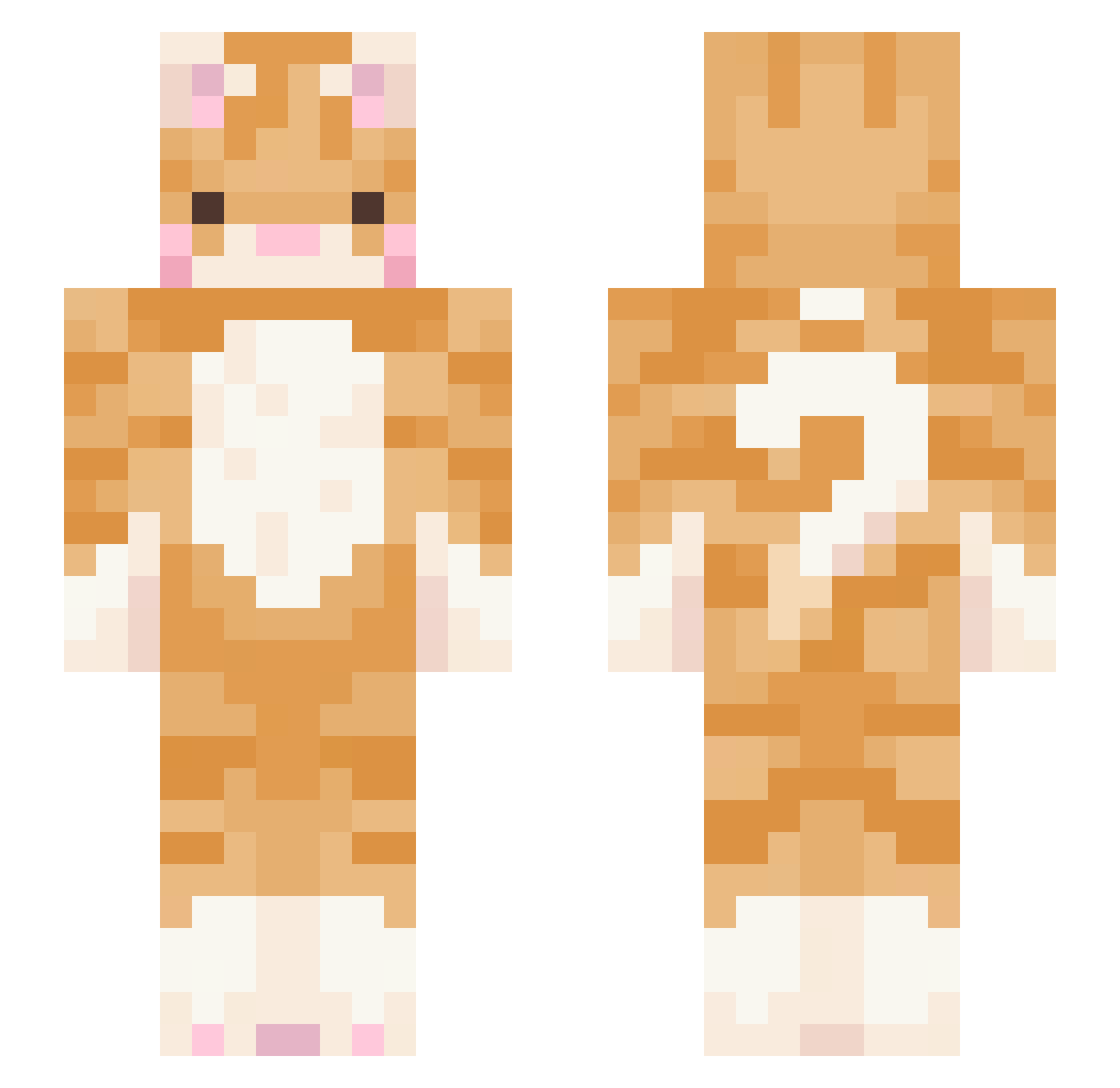
Current Minecraft skin of the player qillua_, loaded from the official Mojang API. Rotate the 3D model with your mouse or finger, then download the skin as a PNG file and use it in Minecraft: Bedrock Edition or Java Edition for free. When qillua_ changes their skin, this page updates automatically and the old skin stays in the history below.
Other players with this skin (412)
qillua_ was the 259th player we have seen with this skin, first spotted on 15.09.2026. The same skin was seen on these players. Open a nickname to see their current skin and skin history.
 1nf3ct3d_f1nn Annipede Myomyo_i zizonhari123 rinkathere Dmab_ cvrpt qhrhtlqdj maruS2 _Cowface Lucie229 Phospheratu J_DaeIl MeowSophia nikkiieez TheMonodie 420wap TESTYJESTER0 FANTASMASS Jhnfall Robinisaiah10 m_gehl Boltzzy catman1234567890 karbear1 FBI_kitty OrangutanLesbian ShimaSnow Noomiu AE_KIT petalmuncher Light_way hayhay566 non_yang diabol1x xhiet HAPPY_ONE TuxedoKcat MingDennis yijieee__ Sadirah JOLlip Gaby_Glaceon daaaom Kittendroplet Baztier Darkness5153 imowie park_jin_k Gaminyang valexuu marine123 Iluvspiderman05 kaciukass Amos_n_Alastor GooberSK
 Tatertot666 __Baba__ Mering0117 NanaBanana725
More Ginger Cat Minecraft skins
How to install the qillua_ skin
- Press the Download button above to save the skin as a PNG file.
- Minecraft: Bedrock Edition (PE): open the Dressing Room from the main menu (or tap your character → Edit Character), go to Classic Skins → Owned, press the + (new skin) button, choose the downloaded PNG and pick the Slim (Alex) model. Works on PC and mobile; consoles cannot import custom skins.
- Minecraft: Java Edition: open the Minecraft Launcher, go to the Skins tab, click New Skin, load the PNG, pick the Slim (Alex) model and press Save & Use. You can also upload it at minecraft.net → Profile → Change Skin.
The skin does not show up after import - what should I do?
Restart Minecraft and open the Dressing Room again - imported skins sometimes appear only after a restart. Also make sure you selected the imported skin and picked the Slim (Alex) model.
Which model should I choose, Classic or Slim?
This skin is designed for the Slim (Alex) model. If you pick the wrong model, the arms of the skin will look stretched or squeezed.
Is the skin of qillua_ free to download?
Yes. Press Download, save the PNG file and use it in Minecraft: Bedrock Edition or Java Edition - no payment or registration needed. The skin also works on multiplayer servers and Realms.
More skins
Looking for more? Go back to all Minecraft skins and check the top skins of the week, month and all time, or find any player's skin by nickname.