
polockas1518 - Minecraft Skins & Skin History
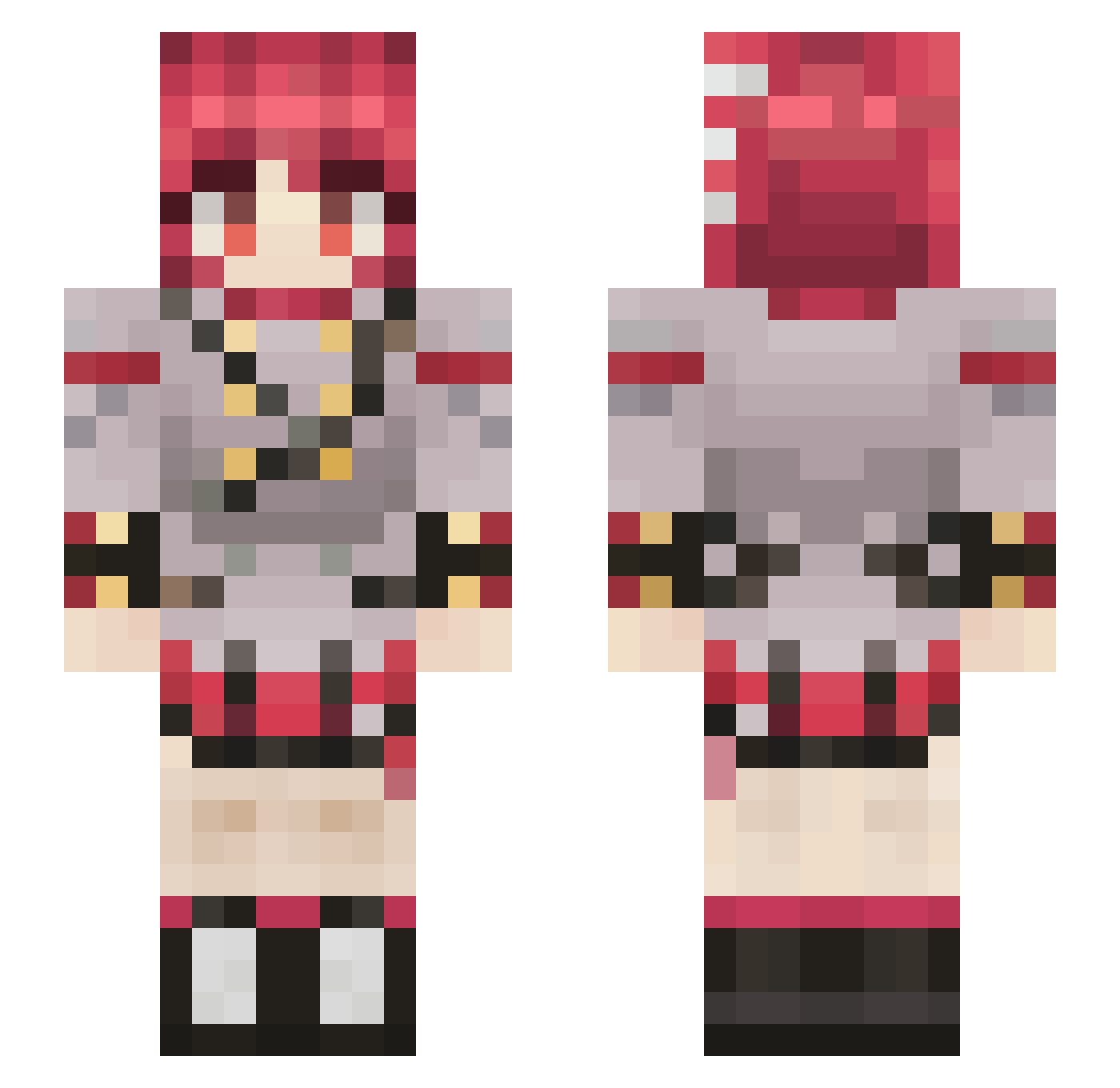
Current Minecraft skin of the player polockas1518, loaded from the official Mojang API. Rotate the 3D model with your mouse or finger, then download the skin as a PNG file and use it in Minecraft: Bedrock Edition or Java Edition for free. When polockas1518 changes their skin, this page updates automatically and the old skin stays in the history below.
Other players with this skin (132)
polockas1518 was the 99th player we have seen with this skin, first spotted on 20.10.2026. The same skin was seen on these players. Open a nickname to see their current skin and skin history.
 Depr1K1nd _Iron1c_ Matfreecsss Tarumae__ mwbm KKflosi_LOL Kingjason1234 misifus_1996 serpenloup 3vilR0b0t xeroderma31 Meawsa SpellDrifter Noooonee GenoHD Enderyouther kondzio2132 IAmAliceee TheHangedMan17 SKIFI228 CrimznGalaxy Centauri_AM AegisPrimus bluedevil14 Scolaget unicorsup lolopinko EpicBruh_ GlazeMaster FrancoJoint JLM55 roboelias4 The_GlitchedSto e33folog Bwenicus Starmaster101 Red_Miku GottyWn ppremaru MarckG WERTI2004 markola08 Palazox chickenchanz gokax34 Micid0 Gamma_2 elpepe67 DragaoTudo F4iko Ammvnition Lithograph_ _Toast_brot Ranny255 Advri Waroong iiMxxn Casual_Samurai Grifffie 0bama1234
More Makima Minecraft skins
How to install the polockas1518 skin
- Press the Download button above to save the skin as a PNG file.
- Minecraft: Bedrock Edition (PE): open the Dressing Room from the main menu (or tap your character → Edit Character), go to Classic Skins → Owned, press the + (new skin) button, choose the downloaded PNG and pick the Slim (Alex) model. Works on PC and mobile; consoles cannot import custom skins.
- Minecraft: Java Edition: open the Minecraft Launcher, go to the Skins tab, click New Skin, load the PNG, pick the Slim (Alex) model and press Save & Use. You can also upload it at minecraft.net → Profile → Change Skin.
The skin does not show up after import - what should I do?
Restart Minecraft and open the Dressing Room again - imported skins sometimes appear only after a restart. Also make sure you selected the imported skin and picked the Slim (Alex) model.
Which model should I choose, Classic or Slim?
This skin is designed for the Slim (Alex) model. If you pick the wrong model, the arms of the skin will look stretched or squeezed.
Is the skin of polockas1518 free to download?
Yes. Press Download, save the PNG file and use it in Minecraft: Bedrock Edition or Java Edition - no payment or registration needed. The skin also works on multiplayer servers and Realms.
More skins
Looking for more? Go back to all Minecraft skins and check the top skins of the week, month and all time, or find any player's skin by nickname.