
pimiboy - Minecraft Skins & Skin History
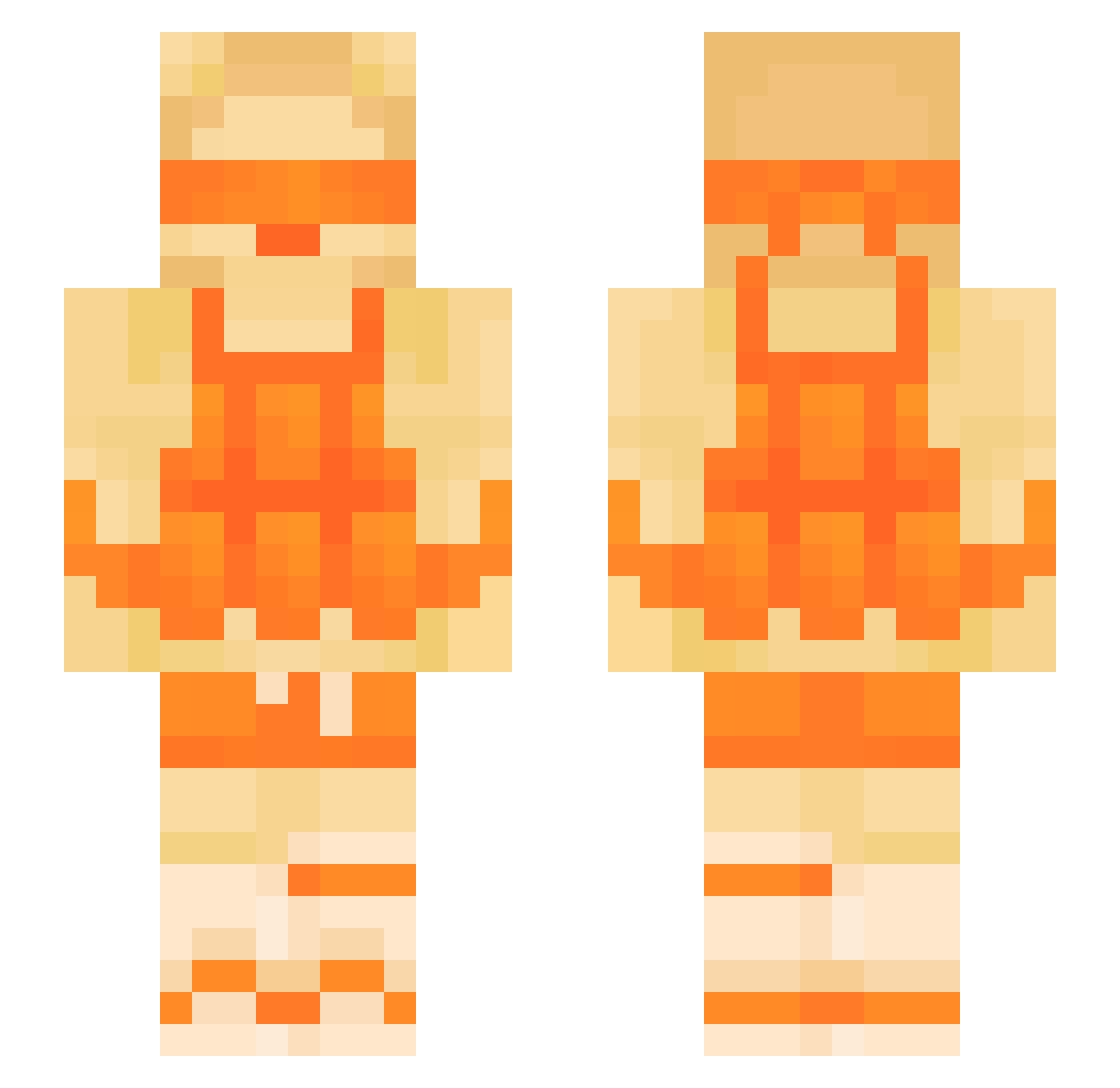
Current Minecraft skin of the player pimiboy, loaded from the official Mojang API. Rotate the 3D model with your mouse or finger, then download the skin as a PNG file and use it in Minecraft: Bedrock Edition or Java Edition for free. When pimiboy changes their skin, this page updates automatically and the old skin stays in the history below.
Other players with this skin (157)
pimiboy was the 145th player we have seen with this skin, first spotted on 22.10.2026. The same skin was seen on these players. Open a nickname to see their current skin and skin history.
 67_PainPear ItzrealAdri gangsterduck123 white_nagger yHqx_ Edutzu2 JJrocks77 Valfrancy22 TNTGames001 Merpinator_ Jamer5714 malvuu nialooo123 Apearta Gramaszek FinanzamtTV bunimunni2340 dragonmatty TrippyN4HUM whoodenplankes Elano__ Eric_Lmao noah666688 mayyberadical dont3v1 nnpg_Crest_nss _FizzyFizz Domssc Marko_Bro764 theManePear Rmoneyongod rayz_1 MightBemonkeyman moospectator albertegg7 NOTMJR11 dudedans1 2060RTX runkmatias jujuonthatquan Elyteee diealteoma44 Custom1707 Deepx123 Machu222hejeje StrikeESB Itz_Opplay Madmaxi3005 chandrujerry _TheMichal_ ManeFragger1 Marcimar bub7979 Clarkzzz kayden4211 faris_714 feshy7 NaxyyS_ 6bemo ANOYEDBY
More Blindfold Minecraft skins
How to install the pimiboy skin
- Press the Download button above to save the skin as a PNG file.
- Minecraft: Bedrock Edition (PE): open the Dressing Room from the main menu (or tap your character → Edit Character), go to Classic Skins → Owned, press the + (new skin) button, choose the downloaded PNG and pick the Slim (Alex) model. Works on PC and mobile; consoles cannot import custom skins.
- Minecraft: Java Edition: open the Minecraft Launcher, go to the Skins tab, click New Skin, load the PNG, pick the Slim (Alex) model and press Save & Use. You can also upload it at minecraft.net → Profile → Change Skin.
The skin does not show up after import - what should I do?
Restart Minecraft and open the Dressing Room again - imported skins sometimes appear only after a restart. Also make sure you selected the imported skin and picked the Slim (Alex) model.
Which model should I choose, Classic or Slim?
This skin is designed for the Slim (Alex) model. If you pick the wrong model, the arms of the skin will look stretched or squeezed.
Is the skin of pimiboy free to download?
Yes. Press Download, save the PNG file and use it in Minecraft: Bedrock Edition or Java Edition - no payment or registration needed. The skin also works on multiplayer servers and Realms.
More skins
Looking for more? Go back to all Minecraft skins and check the top skins of the week, month and all time, or find any player's skin by nickname.