
p0llyscracker - Minecraft Skins & Skin History
Current Minecraft skin of the player p0llyscracker, loaded from the official Mojang API. Rotate the 3D model with your mouse or finger, then download the skin as a PNG file and use it in Minecraft: Bedrock Edition or Java Edition for free. When p0llyscracker changes their skin, this page updates automatically and the old skin stays in the history below.
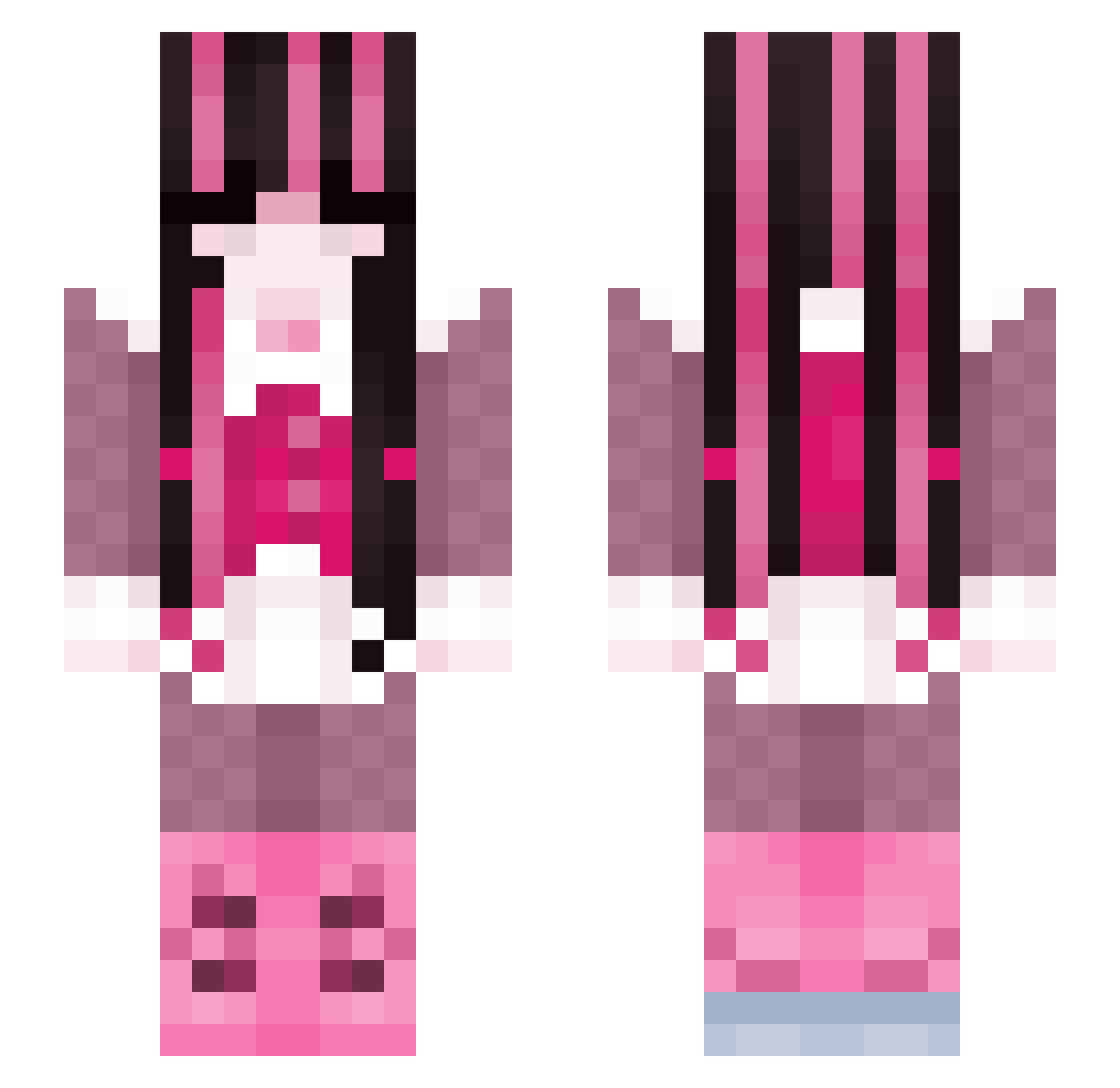
Other players with this skin (256)
p0llyscracker was the 35th player we have seen with this skin, first spotted on 12.08.2026. The same skin was seen on these players. Open a nickname to see their current skin and skin history.
 StrawBslice Clehw NoL17 KTBWCX KillArtemisa DuriDuran ITSHZEL MrsSunaRin lalitakkj Laura012 SloppyToppy22 Marvinela Chloe_fb2 delfinek2137 idkm4nn Lensia__ FoxiButBroke muichiie soreeeeeeen ImsSyms fritz_z
 wedvelvet de4thk1tty eleni2410 maripozaa iggglepiggle hitsujx NubecitaAA L0serboyNico Kaylen16 justcaaat draculauraaaaa Gigicati Sata4ndagi Mixtellis
 oceansalade Vermilion Draculaura_10 MANGOSM00THIE Cinnamonastrid autumiie SaikoNeo rachelstevens Sparkleeee Nixxe7 Annasiro_o sagetheherb25 hana_amai lndyses _Georgiiie_ stringcheese8 Crumbago vampteefs biiiiscuit dxmi21 fspacec saskia420 HighVelocityHD eyeclipse missyme094
More Draculaura Minecraft skins
How to install the p0llyscracker skin
- Press the Download button above to save the skin as a PNG file.
- Minecraft: Bedrock Edition (PE): open the Dressing Room from the main menu (or tap your character → Edit Character), go to Classic Skins → Owned, press the + (new skin) button, choose the downloaded PNG and pick the Slim (Alex) model. Works on PC and mobile; consoles cannot import custom skins.
- Minecraft: Java Edition: open the Minecraft Launcher, go to the Skins tab, click New Skin, load the PNG, pick the Slim (Alex) model and press Save & Use. You can also upload it at minecraft.net → Profile → Change Skin.
The skin does not show up after import - what should I do?
Restart Minecraft and open the Dressing Room again - imported skins sometimes appear only after a restart. Also make sure you selected the imported skin and picked the Slim (Alex) model.
Which model should I choose, Classic or Slim?
This skin is designed for the Slim (Alex) model. If you pick the wrong model, the arms of the skin will look stretched or squeezed.
Is the skin of p0llyscracker free to download?
Yes. Press Download, save the PNG file and use it in Minecraft: Bedrock Edition or Java Edition - no payment or registration needed. The skin also works on multiplayer servers and Realms.
More skins
Looking for more? Go back to all Minecraft skins and check the top skins of the week, month and all time, or find any player's skin by nickname.