
ottoman321 - Minecraft Skins & Skin History
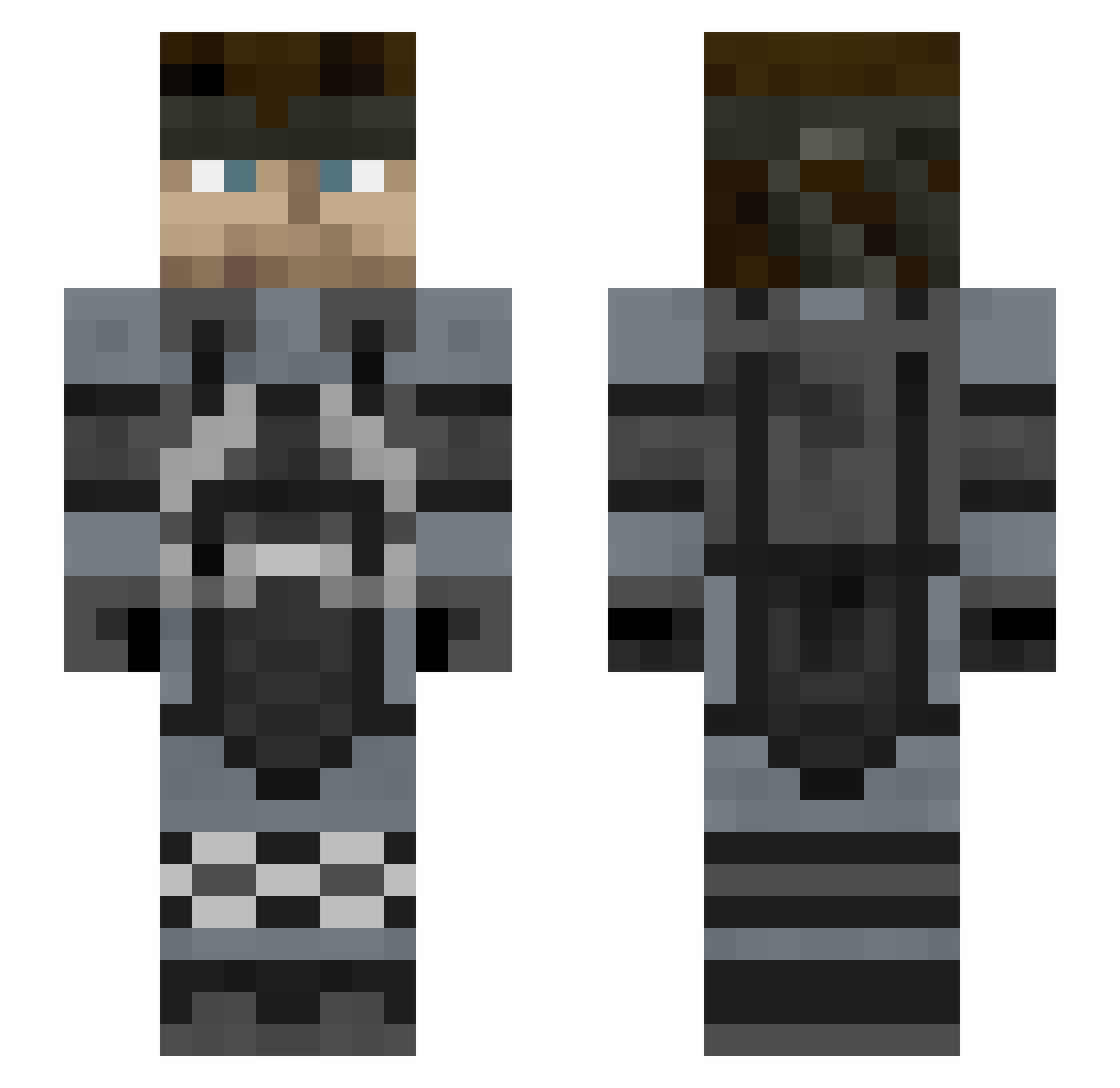
Current Minecraft skin of the player ottoman321, loaded from the official Mojang API. Rotate the 3D model with your mouse or finger, then download the skin as a PNG file and use it in Minecraft: Bedrock Edition or Java Edition for free. When ottoman321 changes their skin, this page updates automatically and the old skin stays in the history below.
Other players with this skin (306)
ottoman321 was the 154th player we have seen with this skin, first spotted on 20.09.2026. The same skin was seen on these players. Open a nickname to see their current skin and skin history.
 Sergas29 Shinto49 mastergrave117 MarioREAL0 PedroH_Reis Papiche13 PaginaPuma shunthunder Snake_Del_Colo JoeGoldberg15 Hilopi ManuelMetal younotnome ErBottega gezellig358 SteveRobs145 Patto_6450 LostintheAether_ RAG_XLS NoXiiD Haganemushi Bon3zz1001 snakeseater totototo23 UtterlyButterly Kiwinsky PepsiManDrinks redhood2004 DualSlap Th3KeKo ZoruB4G sparks534 Tera160106 ChemZ99 General_Locke PanikWasTaken _LennE_ kolosutrogen Profligate1945 umeboshi30 JamBoy1984 Yeso99 EssKay_1 zitro_w Equanundrum DirectorKeegan TheSoleStratego Mr_Nauti Lazyyymp4 bonkripper23 SneakyAndBeaky Zombiesoundwave Halpi_ Ch3rrYM1lkHQ NBtube dat_Mango federexii YahYeetIV Redscorp16 TalkyBard2197
More Stealth Minecraft skins
How to install the ottoman321 skin
- Press the Download button above to save the skin as a PNG file.
- Minecraft: Bedrock Edition (PE): open the Dressing Room from the main menu (or tap your character → Edit Character), go to Classic Skins → Owned, press the + (new skin) button, choose the downloaded PNG and pick the Slim (Alex) model. Works on PC and mobile; consoles cannot import custom skins.
- Minecraft: Java Edition: open the Minecraft Launcher, go to the Skins tab, click New Skin, load the PNG, pick the Slim (Alex) model and press Save & Use. You can also upload it at minecraft.net → Profile → Change Skin.
The skin does not show up after import - what should I do?
Restart Minecraft and open the Dressing Room again - imported skins sometimes appear only after a restart. Also make sure you selected the imported skin and picked the Slim (Alex) model.
Which model should I choose, Classic or Slim?
This skin is designed for the Slim (Alex) model. If you pick the wrong model, the arms of the skin will look stretched or squeezed.
Is the skin of ottoman321 free to download?
Yes. Press Download, save the PNG file and use it in Minecraft: Bedrock Edition or Java Edition - no payment or registration needed. The skin also works on multiplayer servers and Realms.
More skins
Looking for more? Go back to all Minecraft skins and check the top skins of the week, month and all time, or find any player's skin by nickname.