
oklop1kop - Minecraft Skins & Skin History
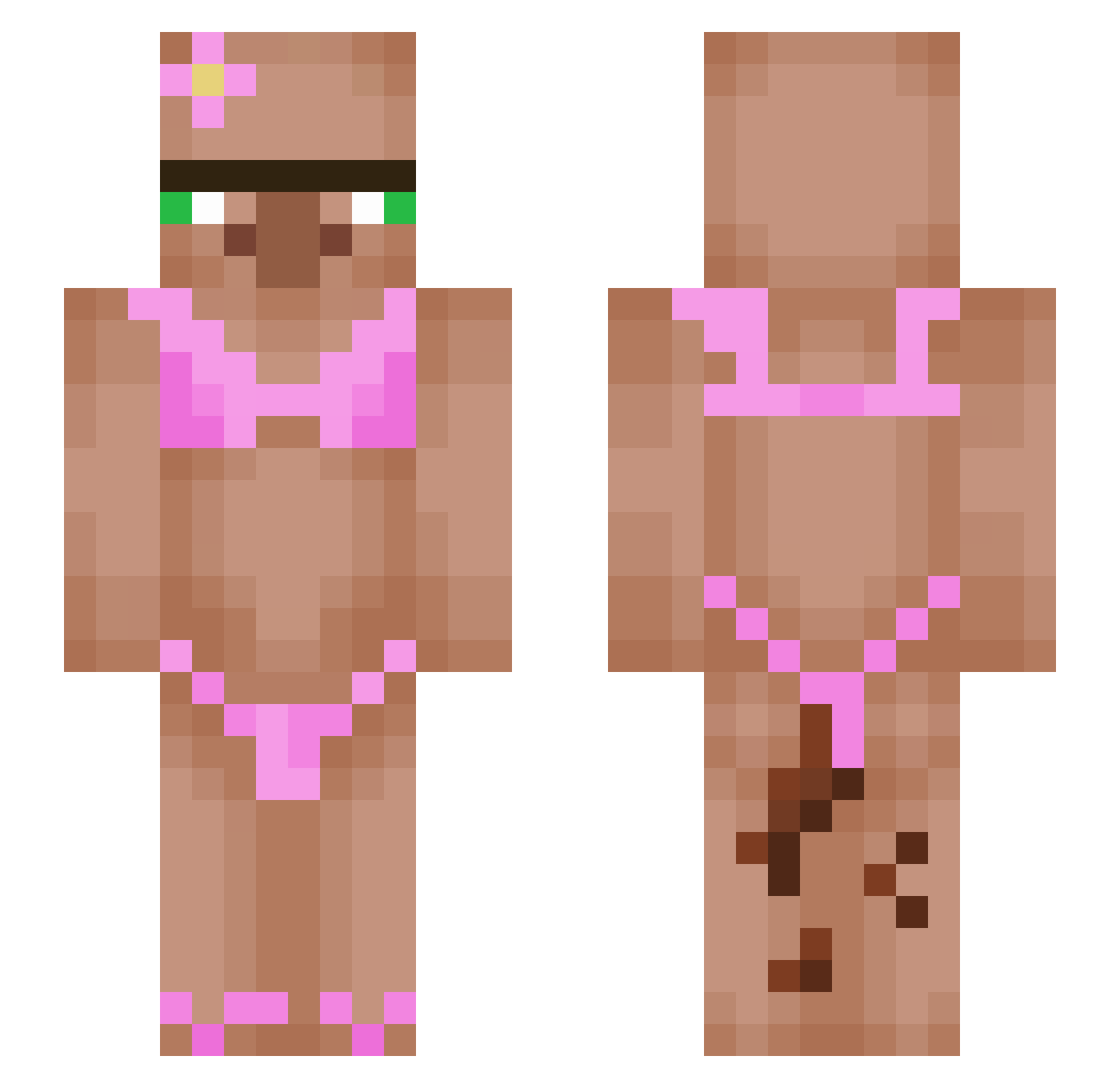
Current Minecraft skin of the player oklop1kop, loaded from the official Mojang API. Rotate the 3D model with your mouse or finger, then download the skin as a PNG file and use it in Minecraft: Bedrock Edition or Java Edition for free. When oklop1kop changes their skin, this page updates automatically and the old skin stays in the history below.
Other players with this skin (624)
oklop1kop was the 469th player we have seen with this skin, first spotted on 21.10.2026. The same skin was seen on these players. Open a nickname to see their current skin and skin history.
 apalumau tomer3334 DodoMediumRare SolexZZZ julbrd elyanap FN_Nina7 HS66x Pinky2009 VillageVandal FirePuebes xsB013 vaporingboat jamal_the_vill allthejedi567 N4t4n4sGR Jonasenevold silly_willy123 oliverbgj LIF536 Pegwink Wilderbeast352 WizzytheWizzard WardedMars MerKys Jriste NalmpaOnW3ed wetinsides69 kmestani2008 LilToddler DanTa729 Schniftyyyyy milosek9 ZaunerMauner charliezcool MR_BIG_J_ aalirq Erickoso _Maysich_ Tangomango890 DavidHamm PABLOTHEDUCK Alexthestan StrelecLS warnx bens_dog brumanchik hpptz DKG22 DmvShawn Zince26 Egor_Delovoi I00G12 BaBuska010 chochochochoyou b00mtang Limittlesss Amit2023 TucumanPresident Geggles420
More Bikini Minecraft skins
How to install the oklop1kop skin
- Press the Download button above to save the skin as a PNG file.
- Minecraft: Bedrock Edition (PE): open the Dressing Room from the main menu (or tap your character → Edit Character), go to Classic Skins → Owned, press the + (new skin) button, choose the downloaded PNG and pick the Slim (Alex) model. Works on PC and mobile; consoles cannot import custom skins.
- Minecraft: Java Edition: open the Minecraft Launcher, go to the Skins tab, click New Skin, load the PNG, pick the Slim (Alex) model and press Save & Use. You can also upload it at minecraft.net → Profile → Change Skin.
The skin does not show up after import - what should I do?
Restart Minecraft and open the Dressing Room again - imported skins sometimes appear only after a restart. Also make sure you selected the imported skin and picked the Slim (Alex) model.
Which model should I choose, Classic or Slim?
This skin is designed for the Slim (Alex) model. If you pick the wrong model, the arms of the skin will look stretched or squeezed.
Is the skin of oklop1kop free to download?
Yes. Press Download, save the PNG file and use it in Minecraft: Bedrock Edition or Java Edition - no payment or registration needed. The skin also works on multiplayer servers and Realms.
More skins
Looking for more? Go back to all Minecraft skins and check the top skins of the week, month and all time, or find any player's skin by nickname.