
novalish - Minecraft Skins & Skin History
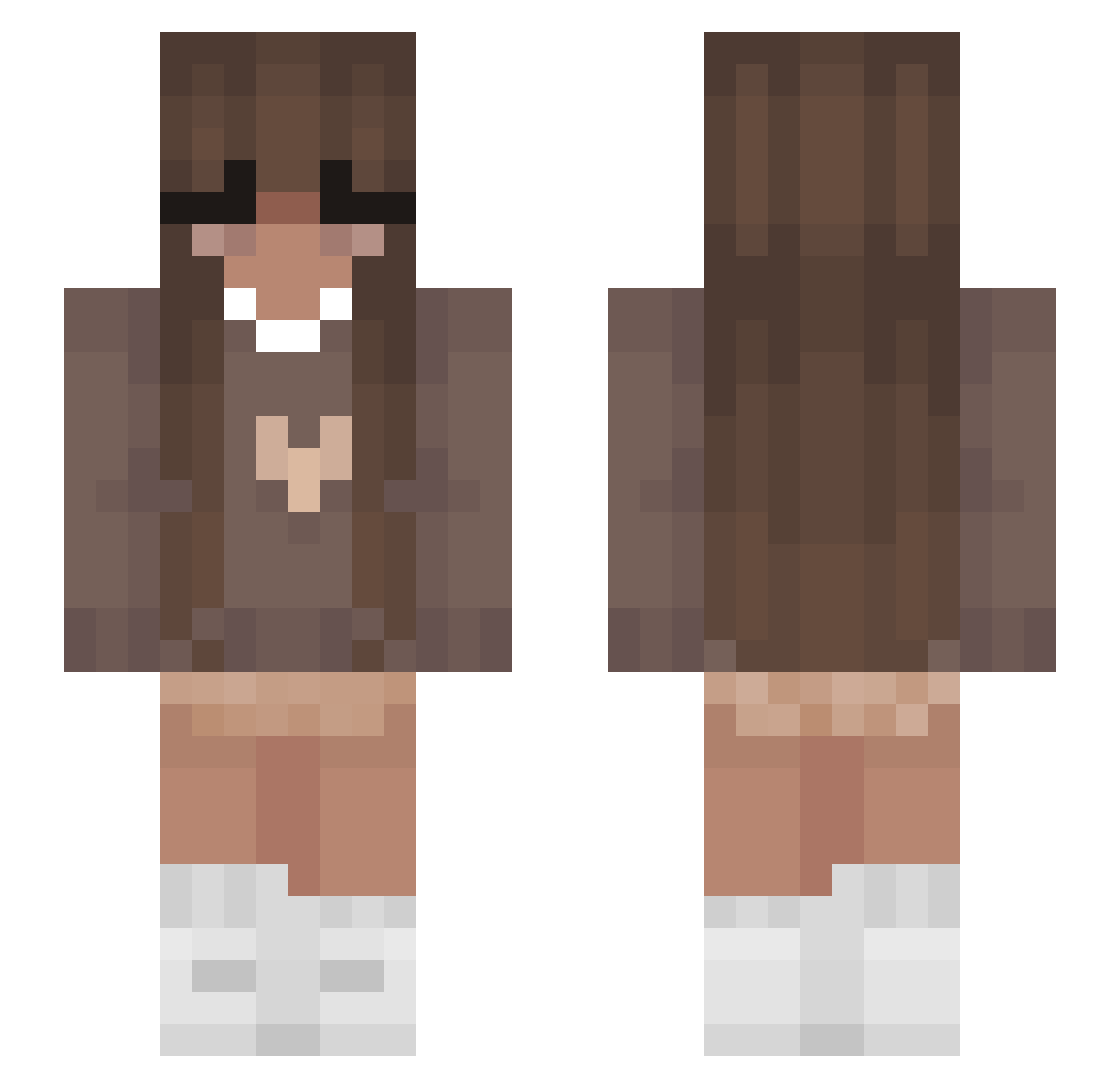
Current Minecraft skin of the player novalish, loaded from the official Mojang API. Rotate the 3D model with your mouse or finger, then download the skin as a PNG file and use it in Minecraft: Bedrock Edition or Java Edition for free. When novalish changes their skin, this page updates automatically and the old skin stays in the history below.
Other players with this skin (356)
novalish was the 176th player we have seen with this skin, first spotted on 12.09.2026. The same skin was seen on these players. Open a nickname to see their current skin and skin history.
 cluelessratt maddyyyy16 dahtinyclown_3 Blossomleaf20 Kayshiname Kefciak Cloud000 adoremelancholy Takica3721 slimequeen6700 Ellieeelise DarkAngel0654 Nanistars sw0k1 milleille Ta5haSL Alan23652 domenicagr EvilSis Julka1911 StarCookie36 AnaFofis Laurenyyy elnimie Lesnon misiamajaok MissDeepz BhabieKay Cap1tolG sanmeilis Kaysse NotJaelG SerenityNotFound _shades4you fuffy9 0GDankster Suniikuu christellen Zuzahorse JesterPickles Daanjelle DivisionBeau slothspice ilWaadl Turknato cccccccccccc2342 HANIABANIA12 WhiteElementalss Discardedsushi AlaynaUnicorn xKaja RedVelvet04 0bs3ssi0n444 selinalovedaddys Aguwoki Clay_Face23 Millie_170 M1k4h AcrylicDust6814 syriaf
More Cozy Minecraft skins
How to install the novalish skin
- Press the Download button above to save the skin as a PNG file.
- Minecraft: Bedrock Edition (PE): open the Dressing Room from the main menu (or tap your character → Edit Character), go to Classic Skins → Owned, press the + (new skin) button, choose the downloaded PNG and pick the Slim (Alex) model. Works on PC and mobile; consoles cannot import custom skins.
- Minecraft: Java Edition: open the Minecraft Launcher, go to the Skins tab, click New Skin, load the PNG, pick the Slim (Alex) model and press Save & Use. You can also upload it at minecraft.net → Profile → Change Skin.
The skin does not show up after import - what should I do?
Restart Minecraft and open the Dressing Room again - imported skins sometimes appear only after a restart. Also make sure you selected the imported skin and picked the Slim (Alex) model.
Which model should I choose, Classic or Slim?
This skin is designed for the Slim (Alex) model. If you pick the wrong model, the arms of the skin will look stretched or squeezed.
Is the skin of novalish free to download?
Yes. Press Download, save the PNG file and use it in Minecraft: Bedrock Edition or Java Edition - no payment or registration needed. The skin also works on multiplayer servers and Realms.
More skins
Looking for more? Go back to all Minecraft skins and check the top skins of the week, month and all time, or find any player's skin by nickname.