
notaplayer67 - Minecraft Skins & Skin History
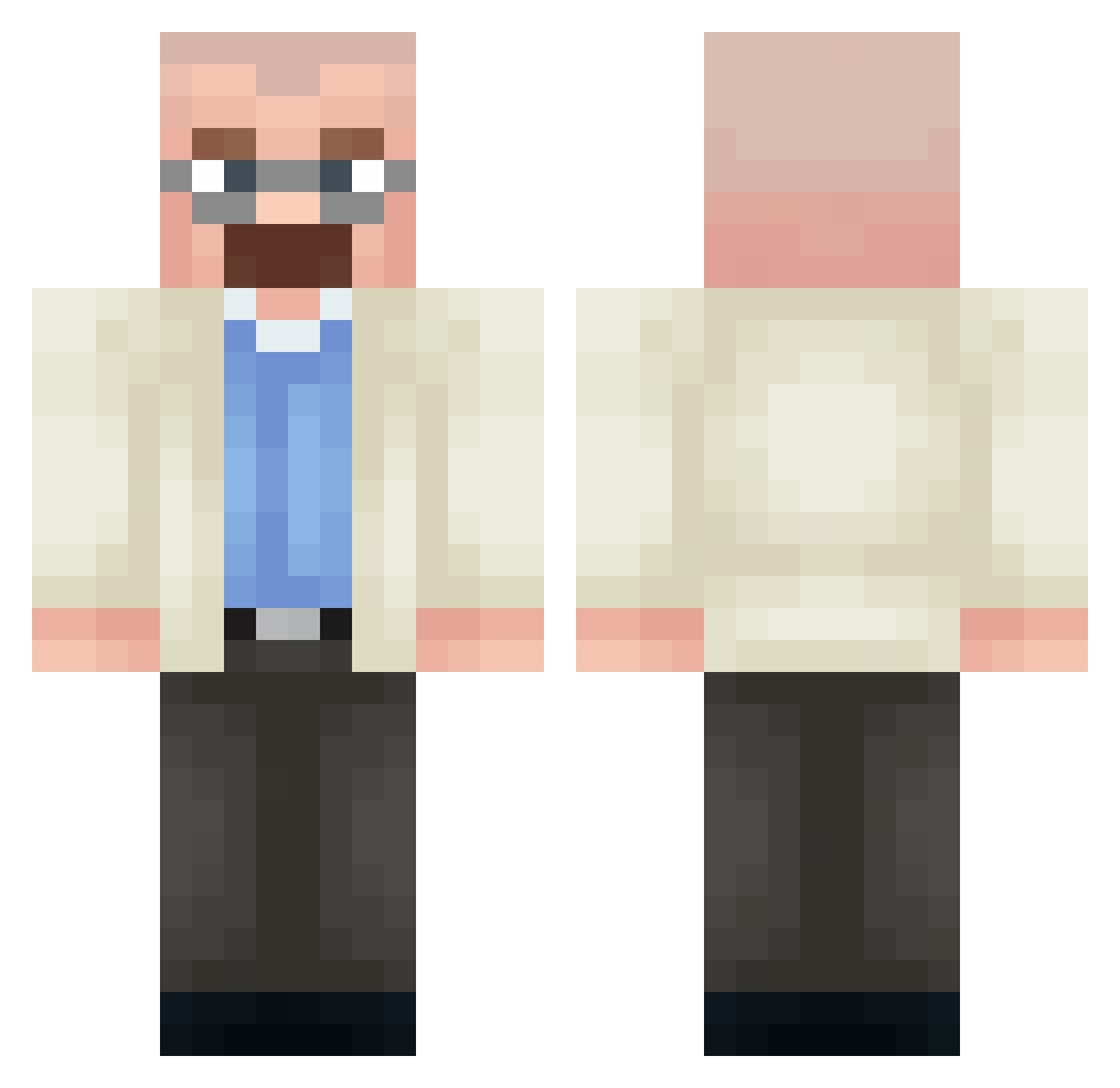
Current Minecraft skin of the player notaplayer67, loaded from the official Mojang API. Rotate the 3D model with your mouse or finger, then download the skin as a PNG file and use it in Minecraft: Bedrock Edition or Java Edition for free. When notaplayer67 changes their skin, this page updates automatically and the old skin stays in the history below.
Other players with this skin (442)
notaplayer67 was the 415th player we have seen with this skin, first spotted on 11.11.2026. The same skin was seen on these players. Open a nickname to see their current skin and skin history.
 cdcrfv schumalexx blueewaffles krysia111 Quinteck rkda Who_Used_My_Name AssortedBow9655 lucabio545 scepticoul joeSwason manchestergoat Seacreatureguy_ Xenoneon PANTA9988 September1972 fifiq_ Sneezys waamp Cyrex__ MintiClean WellixD wrlegend144 Greavus KyloRen_1007 exterminado Lil_Peck47 Monsler alberte1nste1n mubbyface ninjakid1001 Terry7799 Gianyp97 OlleSanell2010 fistah1234 GSUS03 Umut_akturk47 MARTINevangeliza 5boog7654321 LordMorbius GREEWALDELUX Frankfrm JoseH16 XEEENT Oxelious samuel_g15 Fedso Quackerino53 Lampyn Talkingbread213 TecDuck Fpuk PluhCat HPiske LilDavoxX LastRedd Profolie ben231 Denik5 N1n0_1
More Heisenberg Minecraft skins
How to install the notaplayer67 skin
- Press the Download button above to save the skin as a PNG file.
- Minecraft: Bedrock Edition (PE): open the Dressing Room from the main menu (or tap your character → Edit Character), go to Classic Skins → Owned, press the + (new skin) button, choose the downloaded PNG and pick the Classic (Steve) model. Works on PC and mobile; consoles cannot import custom skins.
- Minecraft: Java Edition: open the Minecraft Launcher, go to the Skins tab, click New Skin, load the PNG, pick the Classic (Steve) model and press Save & Use. You can also upload it at minecraft.net → Profile → Change Skin.
The skin does not show up after import - what should I do?
Restart Minecraft and open the Dressing Room again - imported skins sometimes appear only after a restart. Also make sure you selected the imported skin and picked the Classic (Steve) model.
Which model should I choose, Classic or Slim?
This skin is designed for the Classic (Steve) model. If you pick the wrong model, the arms of the skin will look stretched or squeezed.
Is the skin of notaplayer67 free to download?
Yes. Press Download, save the PNG file and use it in Minecraft: Bedrock Edition or Java Edition - no payment or registration needed. The skin also works on multiplayer servers and Realms.
More skins
Looking for more? Go back to all Minecraft skins and check the top skins of the week, month and all time, or find any player's skin by nickname.