
nonamer142 - Minecraft Skins & Skin History
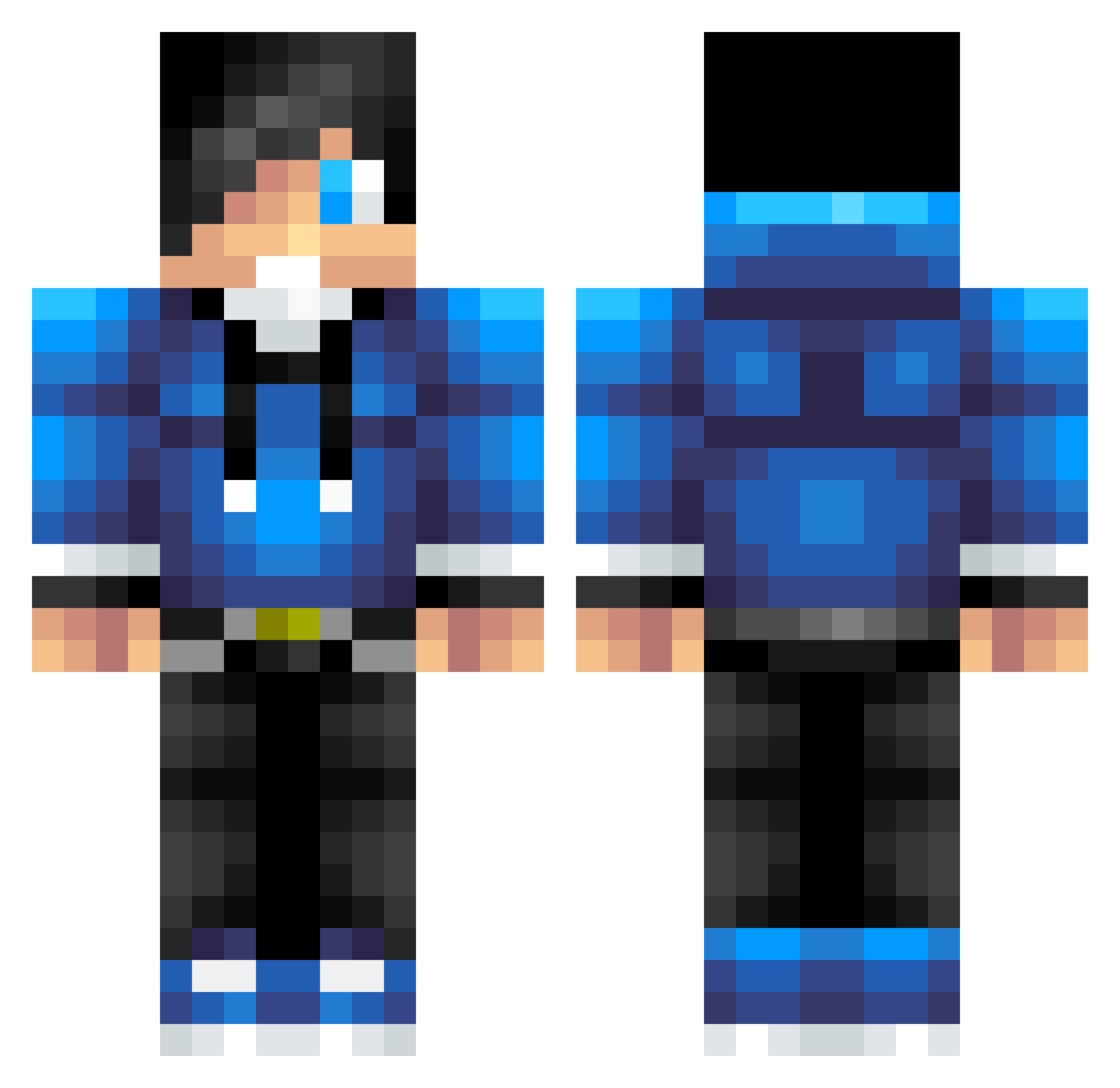
Current Minecraft skin of the player nonamer142, loaded from the official Mojang API. Rotate the 3D model with your mouse or finger, then download the skin as a PNG file and use it in Minecraft: Bedrock Edition or Java Edition for free. When nonamer142 changes their skin, this page updates automatically and the old skin stays in the history below.
Other players with this skin (623)
nonamer142 was the 330th player we have seen with this skin, first spotted on 16.09.2026. The same skin was seen on these players. Open a nickname to see their current skin and skin history.
 mrcreepy36 No_Name765 Sky_Tianyu TheGreatQ38YT Pandadude121 Yoran330 Sprengi_ KidPrince ErculesMarco CrimsonMuffin9 Somnath345 greatjm123 Bensch007 Killyyy Zaktap1477 speederman2000 maxoukin john1211 __Axis DiamondXCreeperz darkknight1963 MCJAYZZ Ivo028 blaiserod1 Colombianyoshi elimnator925 HeadMan222 austinpc1 treak14 sethf20000 888sta888 moneyman14725836 Lazyuber almvagen33a KillerK786 Skyblaster123 Jannradio Koatax xReminiscence Demian090502 Gravxty Diamond_Dan1 Findley2002 snarrich Soulqt12 Dom112014 GamingTardis MarionetterCX LazyCoolGuy drumerboy02 esilver2004 stingycash Rudy99 glrioae2 Sinistrasly Asokos Elden_05 hilbert71 yonatanlevi theking2015
How to install the nonamer142 skin
- Press the Download button above to save the skin as a PNG file.
- Minecraft: Bedrock Edition (PE): open the Dressing Room from the main menu (or tap your character → Edit Character), go to Classic Skins → Owned, press the + (new skin) button, choose the downloaded PNG and pick the Classic (Steve) model. Works on PC and mobile; consoles cannot import custom skins.
- Minecraft: Java Edition: open the Minecraft Launcher, go to the Skins tab, click New Skin, load the PNG, pick the Classic (Steve) model and press Save & Use. You can also upload it at minecraft.net → Profile → Change Skin.
The skin does not show up after import - what should I do?
Restart Minecraft and open the Dressing Room again - imported skins sometimes appear only after a restart. Also make sure you selected the imported skin and picked the Classic (Steve) model.
Which model should I choose, Classic or Slim?
This skin is designed for the Classic (Steve) model. If you pick the wrong model, the arms of the skin will look stretched or squeezed.
Is the skin of nonamer142 free to download?
Yes. Press Download, save the PNG file and use it in Minecraft: Bedrock Edition or Java Edition - no payment or registration needed. The skin also works on multiplayer servers and Realms.
More skins
Looking for more? Go back to all Minecraft skins and check the top skins of the week, month and all time, or find any player's skin by nickname.