
niki09192003 - Minecraft Skins & Skin History
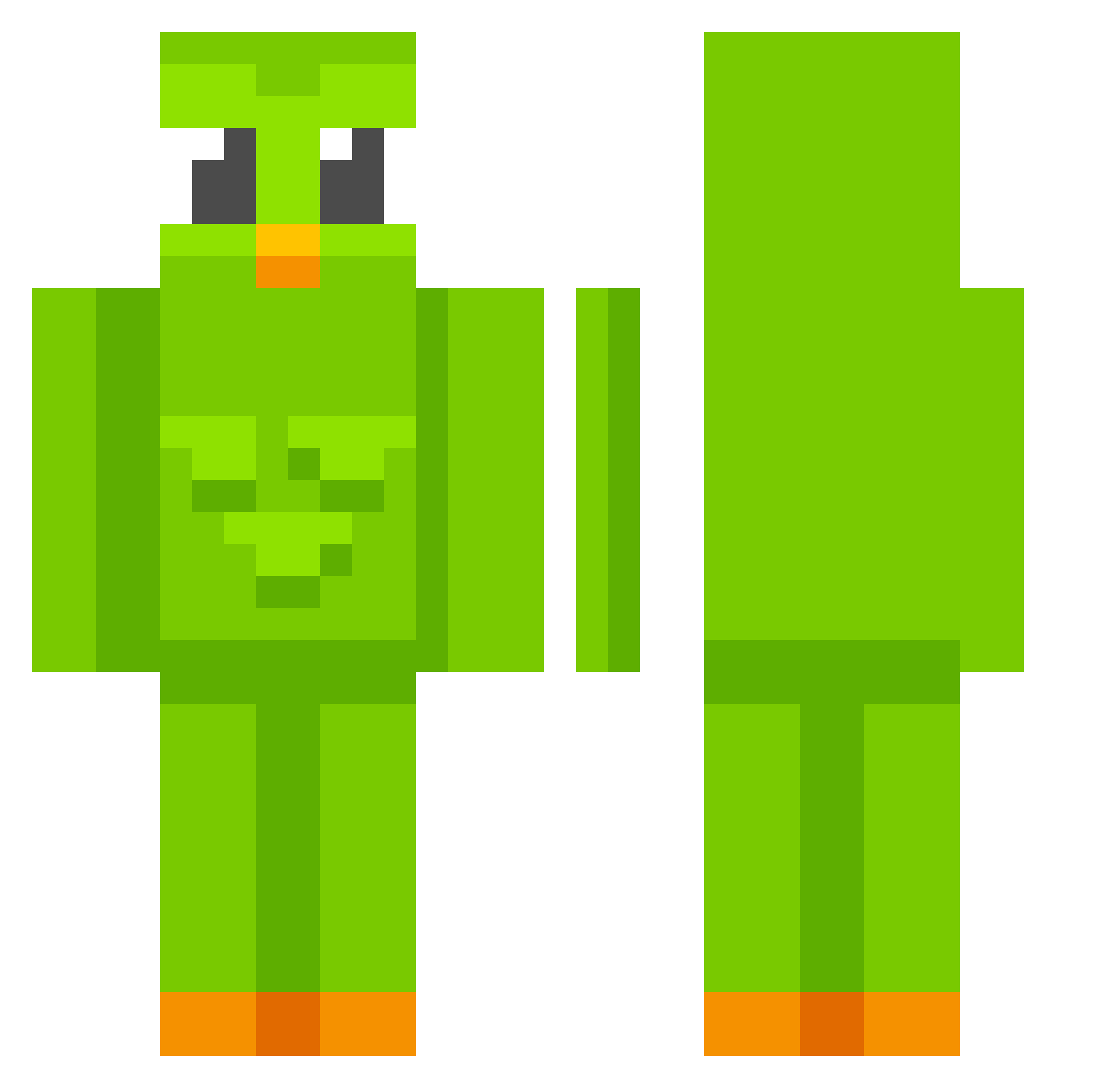
Current Minecraft skin of the player niki09192003, loaded from the official Mojang API. Rotate the 3D model with your mouse or finger, then download the skin as a PNG file and use it in Minecraft: Bedrock Edition or Java Edition for free. When niki09192003 changes their skin, this page updates automatically and the old skin stays in the history below.
Other players with this skin (596)
niki09192003 was the 345th player we have seen with this skin, first spotted on 16.09.2026. The same skin was seen on these players. Open a nickname to see their current skin and skin history.
 Prettyprin Michael10086 Leerpl1cht ashabashaaa Meel15fps Xokastheking draingang4lyfe DraftyDrips Dlos10 pedropintomole RikiTB niqu0tine Caesar3434 brazenbooch GubkaBibob hxsw skibidion Flaiecstchuflaio sz510919 ThePurellGuy kwangs__ Kusogakiii axadasz Mokami1234 Cosm1cVolt ChainedTogether Kacperro14 gipsy777 Sonic_habanero LibraMichael Zioy VanHohenheiim jungho123456 Rislord Marimoomoo KAMABOKOSUN JJacoby2016 Pendergo Lima9984 Ewa__chan Carlos081 NevQ epicgamers35 Carnish1 FreeTopG Hyun_bee KanFungus
 MinotaurKing kunza123 Snappect lzorr51 D_a_V_i_D_8 TheOddPigeon KPLilly awetizum iDartx KOLD6565 MatesCZ1 Kekton jesseeeeh
More Duo Minecraft skins
How to install the niki09192003 skin
- Press the Download button above to save the skin as a PNG file.
- Minecraft: Bedrock Edition (PE): open the Dressing Room from the main menu (or tap your character → Edit Character), go to Classic Skins → Owned, press the + (new skin) button, choose the downloaded PNG and pick the Classic (Steve) model. Works on PC and mobile; consoles cannot import custom skins.
- Minecraft: Java Edition: open the Minecraft Launcher, go to the Skins tab, click New Skin, load the PNG, pick the Classic (Steve) model and press Save & Use. You can also upload it at minecraft.net → Profile → Change Skin.
The skin does not show up after import - what should I do?
Restart Minecraft and open the Dressing Room again - imported skins sometimes appear only after a restart. Also make sure you selected the imported skin and picked the Classic (Steve) model.
Which model should I choose, Classic or Slim?
This skin is designed for the Classic (Steve) model. If you pick the wrong model, the arms of the skin will look stretched or squeezed.
Is the skin of niki09192003 free to download?
Yes. Press Download, save the PNG file and use it in Minecraft: Bedrock Edition or Java Edition - no payment or registration needed. The skin also works on multiplayer servers and Realms.
More skins
Looking for more? Go back to all Minecraft skins and check the top skins of the week, month and all time, or find any player's skin by nickname.