
moonjh1120 - Minecraft Skins & Skin History
Current Minecraft skin of the player moonjh1120, loaded from the official Mojang API. Rotate the 3D model with your mouse or finger, then download the skin as a PNG file and use it in Minecraft: Bedrock Edition or Java Edition for free. When moonjh1120 changes their skin, this page updates automatically and the old skin stays in the history below.
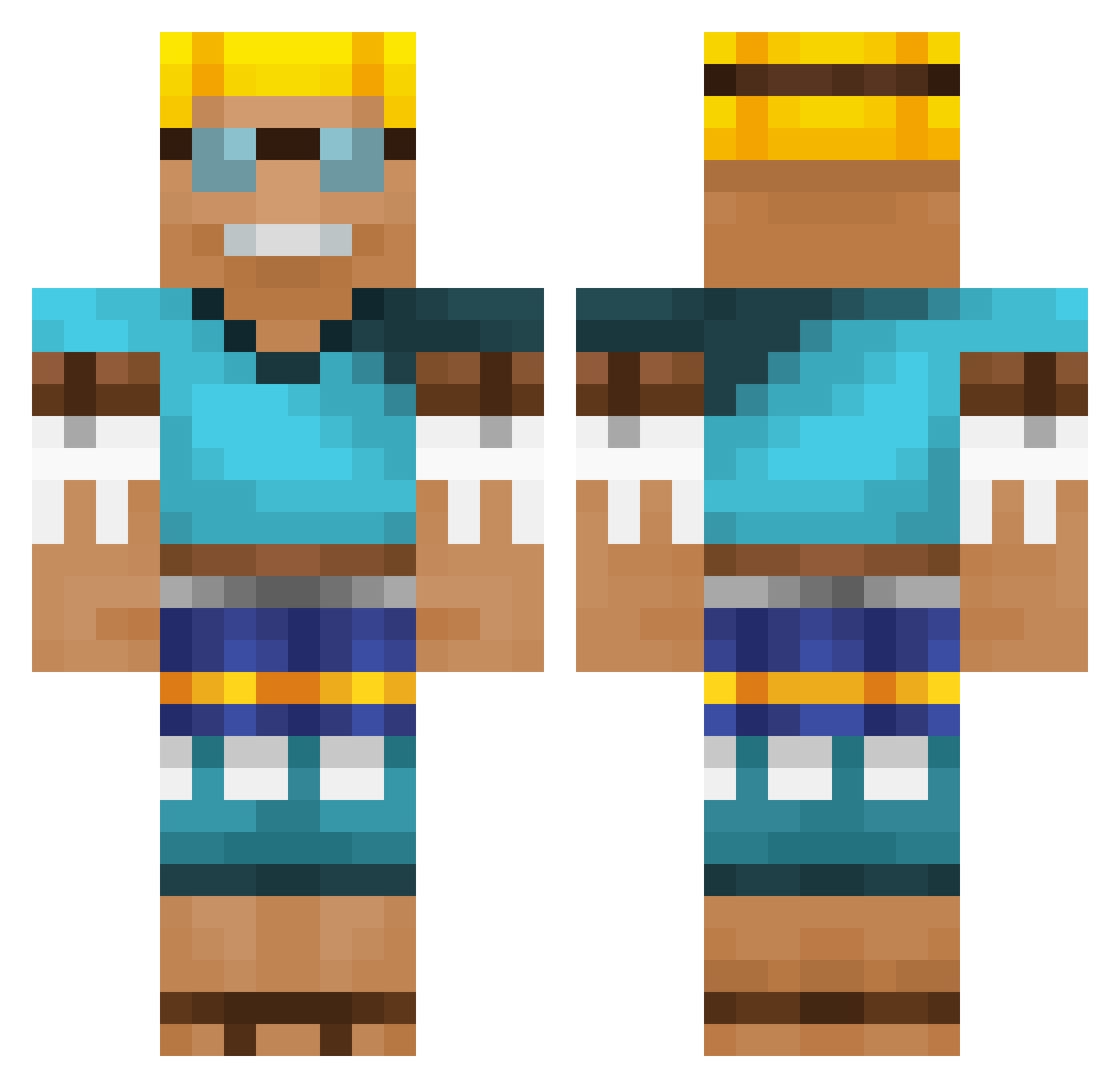
Other players with this skin (535)
moonjh1120 was the 214th player we have seen with this skin, first spotted on 28.08.2026. The same skin was seen on these players. Open a nickname to see their current skin and skin history.
 Jaffa_cake465 SL6_Y LeonelDE
 IDrKraken y_sUP Dricuss Tom_Profi marioman1232 PaperFlow Quique_8888 Angeliito05 nathmoule Flame38Slayer MitoVans Paul_k1 raidho81 KEK123187 Sdaniel74 Timbo176 NotVeryAwkward Gnawzyistrash
 gam3sPL_ Mulkan6967 omeb07 packstone1 FamedHydra81380 whatthedogdo Salluu_ MoBai2018 urzi Anack ReelSquad samallen416 vNT0R SobuszIsBoss RipleyCordelious Matounet50 kost_over stampy_12 Xaps999 gbaonr F16o khrissty happy7675 AgentCMinecraft Friedchicken67 Fazeketan1414 PrismaSMP NavG69420 kokei_sha slurpdaddyz SHERAASINGH veijolito simon1220 callmechris707 MacAttack0079 NMplaysMC28 HarrySnutts alpine_9 DaddyWaddyPatady
More Adventurer Minecraft skins
How to install the moonjh1120 skin
- Press the Download button above to save the skin as a PNG file.
- Minecraft: Bedrock Edition (PE): open the Dressing Room from the main menu (or tap your character → Edit Character), go to Classic Skins → Owned, press the + (new skin) button, choose the downloaded PNG and pick the Classic (Steve) model. Works on PC and mobile; consoles cannot import custom skins.
- Minecraft: Java Edition: open the Minecraft Launcher, go to the Skins tab, click New Skin, load the PNG, pick the Classic (Steve) model and press Save & Use. You can also upload it at minecraft.net → Profile → Change Skin.
The skin does not show up after import - what should I do?
Restart Minecraft and open the Dressing Room again - imported skins sometimes appear only after a restart. Also make sure you selected the imported skin and picked the Classic (Steve) model.
Which model should I choose, Classic or Slim?
This skin is designed for the Classic (Steve) model. If you pick the wrong model, the arms of the skin will look stretched or squeezed.
Is the skin of moonjh1120 free to download?
Yes. Press Download, save the PNG file and use it in Minecraft: Bedrock Edition or Java Edition - no payment or registration needed. The skin also works on multiplayer servers and Realms.
More skins
Looking for more? Go back to all Minecraft skins and check the top skins of the week, month and all time, or find any player's skin by nickname.