
mobamet - Minecraft Skins & Skin History
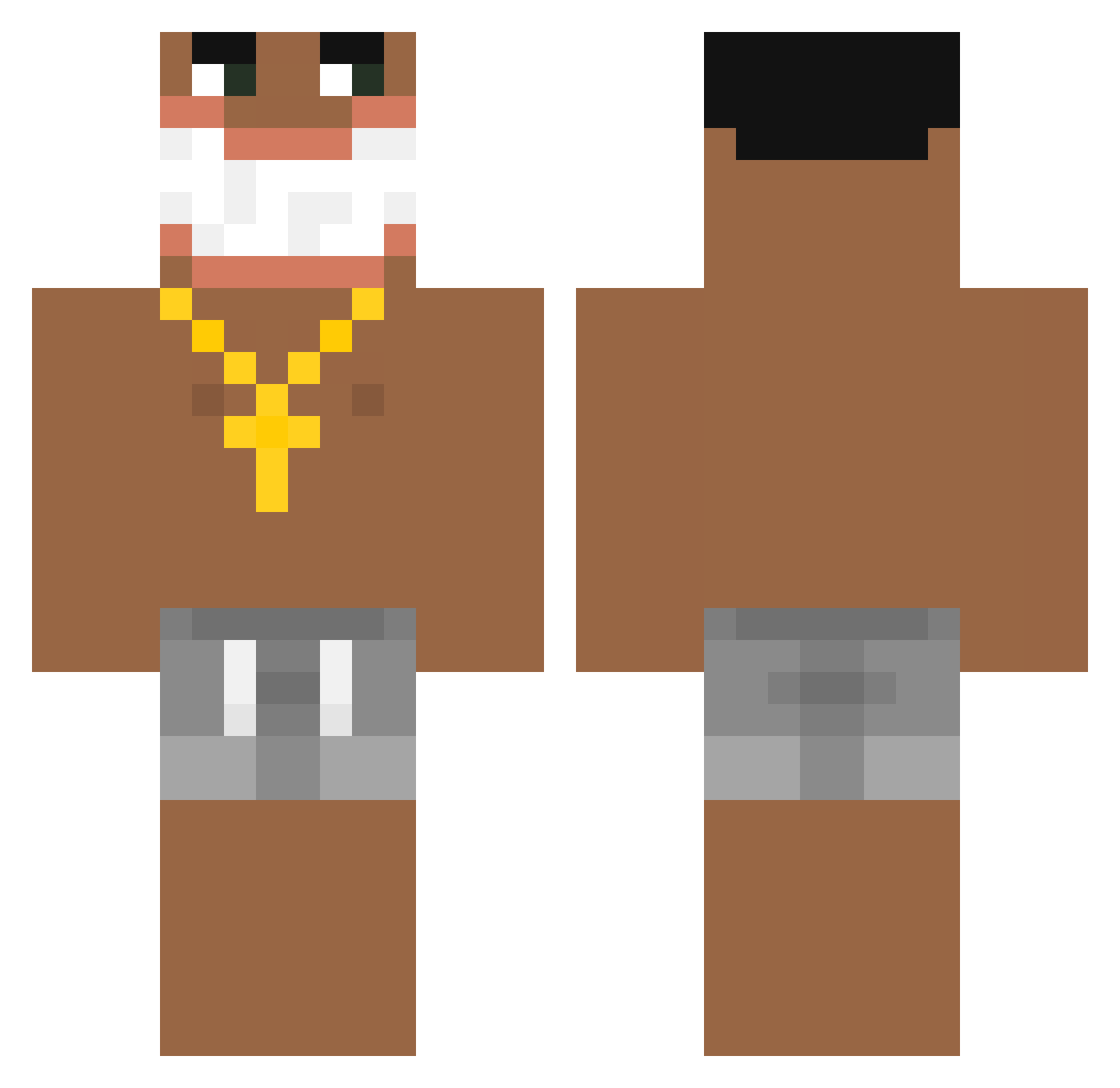
Current Minecraft skin of the player mobamet, loaded from the official Mojang API. Rotate the 3D model with your mouse or finger, then download the skin as a PNG file and use it in Minecraft: Bedrock Edition or Java Edition for free. When mobamet changes their skin, this page updates automatically and the old skin stays in the history below.
Other players with this skin (188)
mobamet was the 30th player we have seen with this skin, first spotted on 14.08.2026. The same skin was seen on these players. Open a nickname to see their current skin and skin history.
 RenatitoTV ssssamuquinha GianlucaGiovanni Krodexx Dejwson12 tugaaaaa Pinguinovic 385Ideal_ Gello05 R0ckett2 MC3xGekauft Aratu Vin_is_back oylx Fusion1616
 w_asd01 pln22 foodpood4 RISKIINRAHIM FernandoSchutze BaboCello114 arbuzek13 ttvbenxytreal TK_NON
 Ankram_ bossmanjb LGL929
 JamesMustaine Tinky_Winky18 kurakins Nilsinznx Odalys_Steven 8T8T8T8T8T8T8T8T bathz TARTIFLEX_TV Alss10 JoseR0828
 Lks2k24 avivoren2001 S4NTiii Km_D Kaxinator CookerBooker LUCASX010 inb0uNd24 Baytae xJ0rdan23 Lugidan3 headshot223kirk NoLoLs souimezy BertoSkate RUISUSKY Mentoss_ Cybeans onClick1 LINCHCHII EXOTIC_LXCAS messi531 Tobias94
More Ishowspeed Minecraft skins
How to install the mobamet skin
- Press the Download button above to save the skin as a PNG file.
- Minecraft: Bedrock Edition (PE): open the Dressing Room from the main menu (or tap your character → Edit Character), go to Classic Skins → Owned, press the + (new skin) button, choose the downloaded PNG and pick the Classic (Steve) model. Works on PC and mobile; consoles cannot import custom skins.
- Minecraft: Java Edition: open the Minecraft Launcher, go to the Skins tab, click New Skin, load the PNG, pick the Classic (Steve) model and press Save & Use. You can also upload it at minecraft.net → Profile → Change Skin.
The skin does not show up after import - what should I do?
Restart Minecraft and open the Dressing Room again - imported skins sometimes appear only after a restart. Also make sure you selected the imported skin and picked the Classic (Steve) model.
Which model should I choose, Classic or Slim?
This skin is designed for the Classic (Steve) model. If you pick the wrong model, the arms of the skin will look stretched or squeezed.
Is the skin of mobamet free to download?
Yes. Press Download, save the PNG file and use it in Minecraft: Bedrock Edition or Java Edition - no payment or registration needed. The skin also works on multiplayer servers and Realms.
More skins
Looking for more? Go back to all Minecraft skins and check the top skins of the week, month and all time, or find any player's skin by nickname.