
mithri1dor - Minecraft Skins & Skin History
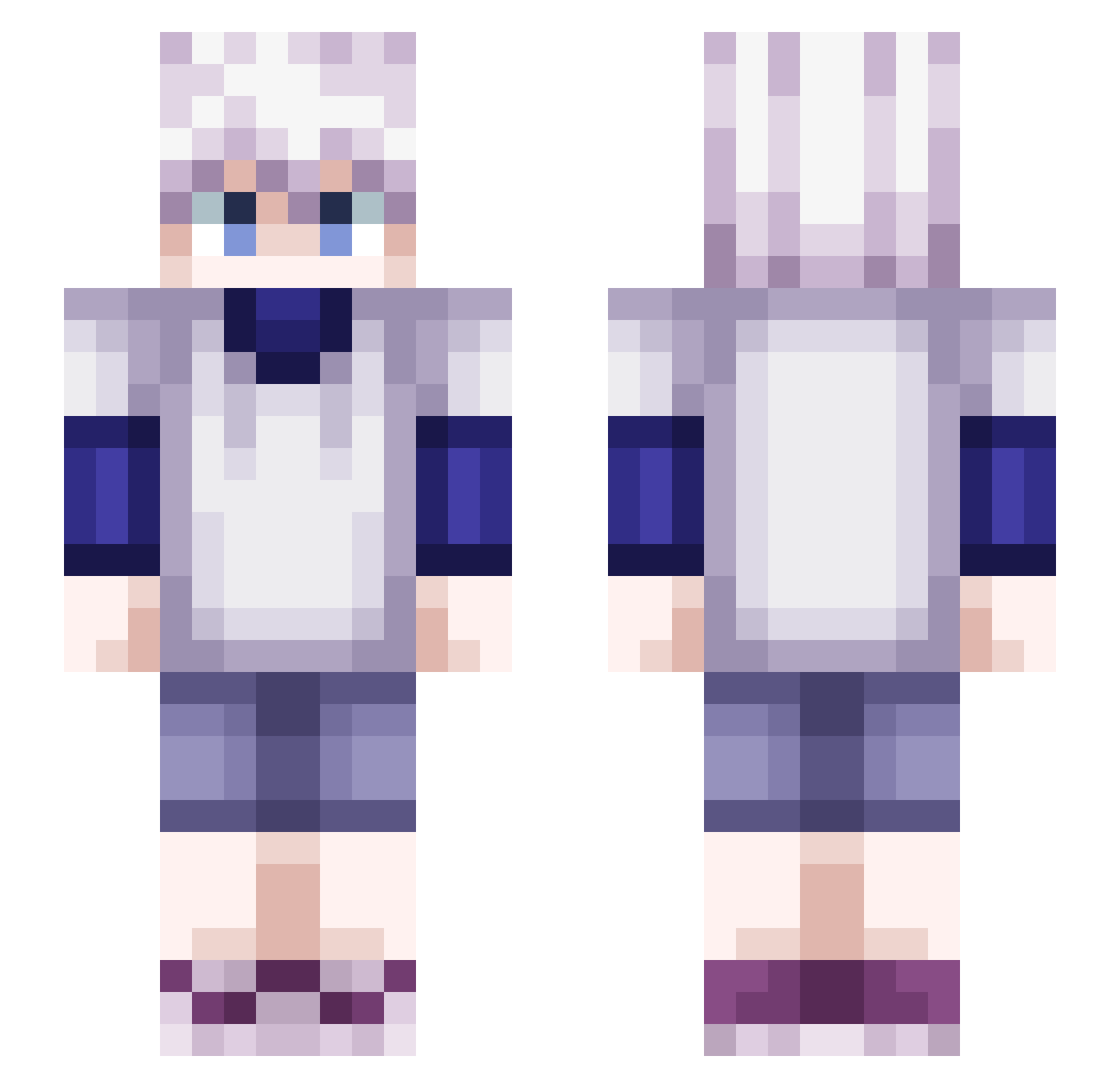
Current Minecraft skin of the player mithri1dor, loaded from the official Mojang API. Rotate the 3D model with your mouse or finger, then download the skin as a PNG file and use it in Minecraft: Bedrock Edition or Java Edition for free. When mithri1dor changes their skin, this page updates automatically and the old skin stays in the history below.
Other players with this skin (543)
mithri1dor was the 461st player we have seen with this skin, first spotted on 27.10.2026. The same skin was seen on these players. Open a nickname to see their current skin and skin history.
 xisd Soul0001 Axlend winguuuu Kamotsu ayhatox Gon_187 Enncoore BumbaClat3 Chalo777 Njyei Megamenlsuper yuki405 childishpark Az2xmh SquirtleSenpai69 KiruuuuuuuuU xtriller10 Plywak31 raiser4 S_ZIGO Swiisch Kyuuuu_ MoistPatato5 Ushering hirukawaa Twiisterz974 Sohoony _XTOSHIROX_ jjoren6969 kieukiyo Goaatie NightSnow930 RIMURU_RU NikTV29 EpLsXD Dex_One robaboy666 C_lestial Gloubs Mavy07 Ammar_Thunder yhrd _Pabs _TheSnup_ N0vel_ _INTRUSO TXZR204 baalistoo DwindlingSoul CursedT Evans4522 mNamik4ze NotYourGuy20 ImNaikO any7h1ng kiba969 Erenjr92 Dakusuto saueka
More Killua Zoldyck Minecraft skins
See all 190 Killua Zoldyck skins
How to install the mithri1dor skin
- Press the Download button above to save the skin as a PNG file.
- Minecraft: Bedrock Edition (PE): open the Dressing Room from the main menu (or tap your character → Edit Character), go to Classic Skins → Owned, press the + (new skin) button, choose the downloaded PNG and pick the Slim (Alex) model. Works on PC and mobile; consoles cannot import custom skins.
- Minecraft: Java Edition: open the Minecraft Launcher, go to the Skins tab, click New Skin, load the PNG, pick the Slim (Alex) model and press Save & Use. You can also upload it at minecraft.net → Profile → Change Skin.
The skin does not show up after import - what should I do?
Restart Minecraft and open the Dressing Room again - imported skins sometimes appear only after a restart. Also make sure you selected the imported skin and picked the Slim (Alex) model.
Which model should I choose, Classic or Slim?
This skin is designed for the Slim (Alex) model. If you pick the wrong model, the arms of the skin will look stretched or squeezed.
Is the skin of mithri1dor free to download?
Yes. Press Download, save the PNG file and use it in Minecraft: Bedrock Edition or Java Edition - no payment or registration needed. The skin also works on multiplayer servers and Realms.
More skins
Looking for more? Go back to all Minecraft skins and check the top skins of the week, month and all time, or find any player's skin by nickname.