
minseo0608 - Minecraft Skins & Skin History
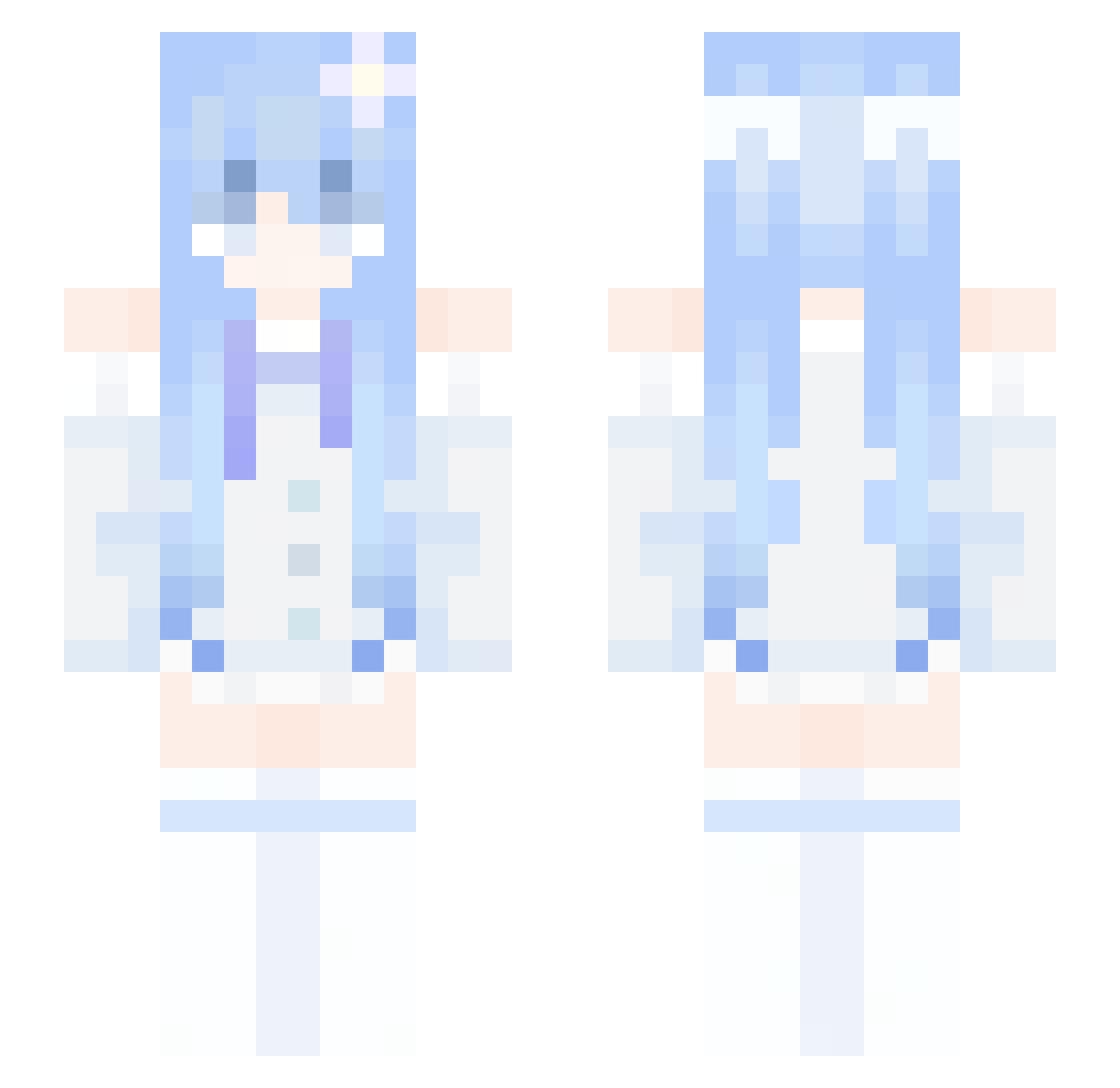
Current Minecraft skin of the player minseo0608, loaded from the official Mojang API. Rotate the 3D model with your mouse or finger, then download the skin as a PNG file and use it in Minecraft: Bedrock Edition or Java Edition for free. When minseo0608 changes their skin, this page updates automatically and the old skin stays in the history below.
Other players with this skin (340)
minseo0608 was the 153rd player we have seen with this skin, first spotted on 17.09.2026. The same skin was seen on these players. Open a nickname to see their current skin and skin history.
 laxy_lux Yazuki666 1142a sharkbluesea Kasper0326 Zinren hvz2024 Lenou12 SALYER_E YUEWUSAQI Leonbella zPxrspective elfst1 Silentdrill213 ycub mingrain150 Hanbyeoring 2xMar PUSONGLIN REdream0 LiberationDaily TheShinyKnight guilhermextz dnsmsRhak Mistlily maiosene Vyerex0 lhxHugo LZL0119 Protoevangelium Angelines0413 AD_Ara Hydrxxgen LyraSnow LynieCN Pixelpawpaw ROXO_XIE yurxo FxZir_STxOP petals88 shenyuwu bomu123 chimeizer GtMoon_ OwO_Drops zin1027 grsese Hihoman087 kiciia thingmuffin Morningggg nielle_sama iOneProK dbchang nagi_mo 5WildCat Pupshley Longyu_xc Robert29376
 8es4
8es4More Flower Hair Clip Minecraft skins
See all 68 Flower Hair Clip skins
How to install the minseo0608 skin
- Press the Download button above to save the skin as a PNG file.
- Minecraft: Bedrock Edition (PE): open the Dressing Room from the main menu (or tap your character → Edit Character), go to Classic Skins → Owned, press the + (new skin) button, choose the downloaded PNG and pick the Slim (Alex) model. Works on PC and mobile; consoles cannot import custom skins.
- Minecraft: Java Edition: open the Minecraft Launcher, go to the Skins tab, click New Skin, load the PNG, pick the Slim (Alex) model and press Save & Use. You can also upload it at minecraft.net → Profile → Change Skin.
The skin does not show up after import - what should I do?
Restart Minecraft and open the Dressing Room again - imported skins sometimes appear only after a restart. Also make sure you selected the imported skin and picked the Slim (Alex) model.
Which model should I choose, Classic or Slim?
This skin is designed for the Slim (Alex) model. If you pick the wrong model, the arms of the skin will look stretched or squeezed.
Is the skin of minseo0608 free to download?
Yes. Press Download, save the PNG file and use it in Minecraft: Bedrock Edition or Java Edition - no payment or registration needed. The skin also works on multiplayer servers and Realms.
More skins
Looking for more? Go back to all Minecraft skins and check the top skins of the week, month and all time, or find any player's skin by nickname.