
mckee1001 - Minecraft Skins & Skin History
Current Minecraft skin of the player mckee1001, loaded from the official Mojang API. Rotate the 3D model with your mouse or finger, then download the skin as a PNG file and use it in Minecraft: Bedrock Edition or Java Edition for free. When mckee1001 changes their skin, this page updates automatically and the old skin stays in the history below.
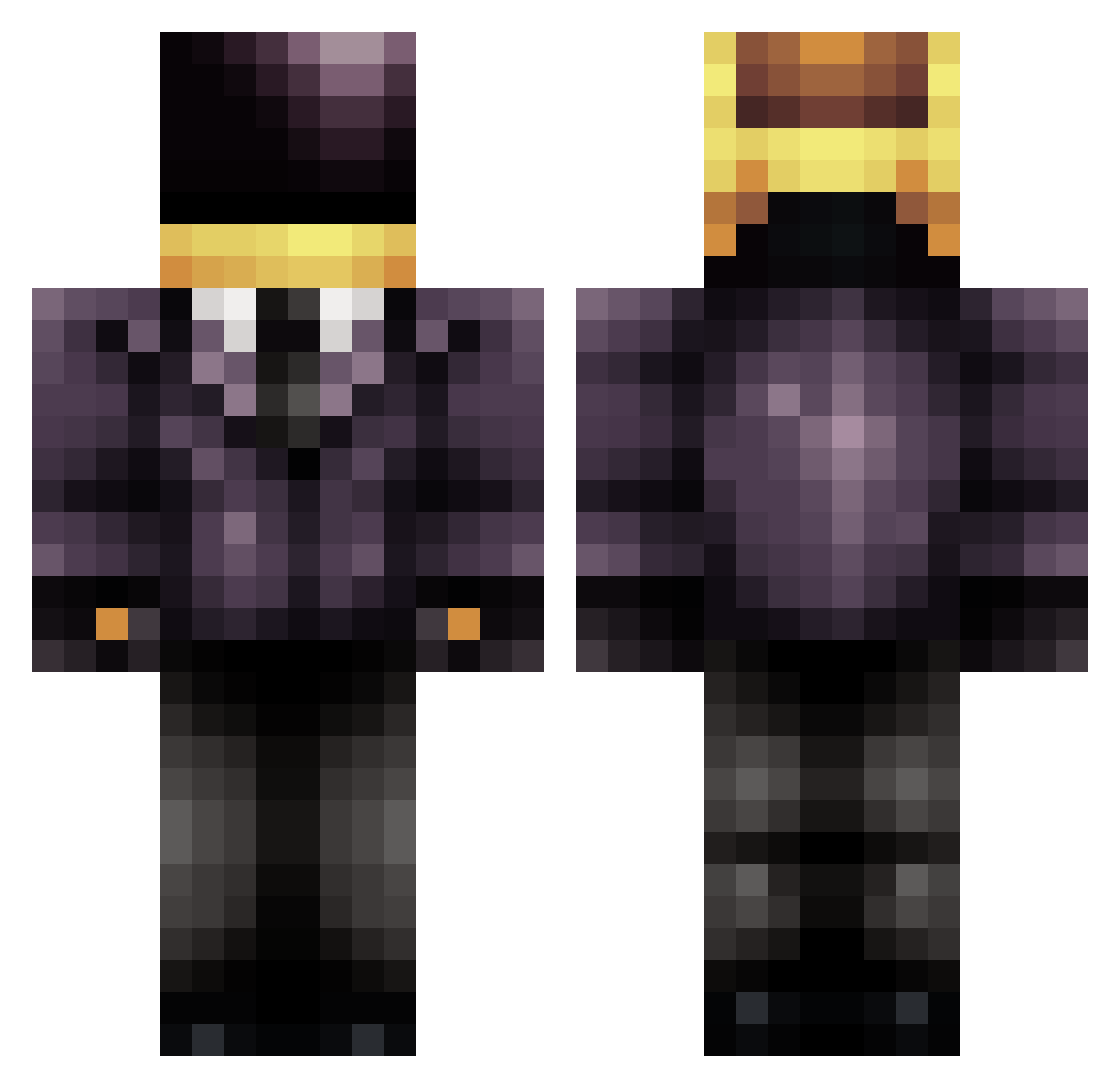
Other players with this skin (709)
mckee1001 was the 109th player we have seen with this skin, first spotted on 12.08.2026. The same skin was seen on these players. Open a nickname to see their current skin and skin history.
 PJ5x5 baldeagle72 Nutscar tmutro Senkora v1kku I_Like_X jh_l hankteford HipsterJoshy SteveyMonkey gurrgurr146 apoguita Goldrei Ghostshaw Dealy_PIG slimslinky DeLaSoul Hennycat14 TroubleMakers20 nuttzgobbler Spazm78 bunny_2013 InfamousPepper radoxrizla Bjuice21 iNF1Nit3 Swiftperfection NeoAcher Handsome_Robot ratelkin SHXPIEMAN UtilityxMan nobiman warriwul nswingle _Sempus ImmaSkittle Alderany Oblivious2all avilez JuanF2197 CJConch13 yechanee espynn Kiwiair Monerris GetCircle andr445g Aiglex conradtheplayer genesis1900 doom_pie_6 _Sly_Dragon_132 zerorockphenom itsjustarka Mistahukislaya csmurf89 DemApples24 chezbrgr
More Daft Punk Minecraft skins
How to install the mckee1001 skin
- Press the Download button above to save the skin as a PNG file.
- Minecraft: Bedrock Edition (PE): open the Dressing Room from the main menu (or tap your character → Edit Character), go to Classic Skins → Owned, press the + (new skin) button, choose the downloaded PNG and pick the Classic (Steve) model. Works on PC and mobile; consoles cannot import custom skins.
- Minecraft: Java Edition: open the Minecraft Launcher, go to the Skins tab, click New Skin, load the PNG, pick the Classic (Steve) model and press Save & Use. You can also upload it at minecraft.net → Profile → Change Skin.
The skin does not show up after import - what should I do?
Restart Minecraft and open the Dressing Room again - imported skins sometimes appear only after a restart. Also make sure you selected the imported skin and picked the Classic (Steve) model.
Which model should I choose, Classic or Slim?
This skin is designed for the Classic (Steve) model. If you pick the wrong model, the arms of the skin will look stretched or squeezed.
Is the skin of mckee1001 free to download?
Yes. Press Download, save the PNG file and use it in Minecraft: Bedrock Edition or Java Edition - no payment or registration needed. The skin also works on multiplayer servers and Realms.
More skins
Looking for more? Go back to all Minecraft skins and check the top skins of the week, month and all time, or find any player's skin by nickname.