
mbbigbm - Minecraft Skins & Skin History
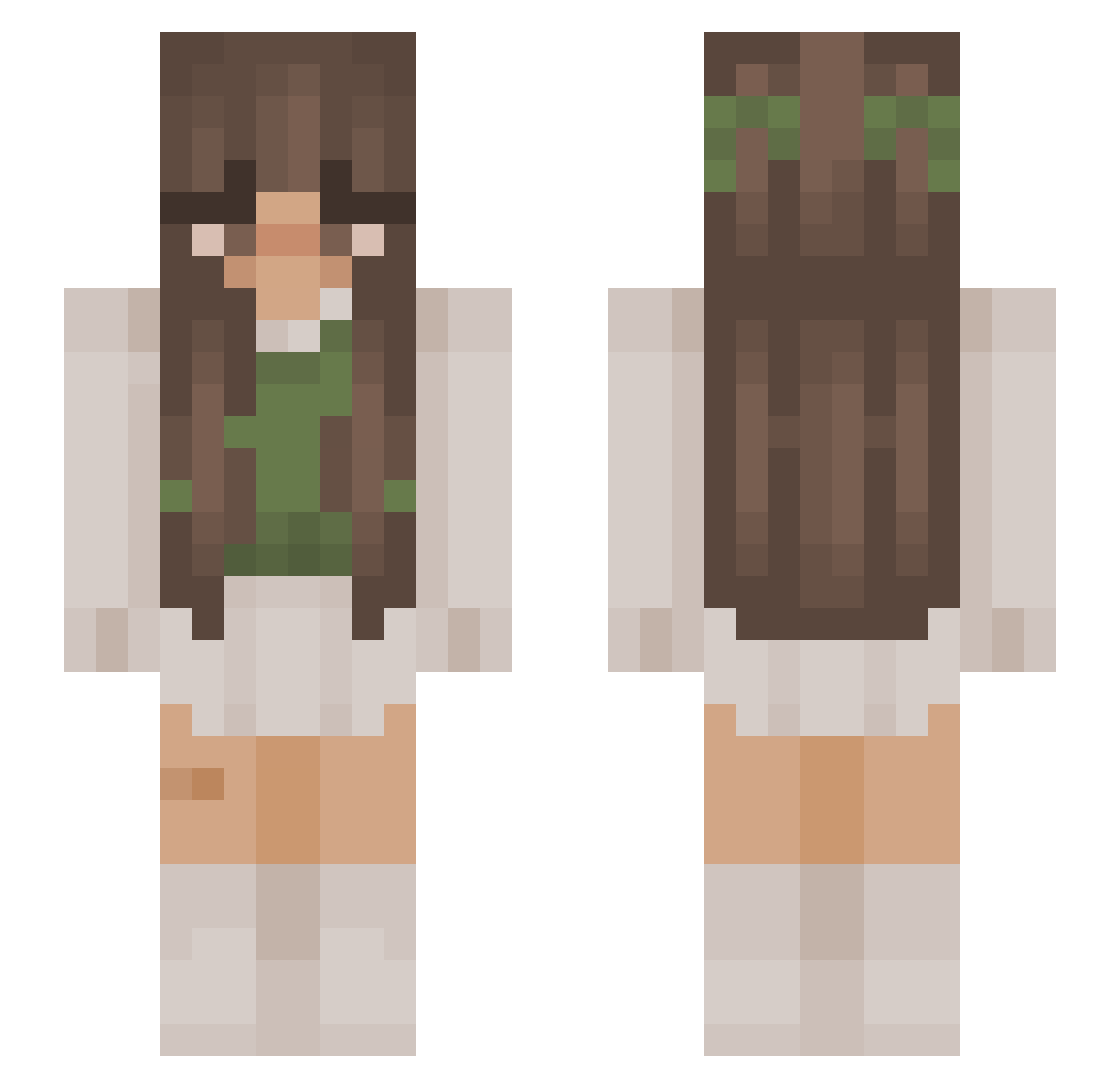
Current Minecraft skin of the player mbbigbm, loaded from the official Mojang API. Rotate the 3D model with your mouse or finger, then download the skin as a PNG file and use it in Minecraft: Bedrock Edition or Java Edition for free. When mbbigbm changes their skin, this page updates automatically and the old skin stays in the history below.
Other players with this skin (1183)
mbbigbm was the 1092nd player we have seen with this skin, first spotted on 11.11.2026. The same skin was seen on these players. Open a nickname to see their current skin and skin history.
 watrt KityBella21 Jennitiah NexWar__ ItsDevDogg zan20085 OxalisPlays Addie3 TealComet1 WDWTea LorbyGallawagher Bainse OliwiaWitch Lexxigg Ashel0 Angel_0fDeath_ Majlena SkyPlaysMc mammamia1366 AimlessGibbon31 MayaDaNoob Shikua itsBella7474 Schulzy49 NeonViperxx ramonaites _sara02 Hijabezahra ppineaple gloomy_y NatiWong22 noracharms Lucicraft2011 NachoMaus TrazDog Akwoma fatima832 hairmilk MaNDdyx red665wind aygala megsmommy _Dianella_ shelbyboi Morticuskahntee pzetunia Nakeeza haimoonchild itsguta Alisha007 xXRoseXx_ XxMelinaxX Bella_o77 michaelalala_1 Wildtoxiic fungicoww SophAnn3 zoniia Erinobakez hhhyphs
More Cottagecore Minecraft skins
See all 7535 Cottagecore skins
How to install the mbbigbm skin
- Press the Download button above to save the skin as a PNG file.
- Minecraft: Bedrock Edition (PE): open the Dressing Room from the main menu (or tap your character → Edit Character), go to Classic Skins → Owned, press the + (new skin) button, choose the downloaded PNG and pick the Slim (Alex) model. Works on PC and mobile; consoles cannot import custom skins.
- Minecraft: Java Edition: open the Minecraft Launcher, go to the Skins tab, click New Skin, load the PNG, pick the Slim (Alex) model and press Save & Use. You can also upload it at minecraft.net → Profile → Change Skin.
The skin does not show up after import - what should I do?
Restart Minecraft and open the Dressing Room again - imported skins sometimes appear only after a restart. Also make sure you selected the imported skin and picked the Slim (Alex) model.
Which model should I choose, Classic or Slim?
This skin is designed for the Slim (Alex) model. If you pick the wrong model, the arms of the skin will look stretched or squeezed.
Is the skin of mbbigbm free to download?
Yes. Press Download, save the PNG file and use it in Minecraft: Bedrock Edition or Java Edition - no payment or registration needed. The skin also works on multiplayer servers and Realms.
More skins
Looking for more? Go back to all Minecraft skins and check the top skins of the week, month and all time, or find any player's skin by nickname.