
marderis - Minecraft Skins & Skin History
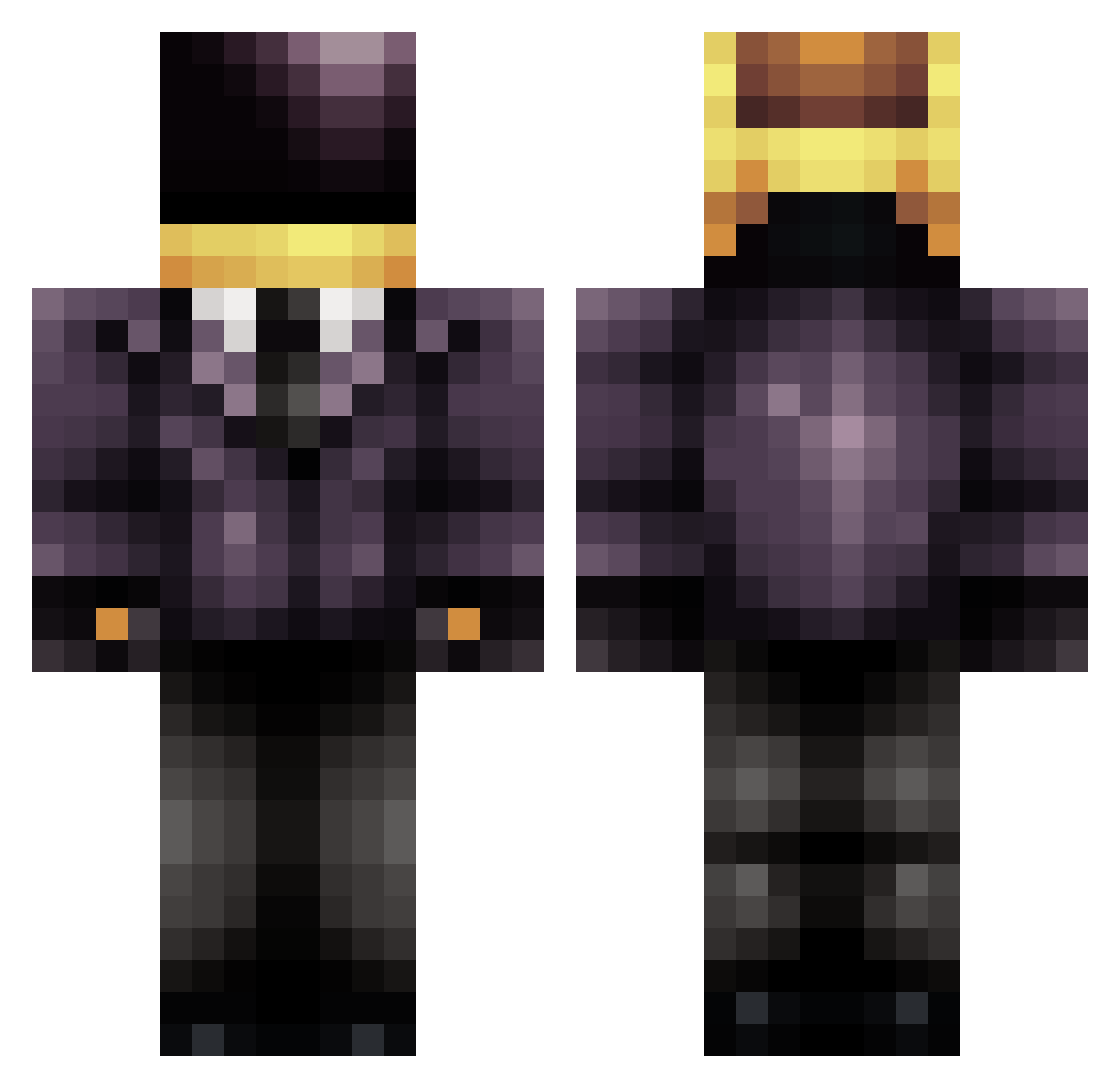
Current Minecraft skin of the player marderis, loaded from the official Mojang API. Rotate the 3D model with your mouse or finger, then download the skin as a PNG file and use it in Minecraft: Bedrock Edition or Java Edition for free. When marderis changes their skin, this page updates automatically and the old skin stays in the history below.
Other players with this skin (709)
marderis was the 281st player we have seen with this skin, first spotted on 13.09.2026. The same skin was seen on these players. Open a nickname to see their current skin and skin history.
 KapT0wKa CopperCarlos96 DrChicken101 SteezyVader jwatson4701 Paranoid_Neko ed_boiii bartolko1998 VeniVeniVeni Nuknog cinox14 SamWithAP jwilds1 X88B88 cesar538 Nuts4mining TheOtherGuy1904 Rummpy CharD197 Wedseur MJay1999 nzgunner maisje Ryan080900 stachelski PapaHimself DraykPlay 604Viking gbafanboy Crocus JSiiN 16pattersonr g6shadez sergiotorres2025 Isuzu_Bighorn Fuzzy_135 Toinh0 SOJA96 roastedpete _TheMO MikalovB Insanedane1223 Socal4 JCreeper999 DoesItRingABell MexicanVilla TheRemover Jinksy Yllas001 Pragmaticsphere Reidbit butterman91 17th_ lolapepsi remcobogge LMS228 avoirfame xsuperninjax123 What_Sanity cookiecruncher14
More Daft Punk Minecraft skins
How to install the marderis skin
- Press the Download button above to save the skin as a PNG file.
- Minecraft: Bedrock Edition (PE): open the Dressing Room from the main menu (or tap your character → Edit Character), go to Classic Skins → Owned, press the + (new skin) button, choose the downloaded PNG and pick the Classic (Steve) model. Works on PC and mobile; consoles cannot import custom skins.
- Minecraft: Java Edition: open the Minecraft Launcher, go to the Skins tab, click New Skin, load the PNG, pick the Classic (Steve) model and press Save & Use. You can also upload it at minecraft.net → Profile → Change Skin.
The skin does not show up after import - what should I do?
Restart Minecraft and open the Dressing Room again - imported skins sometimes appear only after a restart. Also make sure you selected the imported skin and picked the Classic (Steve) model.
Which model should I choose, Classic or Slim?
This skin is designed for the Classic (Steve) model. If you pick the wrong model, the arms of the skin will look stretched or squeezed.
Is the skin of marderis free to download?
Yes. Press Download, save the PNG file and use it in Minecraft: Bedrock Edition or Java Edition - no payment or registration needed. The skin also works on multiplayer servers and Realms.
More skins
Looking for more? Go back to all Minecraft skins and check the top skins of the week, month and all time, or find any player's skin by nickname.