
lullabyebye - Minecraft Skins & Skin History
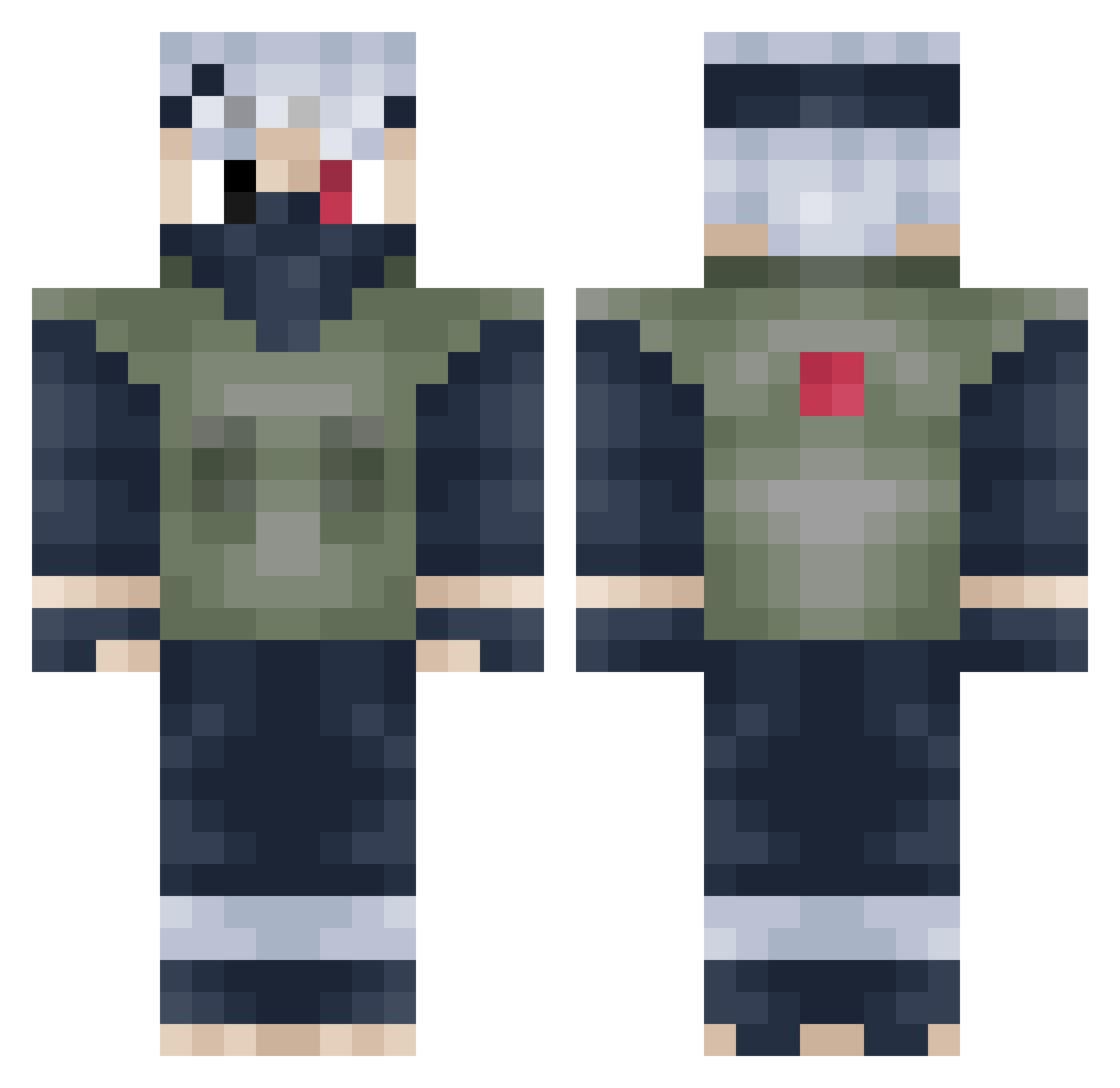
Current Minecraft skin of the player lullabyebye, loaded from the official Mojang API. Rotate the 3D model with your mouse or finger, then download the skin as a PNG file and use it in Minecraft: Bedrock Edition or Java Edition for free. When lullabyebye changes their skin, this page updates automatically and the old skin stays in the history below.
Other players with this skin (491)
lullabyebye was the 395th player we have seen with this skin, first spotted on 30.10.2026. The same skin was seen on these players. Open a nickname to see their current skin and skin history.
 JarrrHeadd BionicCobra84 RealityOfRyan Dawkyo Berryscout Farron_ Bossman0453 andrewyangbang Sam1804x BigBonedG BIGTRUCK_25 WinterParrot1024 BuitragoLDN Tobiasakapaloboy Buhbso MiBrahim123 YaBoiKeegan I_Am_Awkwrd lexapromaster Wex_Meister ElectricXClam K_The_King akira114 Wildcats0006 ArrudaOdrake Kiromoee Le_MochiMan chikibabies Legomax999 HypenotiKus ZeldrisFTW Clamps123 QuentinGamerQG GunterGnom SheWantsTheDVD Zetsu71 itanomaly subwolf358 DP_2305 Pautheon mcandcheese Just_Pa1n Shinemzx CapMick Shadow53901 Ghosttown8765 Bardon ItzBoyceY JaxyyTK Dawgs4024 H0p3w0r1d discountdbl12 FallenTitan9914 enokialt N1els7x WillyXXI MrDi390 Mahumm AzuraHackeClient Chcman
More Kakashi Hatake Minecraft skins
See all 526 Kakashi Hatake skins
How to install the lullabyebye skin
- Press the Download button above to save the skin as a PNG file.
- Minecraft: Bedrock Edition (PE): open the Dressing Room from the main menu (or tap your character → Edit Character), go to Classic Skins → Owned, press the + (new skin) button, choose the downloaded PNG and pick the Classic (Steve) model. Works on PC and mobile; consoles cannot import custom skins.
- Minecraft: Java Edition: open the Minecraft Launcher, go to the Skins tab, click New Skin, load the PNG, pick the Classic (Steve) model and press Save & Use. You can also upload it at minecraft.net → Profile → Change Skin.
The skin does not show up after import - what should I do?
Restart Minecraft and open the Dressing Room again - imported skins sometimes appear only after a restart. Also make sure you selected the imported skin and picked the Classic (Steve) model.
Which model should I choose, Classic or Slim?
This skin is designed for the Classic (Steve) model. If you pick the wrong model, the arms of the skin will look stretched or squeezed.
Is the skin of lullabyebye free to download?
Yes. Press Download, save the PNG file and use it in Minecraft: Bedrock Edition or Java Edition - no payment or registration needed. The skin also works on multiplayer servers and Realms.
More skins
Looking for more? Go back to all Minecraft skins and check the top skins of the week, month and all time, or find any player's skin by nickname.